

Patient education succeeds when people can understand their care, make informed decisions, and complete the next step safely after leaving the office. Medical administrators support that outcome through accurate patient intake procedures, accessible patient portal management, reliable appointment communication, and privacy-conscious patient education workflows. This guide explains the terminology, scripts, verification methods, and quality controls medical admins need to prevent confusion from becoming missed care, medication errors, avoidable callbacks, or unsafe follow-through.
1. Why Patient Education Is an Operational Responsibility for Medical Admins
Patient education includes the spoken, written, visual, and digital information patients receive to understand their health, services, responsibilities, choices, and next actions. Clinical teams usually own diagnosis-specific counseling and treatment instructions. Medical administrators strengthen delivery by coordinating patient communication, organizing educational materials, arranging language assistance, confirming administrative instructions, updating healthcare portals, and routing clinical questions to qualified professionals.
This work requires more than handing a patient a brochure. A technically correct document may still fail when its wording is dense, the font is difficult to read, the patient receives it at the wrong stage, or the instructions conflict with information in the electronic health record. Medical admins should treat comprehension, access, timing, consistency, and documentation as measurable parts of the medical administrative workflow.
Health literacy affects a person’s ability to find, understand, and use health information and services. Organizational health literacy addresses how effectively an organization enables people to perform those tasks. This shifts responsibility toward clearer systems, materials, navigation, and communication rather than expecting every patient to overcome unnecessary complexity independently.
A universal precautions approach assumes every patient may experience difficulty understanding health information at some point. Anxiety, pain, fatigue, unfamiliar terminology, hearing limitations, digital barriers, and time pressure can reduce comprehension even when a patient usually communicates confidently. Staff should therefore apply plain language, organized instructions, and understanding checks consistently during front-desk operations, telehealth administration, and virtual patient management.
The Five Failures Medical Admins Must Prevent
Information overload: Patients receive scheduling details, preparation instructions, insurance requirements, portal steps, medication information, consent materials, and follow-up directions at once. Presenting every detail with equal emphasis causes the most urgent action to disappear.
Jargon leakage: Terms such as authorization pending, allowed amount, NPO, referral, coinsurance, and medical necessity may be familiar to staff while remaining unclear to patients. Use resources covering insurance verification, prior authorization, billing terminology, and Explanation of Benefits terminology to translate administrative concepts accurately.
Unverified understanding: A patient saying “okay” may indicate politeness, stress, or a desire to end the interaction. Staff need a respectful method for checking whether the patient can explain the next step.
Channel inconsistency: Printed instructions may list one arrival time while the portal displays another. These contradictions produce missed appointments, preparation failures, repeated calls, and distrust. Strong scheduling software practices, EMR integration, and patient communication applications reduce conflicting messages.
Uncontrolled clinical explanation: Medical admins should explain administrative processes within their training and authority. New symptoms, treatment changes, medication questions, test interpretation, and clinical risk decisions require escalation to an appropriate licensed professional. Clear role boundaries protect the patient and support legal compliance, risk management, and accurate clinical documentation.
| # | Patient Education Term | Working Definition | Medical Admin Application | Failure It Helps Prevent |
|---|---|---|---|---|
| 1 | Patient Education | Information and instruction designed to help a patient understand care, services, choices, and required actions. | Coordinate approved materials with the patient’s visit stage and intake process. | Generic information being delivered without a usable next step. |
| 2 | Personal Health Literacy | A person’s ability to find, understand, and use health information and services. | Explain administrative instructions in clear language and verify comprehension respectfully. | Blaming patients for complexity created by the organization. |
| 3 | Organizational Health Literacy | How effectively an organization helps people access, understand, and use health information. | Improve forms, signs, portals, call scripts, and administrative procedures. | Repeating communication failures across every patient encounter. |
| 4 | Universal Precautions Approach | Using clear communication practices with every patient because comprehension difficulties may be invisible or situational. | Use plain language and understanding checks as routine workflow steps. | Relying on appearance, education, confidence, or occupation to estimate understanding. |
| 5 | Plain Language | Communication that places the essential message first and uses familiar, direct wording. | Rewrite compliance instructions without losing their required meaning. | Patients missing actions hidden inside jargon-heavy text. |
| 6 | Teach-Back | A method in which patients explain instructions in their own words so staff can check the clarity of the explanation. | Confirm arrival instructions, portal steps, preparation requirements, and follow-up plans. | Treating a nod or “yes” as proof of understanding. |
| 7 | Show-Me Method | A demonstration-based check used when the patient must perform a task. | Ask patients to show how they will locate a portal message or complete an approved administrative process. | Patients understanding the words while remaining unable to perform the task. |
| 8 | Chunk and Check | Dividing information into small sections and checking understanding after each section. | Separate scheduling, preparation, payment, and follow-up information instead of delivering one long explanation. | Working-memory overload during stressful visits. |
| 9 | Ask-Tell-Ask | A communication sequence that identifies existing knowledge, provides targeted information, and checks the resulting understanding. | Use before explaining insurance verification or authorization status. | Delivering explanations that miss the patient’s actual question. |
| 10 | Learning Need | The specific knowledge or skill a patient requires to complete the next step safely. | Identify whether the immediate need involves access, preparation, forms, payment, or follow-up. | Giving extensive education while leaving the essential gap unresolved. |
| 11 | Readiness to Learn | The patient’s current ability and willingness to receive and process information. | Recognize when pain, fear, time pressure, or emotional distress requires shorter instructions and later reinforcement. | Delivering critical information when the patient cannot absorb it. |
| 12 | Learning Preference | The format through which a person can most effectively use information in a particular situation. | Offer approved written, verbal, visual, portal-based, or translated options when available. | Depending on one educational format for every patient. |
| 13 | Actionability | The degree to which material clearly tells the patient what to do. | Convert broad advice into numbered steps with owners, dates, and contact instructions. | Patients understanding the topic while remaining unsure about the next action. |
| 14 | Understandability | The degree to which people from varied backgrounds can process and explain a message. | Review portal materials for wording, order, layout, and unexplained terminology. | Publishing accurate content that patients cannot use. |
| 15 | Numeracy | The ability to understand and use numbers, quantities, timeframes, percentages, and risk information. | State exact dates, clock times, payment figures, and preparation intervals consistently. | Confusion caused by vague numerical instructions. |
| 16 | Risk Communication | The clear explanation of possible outcomes, uncertainty, likelihood, and required action. | Route individualized clinical-risk questions to a qualified clinician while providing approved logistical information. | Administrative staff unintentionally interpreting clinical risk. |
| 17 | Shared Decision-Making | A clinical process in which patients and qualified professionals consider options, evidence, and patient preferences together. | Support access to approved decision aids and document requests for clinician discussion. | Presenting a preference-sensitive decision as a fixed administrative rule. |
| 18 | Decision Aid | An evidence-based tool that helps patients compare healthcare options and consider personal priorities. | Confirm that the correct approved version is available through the patient portal. | Patients relying on promotional or outdated information. |
| 19 | Informed Consent | A clinical and legal process requiring understandable information, capacity, voluntariness, and documented agreement. | Provide approved forms, interpreter access, and workflow support without replacing the clinician’s required discussion. | Treating a signed form as the entire consent process. |
| 20 | Language Access | Services that support meaningful communication for people with limited English proficiency. | Arrange qualified interpretation and translated materials through approved channels. | Using an unqualified person for sensitive or complex communication. |
| 21 | Qualified Interpreter | An individual with demonstrated proficiency, appropriate interpreting skills, and knowledge of relevant terminology and ethics. | Follow the organization’s interpreter-request procedure and document service use. | Allowing family members or minors to carry the full communication burden. |
| 22 | Cultural Humility | An ongoing practice of reflection, respectful inquiry, and avoidance of assumptions about beliefs or preferences. | Use open questions informed by cultural competence principles. | Using stereotypes to predict health decisions or communication needs. |
| 23 | Accessibility | The design of communication so people with disabilities can obtain and use it. | Provide screen-reader-friendly files, captioned content, large print, relay access, and alternative formats where required. | Making essential instructions available through an inaccessible channel. |
| 24 | Caregiver Inclusion | Appropriate participation of a family member, support person, or caregiver in education and follow-through. | Confirm patient permission and apply confidentiality safeguards. | Excluding necessary support or disclosing information without a valid basis. |
| 25 | Patient Activation | The knowledge, confidence, and skills a person uses to manage health-related tasks. | Give manageable next steps, self-service guidance, and clear routes for assistance. | Designing systems that require confidence patients have never been helped to build. |
| 26 | Adherence Barrier | A factor that makes it difficult for the patient to complete an agreed plan. | Identify transportation, cost, scheduling, language, portal, pharmacy, and paperwork barriers for escalation. | Labeling operational obstacles as patient unwillingness. |
| 27 | Closed-Loop Communication | A process in which the receiver confirms the message and the sender verifies that it was understood correctly. | Apply it to urgent callbacks, referral instructions, and emergency appointment changes. | Assuming a message was received, understood, and completed. |
| 28 | Reinforcement | Repeating and supporting essential information across appropriate stages and channels. | Align verbal instructions, printed summaries, reminders, and portal messages. | Expecting one explanation to support a complicated multistep process. |
| 29 | Documentation of Education | A record of the material provided, communication support used, questions raised, and follow-up required. | Enter information in the correct location using approved records-management procedures. | Leaving later staff unable to determine what the patient received. |
| 30 | Educational Outcome | A measurable result showing whether education improved understanding or task completion. | Track teach-back completion, preparation success, portal activation, callbacks, and missed-step rates. | Measuring distribution volume while ignoring whether education worked. |
2. How to Build a Reliable Patient Education Workflow
Patient education should begin with a defined purpose. “Educate the patient” is too broad to guide staff behavior or support an audit. A stronger objective identifies the audience, required action, deadline, channel, and understanding check. For example: “Before leaving, the patient will explain where to report, when to arrive, which administrative documents to bring, and whom to contact if transportation becomes unavailable.”
Step 1: Identify the Immediate Education Need
Determine the decision or action the patient faces next. During patient intake, the immediate need may involve completing forms accurately. During appointment scheduling, the patient may need preparation and arrival instructions. During insurance verification, the patient may need a clear explanation of the difference between verified coverage and guaranteed payment.
Separate essential information from optional background. Ask:
What must the patient do?
By what date and time?
What could prevent completion?
Which questions require clinical escalation?
Which communication support is required?
Where will completion be documented?
This structure keeps front-desk communication, medical office triage, and administrative education within appropriate role boundaries.
Step 2: Confirm the Patient’s Starting Point
Use open questions rather than beginning with a long explanation:
“What information have you already received about the appointment?”
“Which part of the process would be most helpful to review?”
“How do you normally access messages from the office?”
“Would an interpreter or another communication support help today?”
“What could make this step difficult to complete?”
These questions reveal missing information, outdated assumptions, digital access problems, and practical barriers. They also support active listening, empathetic healthcare administration, and respectful patient communication.
Avoid asking, “Do you understand?” The wording invites a yes-or-no answer and places the burden on the patient. Ask for an explanation or demonstration instead.
Step 3: Deliver the Essential Message First
Lead with the action:
“Please arrive at the imaging center by 7:30 a.m. on Thursday, August 20. Bring your photo identification and insurance card. The clinical preparation instructions are in the printed sheet your care team reviewed with you.”
This wording gives a date, time, location, required items, and distinction between administrative and clinical information. Similar precision is needed when explaining prior authorization, medical claims processing, coordination of benefits, and patient portal tasks.
CDC guidance emphasizes plain language because it makes health information easier to understand and use. Strong materials place the main message early, use familiar words, organize information logically, and make actions visible.
Step 4: Match the Delivery Channel to the Task
Use verbal communication for immediate clarification, printed materials for portable reference, portals for secure access, videos for approved demonstrations, and reminders for time-sensitive reinforcement. Each channel should carry the same core facts.
A patient may lack reliable internet access, share a phone, have difficulty reading small text, or need captioned content. Confirm access before relying entirely on telehealth platforms, healthcare CRM tools, secure scheduling systems, or patient communication applications.
Step 5: Check Understanding and Document the Result
Ask the patient to explain the next action:
“I want to make sure I explained the process clearly. Please walk me through what you will do before Thursday’s appointment.”
AHRQ defines teach-back as asking patients or caregivers to explain in their own words what they need to know or do. The method tests the clarity of the explanation and gives staff an opportunity to reteach missed information.
Document the approved material provided, language assistance used, key administrative instructions reviewed, understanding check completed, barriers identified, and referrals made. Follow patient record update procedures, medical records management, and chart audit requirements.
3. Communication Methods That Turn Information Into Action
Teach-Back
Teach-back works best when the staff member accepts responsibility for explaining clearly:
“I covered several details, and I want to check how clearly I explained them. What time will you arrive, and what will you bring?”
Avoid quiz-like wording such as, “Tell me what I just said.” A respectful approach protects dignity and supports patient satisfaction, de-escalation, and stronger patient complaint prevention.
When teach-back reveals an error, explain the missed point differently. Repeating the same sentence more loudly or slowly rarely solves a vocabulary, organization, or context problem. Break the instruction into smaller units, use an approved visual, write down the date, or arrange qualified language assistance.
Show-Me
The show-me method checks whether the patient can perform a task. It may be appropriate for nonclinical actions such as opening a portal message, locating an appointment address, using a check-in kiosk, or finding a secure upload feature. Staff using patient portal systems, appointment scheduling tools, and telehealth technology should understand the exact interface patients will encounter.
A clinical demonstration, such as using an inhaler or administering medication, belongs with appropriately trained clinical personnel. The admin can coordinate access, document the request, and ensure the patient reaches the correct educator.
Chunk and Check
Present one category at a time:
Appointment date, time, and location
Preparation instructions from the clinical team
Documents and identification
Insurance or authorization status
Follow-up and contact route
After each section, check understanding. This prevents a final teach-back from becoming an exhausting recall test. It also supports complex explanations involving CPT terminology, ICD-10 terminology, claims processing, and denial management.
Ask-Tell-Ask
Begin by asking what the patient knows. Tell the patient only the information needed to address the identified gap. Ask what the information means for the next step.
Example:
“What did the office tell you about the referral status?”
“The referral was received, and the specialist’s office still needs to review it before offering an appointment.”
“What will you do if you have not received a call by Friday?”
This method makes referral coordination, appointment conflict resolution, and time-sensitive follow-up easier to manage.
Plain-Language Substitution
Replace internal terminology with accurate patient-facing wording:
“Your claim was adjudicated” becomes “Your insurance company finished reviewing the claim.”
“The authorization is pending” becomes “The insurer has received the request and has not issued a decision yet.”
“You have a balance after COB” becomes “After both insurance plans processed the claim, this amount remains assigned to you.”
“Complete portal onboarding” becomes “Create your account, confirm your identity, and sign in.”
Plain language should preserve legal and operational accuracy. Staff can use EOB terminology, clearinghouse terminology, revenue cycle definitions, and medical coding references to avoid oversimplifying important distinctions.
Which patient education breakdown creates the most repeat work in your medical office?
Hello, World!
Which patient education breakdown creates the most repeat work in your medical office?
4. Patient Education Scenarios and High-Value Response Scripts
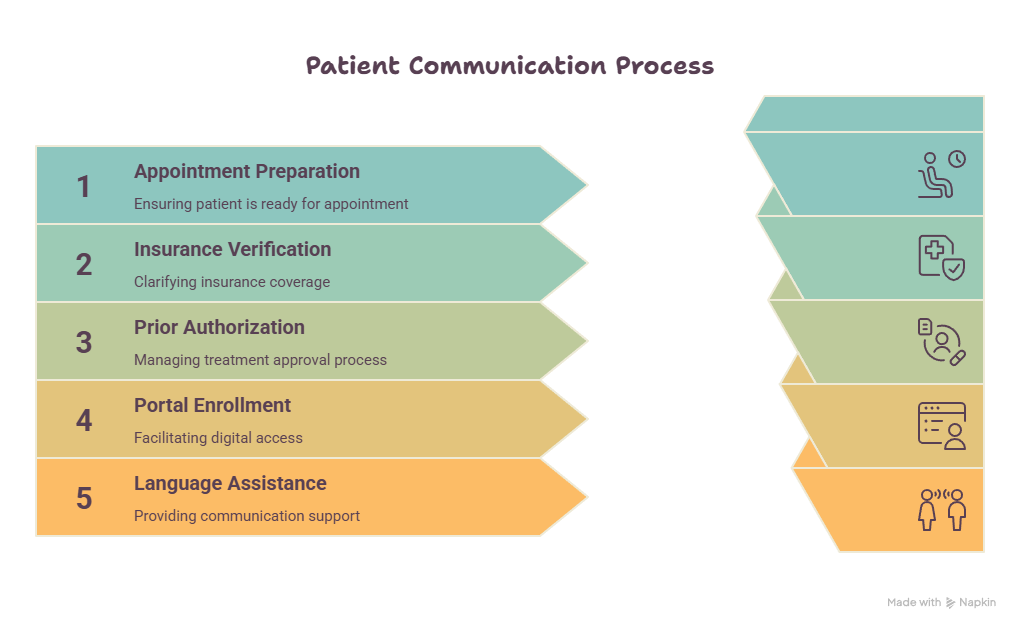
Appointment Preparation
A patient who misunderstands preparation instructions may lose time, transportation money, paid leave, childcare arrangements, and access to a scarce appointment. Medical admins should confirm the location, arrival time, documents, administrative preparation, contact route, and source of clinical instructions.
Use:
“Your appointment is at the North Clinic on Monday, September 14. Please arrive at 8:15 a.m. The clinical preparation sheet was reviewed by your care team and is available in your portal. To check that our administrative instructions are clear, where will you go, and what time will you arrive?”
Use scheduling best practices, scheduling conflict procedures, secure scheduling tools, and daily office checklists to control inconsistencies.
Insurance Verification
Patients often interpret verified eligibility as confirmation that every service will be paid in full. Explain the administrative result precisely:
“Your plan currently shows active coverage. Coverage verification does not guarantee payment for every service. The insurer will apply your benefits and coverage rules when it processes the claim. I can explain the verification information we received, and your insurer can answer plan-specific benefit questions.”
This wording supports accurate insurance verification, EOB education, coordination of benefits, and medical billing communication.
Prior Authorization
Avoid telling patients that authorization means the insurer has approved the treatment as medically appropriate for them. The clinician addresses clinical suitability, while the insurer applies its coverage process.
Use:
“The office submitted the required information to your insurer. The request remains under review. We have not received a coverage decision. Your care team can address clinical questions, and our administrative team will update you when the insurer responds.”
Document submission, status, communication, deadlines, and follow-up ownership through the prior authorization workflow, medical claims process, denial management procedures, and revenue cycle system.
Portal Enrollment
Digital education fails when staff say, “Just use the portal,” without confirming that the patient can create an account, complete identity verification, locate the message, and recover access.
Use:
“First, open the registration email. Select the secure link, confirm your date of birth, create your password, and sign in. Please show me which step you will begin with when you get home.”
Provide an alternative process when digital access is unreliable. Use patient portal guidance, healthcare portal definitions, telehealth platform support, and patient communication tools.
Language Assistance
Ask patients which language they prefer for healthcare communication and arrange qualified support through the approved system. HHS resources emphasize meaningful access and language assistance for individuals with limited English proficiency.
Use:
“Which language would you prefer us to use when discussing your healthcare information? I can arrange a qualified interpreter through our approved service.”
Avoid asking a child to interpret complex, sensitive, or high-stakes information. Apply cultural competence practices, patient confidentiality controls, privacy communication requirements, and the organization’s language-access policy.
Patient Anger After Misunderstanding Instructions
Begin by identifying the consequence:
“I can hear that this created a serious problem for you. Please tell me which instruction you received and what happened when you followed it.”
Then review the source, document the discrepancy, provide the verified next step, and escalate unresolved harm or clinical concerns. Use active listening techniques, difficult-conversation procedures, de-escalation methods, and legal complaint handling.
5. How to Audit and Improve Patient Education Materials
Counting brochures, portal messages, or handouts shows distribution volume. Quality measurement should reveal whether patients understood the material and completed the intended action.
Audit the Content
Review each material for:
One clearly stated purpose
The primary action near the beginning
Familiar words or defined terminology
Short, direct sentences
Specific dates, times, locations, and contact paths
Logical headings and sequence
Readable formatting
Accessible digital structure
Translation control
Current clinical and administrative approval
Version date and content owner
Alignment with portal, print, SMS, and verbal scripts
Connect the audit to medical compliance terminology, policy development, chart audit practices, and medical records management.
Measure the Workflow
Track:
Teach-back completion rate
Percentage of patients requiring reteaching
Appointment preparation failures
Calls caused by unclear instructions
Portal enrollment completion
Failed digital message delivery
Interpreter requests completed
Accessible-format requests fulfilled
Conflicting instruction reports
Missed referrals linked to communication
Repeat form errors
Complaints involving unclear education
Materials reviewed before expiration
Corrective actions completed on time
Combine these measures with patient satisfaction metrics, medical admin time tracking, predictive analytics, and office productivity controls.
Test Materials With Real Users
A readability score cannot reveal every problem. Patients can identify unclear headings, missing actions, intimidating wording, inaccessible layouts, and assumptions staff have stopped noticing. Test materials with people who represent the intended audience, including patients with limited digital access, disabilities, language needs, or complex care navigation demands.
Ask participants:
What is this material asking you to do?
Which action should happen first?
Where would you look for help?
Which words are unclear?
What information appears to be missing?
Which section could be removed?
Could you complete the task using this material alone?
Use the findings to strengthen patient communication workflows, healthcare CRM content, telehealth administration, and virtual patient support.
Assign Content Ownership
Every educational resource needs an owner, reviewer, approval date, revision schedule, and withdrawal process. Outdated instructions can remain in shared drives, exam-room drawers, old portal pages, and employee templates long after a process changes.
A controlled content register should contain:
Resource title
Intended audience
Responsible department
Clinical reviewer
Administrative reviewer
Privacy or compliance reviewer
Approved languages
Accessible formats
Publication channels
Version number
Approval date
Next review date
Withdrawal status
This register supports risk management, medical office policies, patient privacy communication, and defensible records-release practices.
6. FAQs About Patient Education for Medical Admins
-
Medical admins explain approved administrative processes, coordinate educational resources, arrange communication support, reinforce logistics, confirm understanding, document delivery, and route clinical questions appropriately. Common areas include patient intake, appointment scheduling, insurance verification, and patient portal use.
Treatment recommendations, medication changes, diagnosis interpretation, and individualized clinical-risk explanations should be directed to qualified clinical personnel.
-
Place responsibility on the explanation:
“I want to make sure I explained that clearly. Please tell me what you will do next.”
Use a neutral tone, ask every patient when appropriate, and respond to errors by reteaching rather than criticizing. This approach supports active listening, empathetic communication, de-escalation, and stronger patient satisfaction.
-
Teach-back is especially valuable for new, unfamiliar, multistep, high-risk, time-sensitive, or frequently misunderstood instructions. Use it for preparation requirements, referral next steps, authorization status, portal tasks, follow-up scheduling, and urgent administrative changes.
Routine use reduces the risk of singling out patients based on assumptions about education or literacy. AHRQ presents teach-back as a method for confirming that information has been explained clearly.
-
Acknowledge the question, avoid interpreting clinical information, and route it through the approved clinical pathway.
Use:
“That question needs a clinical answer from your care team. I will document your message and route it to the appropriate person. Please seek immediate help through the emergency instructions provided by your organization when the concern is urgent.”
Follow medical office triage terminology, legal responsibility guidance, clinical documentation standards, and the office’s escalation policy.
-
A qualified interpreter should be used for complex, sensitive, or high-stakes healthcare communication when language assistance is needed. Family members may misunderstand terminology, filter information, face conflicts of interest, or expose information the patient did not intend to share.
Confirm the patient’s preferred language and follow approved confidentiality procedures, HIPAA terminology, cultural competence guidance, and language-access policy.
-
Document the approved material or instructions provided, delivery method, interpreter or accessibility support, patient questions, understanding check, reteaching, barriers identified, caregiver participation where appropriate, referrals made, and required follow-up.
Place the information in the approved section of the record. Follow patient record update training, EHR terminology standards, records management procedures, and chart audit controls.
