

Medical Administrative Workflow: Key Terms & Practical Use Cases
Medical administrative workflow is the operating system behind every appointment, referral, chart, claim, payment, and records request. Strong front-desk operations, precise appointment scheduling, disciplined patient communication, and consistent EMR charting keep work moving without forcing patients or staff to chase updates.
Weak handoffs create duplicated calls, missed authorizations, aging claims, privacy exposure, and burnout. This guide turns essential workflow language into practical controls you can apply across insurance claims, denial management, records release, and HIPAA-compliant communication.
1. What Medical Administrative Workflow Actually Means
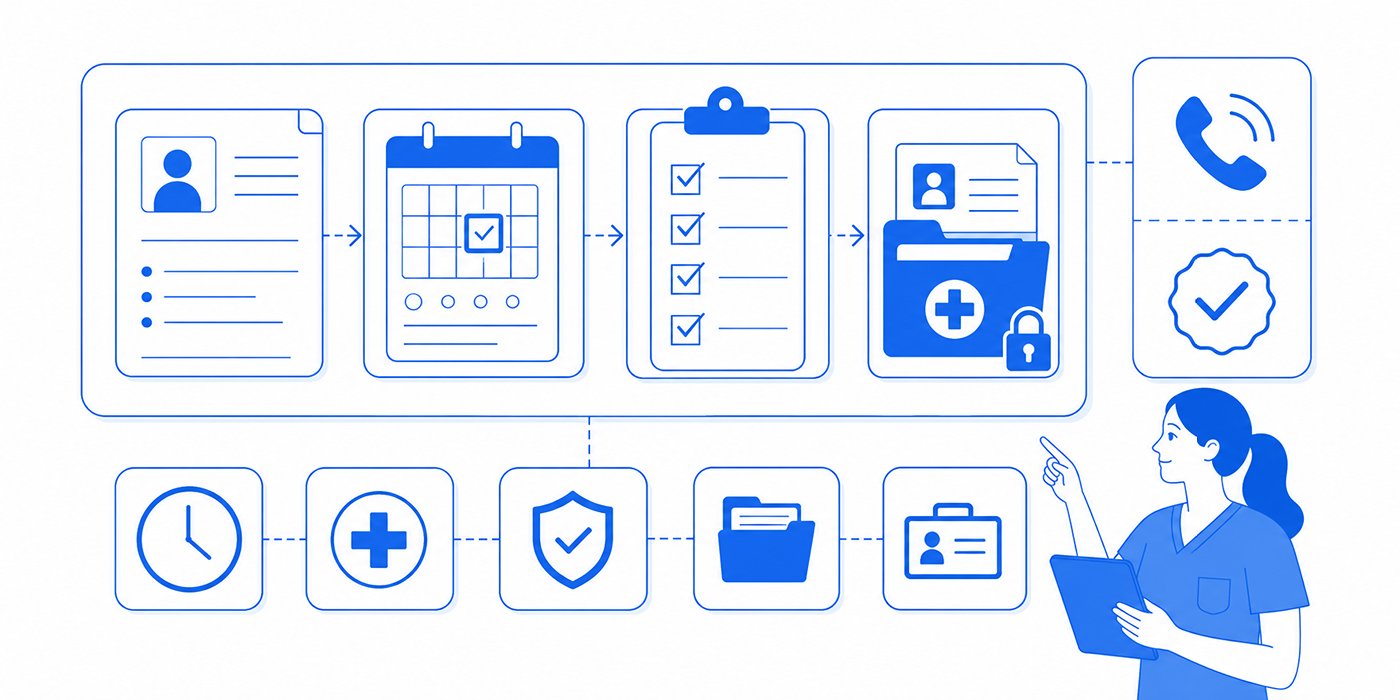
A medical administrative workflow is a repeatable sequence that moves a request from initiation to verified completion. It defines who receives the work, which information must be present, what action comes next, how quickly that action should occur, and how the organization proves completion. This structure applies equally to patient scheduling, telehealth administration, patient record updates, and medical billing operations.
HealthIT.gov describes an electronic health record as technology used to securely document, store, retrieve, share, and analyze patient information. Workflow design determines whether those capabilities produce accurate, timely work or merely create additional screens for staff to manage. A well-configured system supports EMR integration, faster clinical documentation, reliable virtual patient management, and visible accountability across departments.
Every dependable workflow contains seven elements:
A trigger: An event starts the process, such as an appointment request, referral, rejected claim, portal message, or records request. Teams can standardize these triggers through stronger healthcare portal procedures and clearly defined healthcare CRM terms.
Required inputs: Staff need specific data before work can proceed. An insurance-verification task may require the member ID, payer, plan, service date, provider, and proposed procedure. Missing information should place the task in a controlled exception queue rather than a forgotten inbox.
A named owner: Responsibility belongs to a role or work queue. “The front desk will handle it” lacks precision. “The eligibility queue owner reviews requests within four business hours” creates measurable accountability supported by medical staff scheduling tools and office collaboration systems.
A routing rule: The workflow determines where the task goes under ordinary and unusual circumstances. A routine follow-up may remain with scheduling, while chest pain reported during a call should follow the organization’s approved clinical-escalation protocol and emergency appointment workflow.
A service target: Every stage receives a deadline. Teams can use medical admin time tracking to measure whether urgent messages, authorizations, referrals, and claim follow-ups meet internal response standards.
An exception path: Missing records, inactive coverage, conflicting instructions, unavailable appointments, and system outages require predefined next steps. Staff should know whom to contact, what to document, and when to escalate through practical EMR troubleshooting.
Closure evidence: A task closes only when the required outcome is documented. “Called patient” describes activity. “Patient reached, appointment confirmed for June 18, instructions sent through the portal, and confirmation logged” proves completion.
| # | Workflow Term | Working Definition | Practical Use Case | Control Question |
|---|---|---|---|---|
| 1 | Patient intake | Collection of demographic, contact, insurance, consent, and visit information before care begins. | Send digital forms before the appointment and route incomplete submissions to an intake queue. | Can staff see which required fields remain incomplete? |
| 2 | Demographic verification | Confirmation that the patient’s name, date of birth, address, phone, email, and emergency contact remain current. | Verify high-risk fields at check-in without repeatedly rebuilding the complete record. | Which fields require confirmation at every visit? |
| 3 | Patient identity matching | Use of approved identifiers to connect a person with the correct medical record. | Check defined identifiers before creating a new chart or attaching an external document. | What prevents duplicate or mismatched records? |
| 4 | Eligibility verification | Confirmation that insurance coverage appears active for the planned date of service. | Run eligibility before the visit and place unclear responses in a manual-review queue. | How far in advance is coverage checked? |
| 5 | Benefits verification | Review of plan information that may affect coverage, patient responsibility, network status, or service requirements. | Document the payer response, reference number, representative, and limitations communicated. | Can another employee reconstruct the verification? |
| 6 | Prior authorization | Payer review that may be required before a service, medication, procedure, or test receives coverage consideration. | Track submission date, requested documents, status, deadline, and authorization details. | Who owns pending authorizations each day? |
| 7 | Referral intake | Receipt and validation of a referral order and its supporting information. | Confirm diagnosis, reason for referral, destination, insurance requirements, and relevant records. | Which missing item prevents scheduling? |
| 8 | Closed-loop referral | A referral process that records whether the patient reached the receiving service and what follow-up occurred. | Track referrals through scheduling, attendance, report receipt, and provider review. | Can the practice identify every open referral? |
| 9 | Appointment triage routing | Use of approved criteria to direct appointment requests to administrative or clinical review. | Send symptom-based requests outside administrative authority to licensed clinical staff. | Which requests require immediate escalation? |
| 10 | Scheduling conflict | A clash involving availability, appointment type, duration, resources, provider restrictions, or patient needs. | Offer approved alternatives while preserving required visit length and equipment access. | Who can authorize an override? |
| 11 | Check-in workflow | Arrival process covering identity confirmation, forms, coverage, balances, consent, and status updates. | Use a visible checklist that separates completed, missing, and escalated items. | What must be resolved before rooming? |
| 12 | No-show workflow | Standard response to missed appointments, including documentation, outreach, rescheduling, and policy application. | Trigger an outreach task and apply the practice’s approved attendance policy consistently. | Are high-risk patients treated according to policy? |
| 13 | Encounter preparation | Administrative review completed before the visit to surface missing information or unresolved requirements. | Check forms, referral documents, insurance status, prior records, and appointment instructions. | Can staff resolve gaps before the patient arrives? |
| 14 | Task queue | A centralized list of work assigned by role, category, priority, status, or deadline. | Replace personal reminder notes with shared, reportable tasks. | Can supervisors see unassigned and overdue work? |
| 15 | Routing rule | A defined instruction that sends a task to the appropriate person, team, or queue. | Route billing questions, refill requests, records requests, and complaints separately. | Does each request type have one approved destination? |
| 16 | Service-level target | An internal expectation for response or completion time. | Set different targets for urgent portal messages, routine referrals, claim follow-ups, and records requests. | Is the deadline visible where the work occurs? |
| 17 | Exception queue | A controlled location for work that cannot proceed through the standard path. | Hold tasks with missing data, conflicting records, payer errors, or system failures. | Who reviews exceptions and how often? |
| 18 | Escalation path | A predefined route for issues exceeding an employee’s authority, expertise, or risk threshold. | Escalate threats, privacy concerns, repeated complaints, and urgent clinical statements appropriately. | Does the employee know the next two contacts? |
| 19 | Handoff | Transfer of work, context, ownership, and deadline from one person or team to another. | Include the request, completed actions, remaining action, urgency, and expected outcome. | Can the receiver act without repeating the investigation? |
| 20 | Chart completion | Confirmation that required encounter documentation has reached the appropriate completion status. | Track unsigned or incomplete charts through role-based queues and aging reports. | Which downstream process is waiting for the chart? |
| 21 | Charge capture | Identification and transmission of billable services and supplies documented during an encounter. | Reconcile scheduled services, completed services, documentation, and submitted charges. | How are missing charges detected? |
| 22 | Coding validation | Review of coding information for completeness and consistency within authorized job responsibilities. | Route coding questions to qualified personnel with supporting documentation attached. | Are employees working within their permitted scope? |
| 23 | Claim scrub | Automated or manual review for missing, inconsistent, or potentially invalid claim data. | Check identifiers, codes, dates, modifiers, payer rules, and required fields before transmission. | Which errors repeatedly fail first-pass review? |
| 24 | Claim submission | Transmission of a claim through the approved electronic or manual channel. | Record transmission date, batch status, clearinghouse acceptance, and payer acknowledgment. | Does submission evidence exist? |
| 25 | Claim-status follow-up | Structured review of claims that remain unpaid, rejected, denied, or unresolved. | Prioritize by filing deadline, balance, age, reason, and likelihood of recovery. | Which claims are approaching irreversible deadlines? |
| 26 | Denial management | Process for categorizing, correcting, appealing, preventing, and measuring denied claims. | Assign denial reason codes and feed recurring causes back to registration, authorization, coding, or documentation teams. | Is the practice correcting causes or only reworking claims? |
| 27 | Electronic remittance advice | Electronic explanation of how a payer processed claims and calculated payment or adjustment. | Use remittance information to post payments, identify denials, and route variances. | Are unmatched remittances placed in a tracked queue? |
| 28 | Payment posting | Application of payer and patient payments, adjustments, and contractual amounts to accounts. | Reconcile posted transactions against deposits, remittances, and unresolved balances. | Who reviews posting variances? |
| 29 | Records release | Controlled processing of requests for medical information under applicable authorization, identity, policy, and legal requirements. | Log receipt, requester, scope, authority, deadline, disclosure, and completion evidence. | Can the organization reconstruct the disclosure? |
| 30 | Audit trail | A record showing who accessed, changed, transmitted, approved, or completed an action. | Use system history to investigate errors, validate completion, and strengthen controls. | Does the record show action, actor, and time? |
| 31 | Minimum necessary | Privacy principle requiring reasonable limits on PHI use, access, requests, and disclosure for the intended purpose. | Configure role-based access and release only the information required for an approved task. | Why does this person or process need each data element? |
| 32 | Workflow KPI | A measure showing speed, quality, workload, backlog, rework, or outcome. | Track cycle time, first-pass completion, exception rate, aging, and closure reliability. | Does the metric reveal an action the team can take? |
2. Key Workflow Terms That Turn Activity Into Control
Workflow terminology becomes valuable when staff use it to make decisions. Memorizing “queue,” “handoff,” and “escalation” adds little unless each term changes how the office assigns, tracks, and closes work. The following concepts create the operational backbone of reliable medical office organization, enforceable administrative policies, and defensible risk-management procedures.
Trigger: A trigger should be observable and timestamped. “Patient needs help” is vague. “Portal message categorized as billing question at 9:14 a.m.” creates a usable starting point. Standard categories from a healthcare portal reference, patient communication directory, or telehealth platform guide help the system route requests consistently.
Ownership: Every open task needs one current owner. Several employees may contribute, yet one role remains accountable for moving the task forward. Shared responsibility without visible ownership produces the familiar “I thought someone else handled it” failure. Practices can reinforce ownership through staff scheduling tools, team collaboration platforms, and documented medical admin procedures.
Work queue: A queue organizes tasks by type, priority, age, assignee, or status. Useful queues separate new work, active work, waiting-on-external-party items, exceptions, and overdue tasks. A single inbox containing refill messages, complaints, records requests, and insurance issues hides risk. Stronger queue design draws on EMR shortcuts, EMR issue-resolution practices, and efficient records-release tools.
Routing rule: Routing rules determine where work goes based on its content and risk. A portal message containing a scheduling request can move to the appointment team. A message reporting new or worsening symptoms requires the organization’s approved clinical path. Administrative employees should follow defined boundaries, effective communication protocols, and established de-escalation techniques rather than improvising clinical guidance.
Service-level target: A service-level target defines how soon an action should occur. Different work deserves different timing. A routine scheduling request may carry a one-business-day target, while an urgent message may require immediate routing under policy. Time-management systems and medical admin tracking tools expose workloads that exceed staffing capacity or create recurring delays.
Exception: An exception occurs when a task cannot follow the normal path. Examples include an invalid member ID, missing referral order, unreadable attachment, mismatched patient record, payer portal outage, or conflicting provider instruction. Each exception needs a reason code, owner, next action, and review date. This approach supports safer record updates, cleaner insurance claim workflows, and faster denial prevention.
Escalation: Escalation transfers an issue to someone with greater authority, expertise, or decision rights. A useful escalation includes the problem, patient or account identifier, actions already taken, deadline, risk, and requested decision. It avoids sending a vague “Please advise” message that forces the recipient to restart the investigation. Difficult patient conversations, complaint handling, and active listening all benefit from precise escalation records.
Closure criteria: Closure defines the evidence required before a task leaves the active queue. A voicemail attempt may satisfy one step while leaving the underlying request open. A referral reaches closure after the required outcome has been documented according to policy. An authorization closes after the decision, approved service details, validity dates, and reference information are recorded and communicated to the appropriate team.
3. Practical Medical Administrative Workflow Use Cases
The following use cases show how workflow terms prevent common losses across scheduling, referrals, documentation, billing, and privacy.
Use Case 1: A patient requests an urgent appointment through the portal
The trigger is the submitted portal message. The initial owner may be the centralized messaging queue, where staff verify identity, categorize the request, and review the message for escalation language. Scheduling staff can manage availability through approved appointment scheduling practices, secure scheduling tools, and the organization’s scheduling-conflict process.
Symptoms or safety concerns should follow the practice’s authorized clinical-routing protocol. Administrative personnel document the patient’s words accurately, transfer the request, and record the time and recipient. They avoid interpreting symptoms or promising a clinical outcome. Effective patient communication, empathy in healthcare administration, and de-escalation skills help staff remain calm while preserving urgency.
Closure evidence should show the final disposition: appointment scheduled, message transferred for clinical review, patient given approved instructions, or emergency protocol activated under policy. The task remains open while the organization is still waiting for an action that its workflow requires.
Use Case 2: A referral arrives without enough information
The referral-intake trigger may be a fax, portal transfer, secure message, or electronic order. Required inputs commonly include patient identifiers, referring provider, destination, reason for referral, relevant records, and payer-related information. Staff validate each input using a standardized checklist drawn from front-desk workflow controls, patient record procedures, and virtual patient-management practices.
An incomplete referral enters an exception queue with a specific reason such as “missing order,” “missing clinical records,” or “insurance information unclear.” “Referral incomplete” gives supervisors little diagnostic value. Precise exception codes reveal which referring sources, departments, or intake steps produce repeated rework.
The owner contacts the correct party, documents each attempt, assigns a review date, and protects the request from disappearing into a static fax folder. Closure occurs when the patient has reached the required referral outcome and the practice has documented the result under its policy. Patient reminders through approved communication applications can support follow-through without replacing internal accountability.
Use Case 3: Prior authorization remains pending as the appointment approaches
The workflow begins before the scheduled service. Eligibility, benefits, procedure information, supporting documentation, and payer submission requirements should be confirmed early enough to allow review. Teams can coordinate this work through insurance-claims training, medical billing terminology, and role-specific CPT education.
The authorization record should contain the payer, submission channel, submission date, reference number, requested service, status, missing items, follow-up date, and responsible employee. A dashboard can sort pending items by appointment date and risk. This prevents staff from discovering the problem during check-in, when the patient has already arranged transport, time away from work, or caregiving.
If a decision remains pending, the escalation path should identify who can determine the next operational step. Staff communicate approved information to the patient with care and document the conversation. Legally responsible administrative practice, patient privacy communication, and professional complaint handling reduce confusion during financially sensitive discussions.
Use Case 4: An incomplete chart blocks claim processing
The trigger may be a report showing an unsigned note, missing element, unresolved query, or incomplete encounter status. The administrative owner identifies the correct chart, verifies the status, and routes the task to the authorized recipient. Accurate clinical documentation terminology, strong EMR charting knowledge, and efficient EMR productivity shortcuts help staff locate the problem without modifying information beyond their role.
The workflow should track chart age, responsible role, reminder history, and the downstream process being delayed. Repeatedly sending generic reminders creates message fatigue. A tiered escalation schedule can prioritize high-value claims, filing deadlines, or patterns affecting entire departments.
When the chart reaches its required completion status, the task should automatically or manually move to the next queue. The organization can then measure the delay between encounter date, documentation completion, charge processing, and claim submission. Those measurements connect documentation bottlenecks with denial-management trends and medical admin analytics.
Use Case 5: A patient requests a copy of medical records
The trigger is the received request. Staff verify the requester, authority, requested records, delivery method, applicable deadline, and any required authorization. The task belongs in a dedicated records-release workflow supported by records-release tools, HIPAA terminology, and the organization’s legal responsibility guide.
HHS explains that the HIPAA minimum necessary standard generally requires covered entities to make reasonable efforts to limit PHI use, disclosure, and requests to the information needed for the intended purpose. Staff should apply current law, organizational policy, and authorized guidance to each request because the appropriate process depends on the requester, purpose, jurisdiction, and circumstances.
Closure evidence should include what was released, to whom, through which method, under whose authority, and when. An incomplete disclosure log can create serious investigation problems months later, even when the original employee remembers handling the request correctly.
4. How to Map and Improve a Medical Administrative Workflow
A useful workflow map shows actual work rather than the procedure people believe they follow. Staff may describe a five-step referral process while the real process includes fax monitoring, duplicate data entry, three reminder messages, a spreadsheet, an informal hallway question, and a final portal update. Improvement begins by exposing that hidden labor through medical office organization, time tracking, and direct observation.
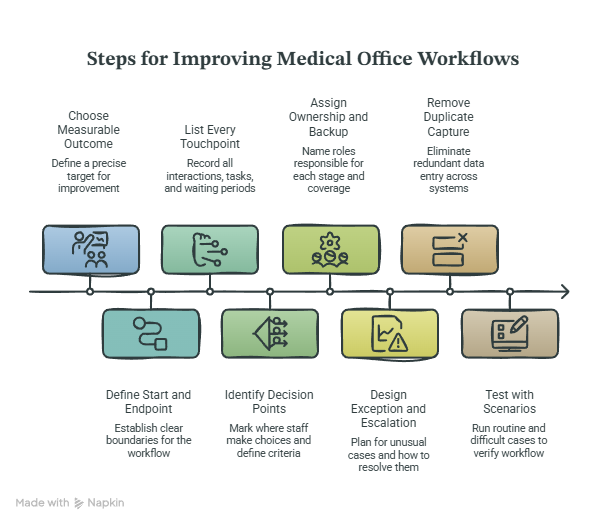
Step 1: Choose one measurable outcome. “Improve scheduling” covers too much. “Reduce appointment requests older than one business day” creates a precise target. Other useful outcomes include lowering incomplete referrals, reducing authorization-related cancellations, improving first-pass claim acceptance, or accelerating records-request completion. Scheduling software mastery, claims-management training, and records-release guidance can help teams define the work included.
Step 2: Define the start and endpoint. Choose an observable trigger and verifiable closure condition. A referral workflow may start when the order enters the designated intake channel and close when the defined referral outcome is documented. Clear boundaries prevent the project from drifting into unrelated clinical or financial processes.
Step 3: List every touchpoint. Record each screen, call, message, form, queue, spreadsheet, approval, and handoff. Include rework and waiting. Staff frequently underestimate time spent locating missing information, resolving duplicate records, or asking who owns an unresolved task. EMR troubleshooting, collaboration platforms, and front-desk checklists can reveal fragmented steps.
Step 4: Identify decision points. Mark every place where staff choose a route. Examples include routine versus urgent, complete versus incomplete, active versus inactive coverage, standard versus exception, and administrative versus clinical review. Each decision point needs approved criteria. Vague instructions such as “use judgment” create inconsistent treatment and expose less-experienced employees to avoidable pressure.
Step 5: Assign ownership and backup coverage. Name the role that owns each stage and the role covering absences or volume spikes. A task should never depend entirely on one person’s memory. Staff scheduling directories, medical office team tools, and professional time-management practices help preserve continuity.
Step 6: Design exception and escalation paths. Standard work handles predictable cases. Operational risk accumulates inside unusual cases. Define the reasons a task may stop, the person responsible for resolving each reason, the escalation threshold, and the required documentation. Build communication scripts with active listening techniques, de-escalation guidance, and difficult-conversation procedures.
Step 7: Remove duplicate capture. Re-entering the same information across paper forms, spreadsheets, emails, and the EMR increases delay and inconsistency. Determine which system serves as the authoritative record, which integrations can transfer data safely, and which shadow trackers can be retired. EMR integration tools, healthcare CRM terminology, and portal workflow knowledge support better system decisions.
Step 8: Test with ordinary and difficult scenarios. Run a routine case, an incomplete case, an urgent case, a system-outage case, and a case requiring management approval. A workflow that succeeds only when every field is complete offers little protection during a busy Monday morning. Testing should verify routing, permissions, backup coverage, audit history, and closure evidence.
5. Workflow Metrics, Safeguards, and a 30-Day Implementation Plan
Medical offices need measures that reveal where work waits, fails, repeats, or disappears. Counting completed tasks provides limited insight when the queue contains growing backlogs or employees repeatedly correct preventable errors. A stronger scorecard combines speed, quality, workload, and outcome measures through predictive administrative analytics, time-tracking systems, and clear medical office policies.
Cycle time measures elapsed time from trigger to closure. Touch time measures active staff effort. The difference exposes waiting. A referral may require only 20 minutes of actual work while remaining open for 12 days because ownership, missing information, and follow-up dates remain unclear.
First-pass completion rate measures how often work succeeds without correction, return, or resubmission. It can be applied to registration, referrals, authorizations, claims, and records requests. Low first-pass performance often signals unclear requirements, weak training, poor system configuration, or inconsistent data capture. Teams can connect these findings with CMAA exam knowledge, medical terminology training, and medical billing education.
Exception rate shows the percentage of tasks leaving the standard path. The rate should be separated by reason. A rise in “missing insurance image” needs a different solution from “payer portal unavailable.” Specific exception data turns staff frustration into an improvement target.
Aging groups open work by elapsed time. Useful categories depend on the process and associated deadlines. A daily dashboard should highlight overdue work, tasks approaching filing or service deadlines, unassigned items, and cases waiting on internal action. Denial-management controls, risk-management strategies, and claims tutorials provide strong applications.
Rework rate counts tasks requiring correction because an earlier stage was incomplete or inaccurate. This metric helps leadership address causes upstream. Repeated claim errors may originate during registration, authorization, documentation, coding, or submission. Blaming the employee handling the final denial leaves the source untouched.
CMS maintains standardized electronic healthcare transactions covering operational areas such as eligibility, claims, claim status, electronic funds transfer, and electronic remittance advice. These standards support consistent electronic exchange across healthcare organizations. Practices still need internal controls that verify accurate data entry, accepted transmission, exception handling, reconciliation, and completion.
A practical 30-day rollout can proceed in four stages:
Days 1–7: Diagnose. Select one painful workflow. Interview the people performing it, observe actual steps, review task aging, and identify the three most frequent failure reasons. Include employees who manage scheduling conflicts, patient complaints, or EMR errors, since they see failure patterns first.
Days 8–14: Redesign. Define the trigger, required inputs, owner, backup, routing rules, service targets, exception codes, escalation path, and closure criteria. Reduce duplicate data entry and place required information where the next employee can find it.
Days 15–21: Pilot. Test the redesigned workflow with a small team or service line. Hold brief daily reviews of overdue work, exceptions, employee questions, and system limitations. Update unclear instructions quickly while preserving version control.
Days 22–30: Stabilize. Train the wider team, publish the approved procedure, establish dashboard ownership, and schedule a review after 30 and 90 days. Reinforcement through medical administrative professional organizations, CMAA learning communities, and relevant medical administration conferences can strengthen long-term operational capability.
6. FAQs About Medical Administrative Workflow
-
A workflow shows how work travels across people, systems, decisions, and deadlines from trigger to closure. A procedure explains how an individual completes a particular action within that flow. For example, the records-release workflow covers intake, identity validation, authority review, retrieval, quality review, delivery, logging, and closure. The procedure may explain how an employee records the request inside a specific platform.
Practices need both. A detailed procedure cannot repair an absent owner or a broken handoff, while a workflow map cannot replace step-level instructions. Strong organizations connect policy and procedure development, records-release tools, legal responsibilities, and HIPAA terminology inside one controlled system.
-
Begin with the workflow producing the greatest combination of patient harm potential, financial loss, employee rework, delay, and complaint volume. Useful candidates include urgent message routing, prior authorization, incomplete referrals, claim denials, unsigned charts, and records requests. Review backlog age, repeated calls, cancellation reasons, missed deadlines, and escalation frequency.
A high-volume annoyance may deserve attention, while a lower-volume privacy or safety exposure may carry greater urgency. Leadership should use risk-management principles, patient complaint patterns, denial-management data, and patient satisfaction insights to choose the first project.
-
A small practice can build strong controls with a well-configured EMR, shared role-based queues, standardized templates, clear status labels, daily backlog review, and written escalation rules. The essential requirement is one authoritative location for each type of work. Personal notebooks, unstructured email chains, and disconnected spreadsheets make coverage and auditing difficult.
Start with a simple queue containing task type, patient or account identifier, owner, status, due date, next action, and closure evidence. Use approved EMR shortcuts, carefully selected collaboration tools, appropriate scheduling software, and secure patient communication applications.
-
Review frequency should match risk and urgency. Urgent patient messages may require continuous or frequent monitoring during operating hours. Appointment requests, referrals, authorizations, records requests, and revenue-cycle queues may need daily review, with higher-risk subsets reviewed more often. Supervisors should also examine overdue, unassigned, and exception items.
A queue review needs a defined owner and action. Merely opening the dashboard adds no control. The reviewer should reassign uncovered tasks, escalate aging items, resolve blocked cases, and document emerging patterns. Medical admin time management, staff scheduling tools, emergency appointment procedures, and telehealth administration guidance can support appropriate review schedules.
-
A complete handoff identifies the patient or account through approved identifiers, states the request, summarizes verified facts, records completed actions, explains the remaining action, names the current deadline, identifies risk, and specifies the expected response. It should also show the receiving owner and transfer time.
Employees should avoid unnecessary PHI, assumptions, unclear abbreviations, and unsupported conclusions. The recipient should be able to continue the work without repeating calls or reconstructing the entire case. Strong handoffs depend on active listening, patient privacy communication, medical terminology mastery, and clear medical scribe documentation terms.
-
The strongest workflow skills include prioritization, accurate data validation, written communication, queue management, escalation judgment, privacy awareness, payer-process knowledge, EMR navigation, and root-cause analysis. Employees also need confidence in identifying missing information and asking precise questions before a task moves downstream.
Career development should combine operational knowledge with practical simulations. Professionals can strengthen their capabilities through an ACMSO certification study schedule, CMAA exam preparation, medical administrative interview preparation, and a well-structured CMAA resume. Practical mastery appears when the employee can recognize a workflow failure, protect the patient experience, document the issue, and move the task to a verified endpoint.
