

Directory of Medical Admin Staff Scheduling Tools
A scheduling tool is never just a calendar in a medical office. It controls access, patient flow, front-desk workload, reminder timing, provider utilization, registration accuracy, no-show exposure, and the tone of the patient experience before a visit even starts. When the scheduling stack is weak, medical administrative assistants end up absorbing the damage through hold times, angry reschedules, double-booking chaos, incomplete intake, and rushed corrections that create downstream billing and compliance risk.
That is why this directory matters. The goal is not to dump software names into one page. It is to help you evaluate which scheduling tools actually solve the daily pain points medical admin staff face: overloaded phones, unclear templates, last-minute openings, reminder failures, bad handoffs, portal friction, and the constant pressure to keep schedules full without making the front desk feel like a triage battlefield.
1. What Medical Admin Staff Really Need From a Scheduling Tool
Medical admin teams usually do not fail because they do not care. They fail because the office asks them to coordinate too many moving parts with too little structure. A patient wants a same-week visit, a provider has blocked time, a prior authorization is pending, the visit type was selected incorrectly, the reminder never went out, the portal intake is incomplete, and now the front desk is expected to fix all of it in under three minutes. That is why the best scheduling tools are not defined by flashy dashboards. They are defined by operational control.
At minimum, a high-value scheduling platform should support online booking or request workflows, automated reminders, cancellation handling, rescheduling, intake alignment, and visibility into real availability. That is the pattern repeatedly emphasized by official vendor materials from Phreesia, NexHealth, Tebra, AdvancedMD, eClinicalWorks/healow, DrChrono, Solutionreach, SimplePractice, Carepatron, and athenahealth Marketplace partners. Their current product pages consistently position scheduling as part of a larger patient-access workflow that also touches reminders, waitlists, intake, messaging, and calendar control.
For medical administrative assistants, that matters because scheduling quality is tied directly to other desk responsibilities. A bad scheduler increases demographic mistakes, rushed insurance checks, missed preparation steps, and patient frustration before the visit even starts. That is why this topic fits naturally beside front desk operations terms, appointment scheduling best practices, patient intake procedures, and insurance verification definitions. The strongest scheduling setup does not live alone. It works with intake, verification, communication, portal use, and follow-up discipline.
A smart medical admin assistant should also judge software by pain reduction, not by brand familiarity. Does it reduce calls, shorten confirmation work, fill cancellations faster, keep reminders consistent, and lower the number of appointments that require manual rescue? Those are the real questions. Tools that offer self-scheduling, reminder automation, and waitlist-style recovery features often create the most immediate front-desk relief because they reduce the repetitive work that eats the day. Vendor materials from Phreesia, NexHealth, Tebra, AdvancedMD, and athenahealth Marketplace scheduling partners all highlight those exact operational benefits.
This directory table is based on current vendor positioning around online scheduling, appointment reminders, waitlist recovery, analytics, patient messaging, calendar control, and EHR-connected access workflows as described on official product or support pages.
2. How to Evaluate Scheduling Tools Like an Operations Professional Instead of a Shopper
Most offices choose scheduling tools the wrong way. They ask whether the product looks modern, whether the sales demo feels smooth, or whether patients can technically book online. Those are surface questions. A medical admin assistant needs deeper ones. Can the system protect slot integrity? Can it separate visit types correctly? Can it help the office stop bleeding time into reminder calls, reschedule cleanup, and same-day confusion? Can it reduce the number of times staff have to manually explain what should already be obvious from the workflow?
The first lens is workload design. If your phones are always overloaded, your best bet is usually a tool with strong online booking, reminders, and self-service rescheduling. That is why platforms like NexHealth, Tebra, AdvancedMD self-scheduling, and Solutionreach often stand out in offices trying to move routine booking away from live phone traffic. Their official materials repeatedly emphasize 24/7 booking, automated reminders, and staff time savings. Pair that with internal workflow discipline from medical appointment scheduling tools ranked by ease of use, healthcare portal terms, effective patient communication terms, and de-escalation techniques, and you get something far more valuable than software alone: a calmer patient-access system.
The second lens is recovery power. Plenty of tools can book appointments. Fewer tools help you rescue the schedule when reality breaks it. Cancellation recovery, waitlists, short-notice fill workflows, recalls, and reactivation sequences are where operational value gets serious. Official materials from Phreesia, NexHealth, Luma Health, and NextPatient all highlight schedule-gap recovery or waitlist-style support because filling one canceled slot is not just a convenience issue. It protects provider utilization, daily revenue, and staff sanity.
The third lens is connected workflow. A scheduling tool becomes much more useful when it is aligned with intake, portal actions, or messaging. eClinicalWorks positions healow Open Access and related patient engagement tools around appointment booking, reminders, portal actions, and mobile access. Phreesia frames scheduling alongside registration and analytics. Tebra and PatientPop frame it inside a broader patient-experience system. That matters because the worst offices force staff to schedule in one place, verify in another, message in another, and patch the experience together manually.
3. Which Types of Scheduling Tools Fit Different Medical Office Realities
The best scheduling stack for a high-volume multispecialty group is not automatically the best one for a lean office with two providers and one overworked front-desk lead. That is why the right choice starts with operational reality, not feature envy. If your office has enough patient demand but poor schedule control, look for template discipline, reminder reliability, and waitlist recovery. If your office is struggling more with access convenience and inbound traffic, prioritize self-scheduling and digital intake alignment. If your office is balancing growth and patient acquisition, choose tools that combine booking with messaging and experience management.
For smaller practices, products like Tebra, PatientPop, SimplePractice, Carepatron, and Solutionreach often appeal because they emphasize ease, patient experience, reminders, and online scheduling without requiring a giant enterprise posture. Their official materials consistently highlight convenience, time savings, and smoother communication. For medical admin assistants in those environments, that matters because small teams cannot afford fragmented systems or endless manual chasing. If every missed reminder becomes a phone call and every booking request becomes a back-and-forth exchange, the office feels understaffed even when the real problem is workflow friction.
For busier organizations, tools with stronger access automation and reporting often create more value. Phreesia emphasizes scheduling automation, reminders, smart waitlists, and reporting. NexHealth highlights booking, intake, and messaging. AdvancedMD adds schedule visibility and reminders. eClinicalWorks/healow ties scheduling to patient engagement and mobile access. Those are not interchangeable strengths. They answer different forms of pain.
This is where ACMSO readers should think beyond “What software is popular?” and ask “What breaks most often in our office?” If your staff struggles with patient preparation, then scheduling must work with telehealth platform definitions, healthcare CRM terms, top 20 scheduling and appointment terms, and medical office automation trends. If your staff struggles with privacy-sensitive coordination, then scheduling has to align with top 20 HIPAA and patient privacy terms, predicting HIPAA updates, cmaas and data privacy future regulations, and future healthcare compliance changes.
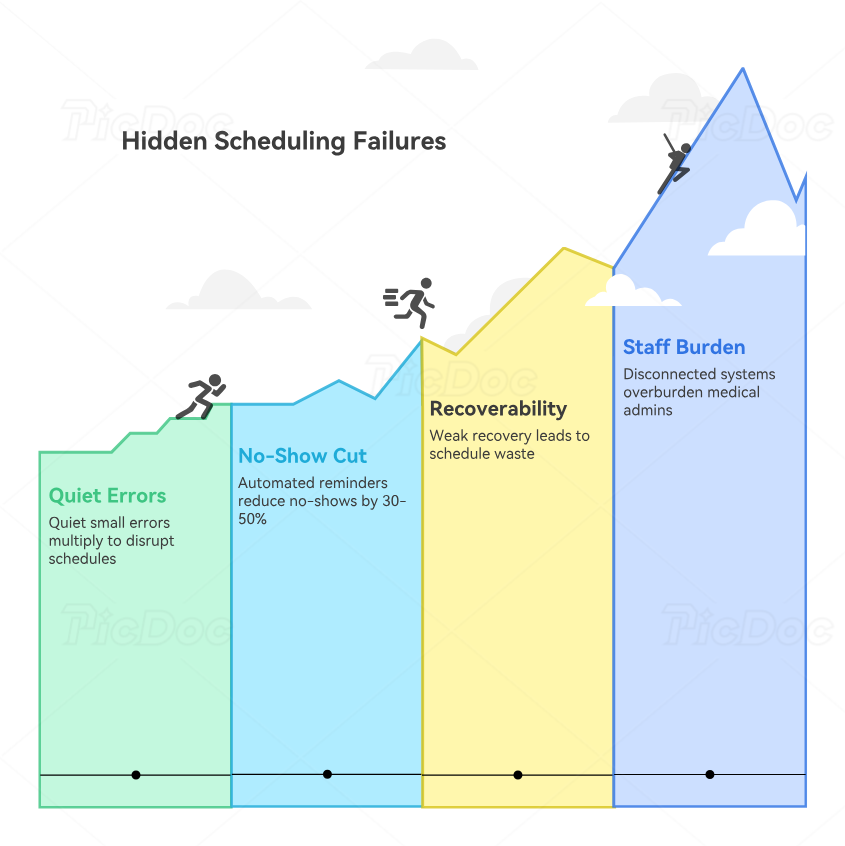
4. The Hidden Scheduling Failures That the Right Tool Should Eliminate
The most dangerous scheduling failures are not always dramatic. Often they are quiet errors that look small until they multiply. A patient books the wrong visit type. A same-day opening is not offered to the right person. A reminder goes out too late. A patient shows up without the needed prep because the workflow did not connect messaging to the appointment. A portal request sits untouched while phone traffic keeps exploding. A cancellation opens a hole no one fills because the office has no effective recall or waitlist logic. These are the failures that make staff feel “busy all day” without ever feeling in control.
That is why reminder sophistication matters more than many offices admit. Solutionreach publishes extensively on reminder cadence and confirmation strategy. Tebra directly says automated reminders can cut no-shows by 30% to 50%. Phreesia emphasizes confirmation, cancellation, and recapture workflows. DrChrono and SimplePractice both support automated appointment reminders with configurable timing. AdvancedMD frames reminders as a tool to reduce no-shows and late arrivals. These are not cosmetic features. They are defense mechanisms against a schedule that leaks value.
The second hidden failure is poor schedule recoverability. When a practice cannot recover from cancellations, it starts living with avoidable waste. That is why waitlists, short-notice notifications, and earlier-visit prompts matter so much. Phreesia, NexHealth, Luma Health, athenahealth’s NextPatient example, and related marketplace tools all emphasize faster fill or automated recovery behavior. The common thread is simple: a modern schedule should not collapse every time a patient cancels.
The third hidden failure is forcing staff to become human middleware. When scheduling, portal activity, messaging, and intake do not connect, the burden shifts to the medical admin team. They become translators, chasers, and patch-makers. That is exhausting, and it is one of the clearest signals that a scheduling stack is underperforming. A better system reduces the number of manual touches required per appointment and increases the number of routine actions patients can complete without staff intervention. That is exactly why current product positioning across NexHealth, Phreesia, Tebra, eClinicalWorks/healow, and AdvancedMD keeps linking scheduling with intake, messaging, or patient engagement rather than treating scheduling as a calendar-only task.
5. How Medical Admin Teams Should Implement Scheduling Tools Without Creating New Chaos
Even a good platform can fail if the office implements it badly. The first mistake is trying to automate broken logic. If visit types are unclear, provider rules are inconsistent, and scheduling authority changes by person and shift, software will simply scale the confusion. Before rollout, offices should define which appointments can be self-booked, which require review, which reminders go to which visit types, how cancellations are handled, and who owns same-day recovery. Without that structure, the tool becomes a prettier version of the same disorder.
The second mistake is treating implementation as an IT project instead of a front-desk workflow redesign. Medical administrative assistants need a voice here because they know where scheduling pain actually lives. They know which calls are repetitive, which questions derail booking, which appointments get booked incorrectly, which patients ignore portal messages, and which providers create template pressure. Any tool decision that excludes that knowledge is strategically weak. This is also why teams should reinforce implementation with future-proof your CMAA career, how AI will transform medical administrative assistant roles by 2030, the future of EMR systems, and interactive guide: the medical office of 2025 technologies CMAAs must master. The scheduling layer is becoming part of a bigger access-and-automation skillset.
The third mistake is measuring rollout by login adoption instead of operational outcomes. A tool is succeeding when no-shows drop, schedule gaps fill faster, routine phone traffic declines, reminder consistency improves, and the front desk spends less time on avoidable rescue work. That is the real scorecard. Phreesia, Tebra, AdvancedMD, and Solutionreach all frame scheduling improvement in terms of fewer no-shows, stronger attendance, or better efficiency, which is the right benchmark to borrow.
6. FAQs
-
For most offices, it is not just online booking. It is the combination of booking, reminder automation, and clean rescheduling or cancellation handling. A tool that books visits but does not reduce downstream cleanup only solves half the problem.
-
Yes. Official vendor materials consistently position reminders as a major lever for reducing no-shows and improving schedule integrity, and Tebra explicitly says automated reminders can cut no-shows by 30% to 50%.
-
Any practice with frequent cancellations, provider variability, or long patient demand queues. Waitlist and short-notice tools help staff turn open slots into recoverable visits instead of avoidable waste. Phreesia, NexHealth, Luma Health, and NextPatient all market these recovery-style capabilities.
-
Usually, they should choose the tool that removes the most manual effort without creating system sprawl. For some offices that means a lighter patient-experience platform. For others it means using stronger scheduling and reminder functions inside an existing PM or EHR stack.
-
Look for five signals: constant phone overload, high reminder rescue work, weak cancellation recovery, frequent booking errors, and poor coordination between scheduling, intake, and messaging. If staff are acting as human glue all day, the stack is probably weak.
-
Only when visit types, provider rules, and eligibility logic are clear. Self-scheduling can save enormous time, but if the office has loose templates or confusing appointment categories, it can magnify errors instead of reducing them.
-
They should strengthen patient access judgment, intake workflow, portal communication, privacy handling, insurance verification, and de-escalation. Scheduling tools work best when paired with operational skill, not treated as a substitute for it.
-
Usually reminder automation and better cancellation recovery. Those upgrades tend to reduce no-shows, protect provider time, and relieve the front desk faster than large, disruptive system overhauls.
