

Interactive Medical Office Ergonomics Tools Directory
Medical office ergonomics is not a soft perk. It is an operational issue hiding inside pain, fatigue, slower documentation, sloppy scheduling, distracted phone work, and avoidable burnout. When a front-desk coordinator is twisting toward two screens, a scheduler is clicking all day with a poor mouse angle, or a virtual admin is doing portal work on a laptop without proper support, comfort problems become performance problems. That matters in jobs already shaped by front-desk operations, nonstop appointment scheduling, high-volume patient communication, and growing medical office automation.
This directory is built for ACMSO readers who want usable ergonomic tools, not vague advice. The best tools do more than tell you to “sit up straight.” They help you assess workstation risk, calculate fit, trigger movement breaks, choose equipment intelligently, and connect setup decisions to daily tasks like healthcare portal work, telehealth coordination, insurance verification, and privacy-heavy desk work shaped by HIPAA and patient privacy. OSHA’s computer workstation eTool, NIOSH’s lifting app, Cornell’s workstation tools, NIH and Yale self-assessments, OHCOW’s office ergonomics calculator, Ergotron’s workspace tools, and commercial platforms from VelocityEHS, ErgoPlus, and Briotix all show that ergonomics is moving toward guided, interactive decision support rather than guesswork.
1. Why ergonomics matters in medical offices more than people admit
Medical offices create a perfect storm for ergonomic neglect. Staff sit and stand unpredictably. They pivot between phones, scanners, portals, EHR screens, printers, forms, and face-to-face patient interactions. They stay motionless during heavy inbox work, then rush through intake windows when volume spikes. Over time, that mix of repetition, awkward reach, poor monitor positioning, and static posture quietly drains focus.
That matters because ergonomic strain rarely stays physical. It spills into work quality. A tired scheduler makes more errors. A strained registrar gets less patient-facing patience. A staff member dealing with neck and wrist discomfort may move slower through patient intake procedures, become sloppier in healthcare CRM tasks, and feel more overwhelmed when handling de-escalation moments or juggling front-desk checklists. OSHA’s workstation guidance explicitly centers neutral postures, relaxed shoulders, supported feet, and appropriate screen and input-device positioning because bad workstation setup increases avoidable stress on the body.
In medical administration, that stress is amplified by workflow design. A workstation can look tidy and still be wrong for the work being performed. Someone doing mostly calls needs a different arrangement than someone scanning insurance cards all day. Someone deep in telehealth platform support may need better camera and monitor placement than someone focused on appointment scheduling terms. Interactive tools matter because they force a more honest question: does this setup actually fit the task?
| # | Tool | Type | Best Use in a Medical Office | Why It’s Valuable |
|---|---|---|---|---|
| 1 | OSHA Computer Workstations eTool | Interactive guidance tool | Baseline desk, monitor, keyboard, chair setup | Excellent starting point for role-by-role workstation correction |
| 2 | OSHA workstation evaluation checklist | Checklist | Quick audits for front-desk and admin pods | Fast way to spot obvious setup failures |
| 3 | NIOSH NLE Calc | Mobile lifting-risk app | Supply boxes, paper loads, scanner or equipment moves | Useful when admin staff still perform manual lifting |
| 4 | Cornell Computer Workstation Checklist | Checklist | Detailed self-review for desk-heavy staff | Principles-based and practical |
| 5 | Cornell Ergonomic Workstation Advisor | Scored worksheet | Structured scoring for seated and sit-stand work | Good for tracking improvement over time |
| 6 | Cornell seating evaluation form | Equipment evaluation | Chair selection and fit reviews | Helpful before buying “ergonomic” chairs blindly |
| 7 | NIH workstation self-assessment | Self-assessment checklist | Desk staff with neck, knee, wrist, or back discomfort | Action-oriented yes/no format |
| 8 | Yale workstation self-assessment | Self-assessment checklist | Structured review before requesting accessories | Good for home and hybrid medical admin staff |
| 9 | OHCOW Office Ergonomics Calculator | Measurement calculator | Chair, keyboard, and screen height checks | Great when a setup “feels wrong” but needs numbers |
| 10 | Office Ergo Calculator app | Mobile calculator | Quick field checks without spreadsheets | Useful for supervisors doing walk-throughs |
| 11 | Ergotron Workspace Assessment | Interactive questionnaire | Individual workstation fit checks | Simple and beginner-friendly |
| 12 | Ergotron Workspace Planner | Height planner | Monitor, keyboard, and chair baselines | Useful for sit-stand conversion planning |
| 13 | VelocityEHS Office Ergonomics | Office ergonomics platform | Organization-wide self-assessments and recommendations | Strong for multi-site medical groups |
| 14 | VelocityEHS 3D SSPP | Strength prediction software | Non-desk tasks involving lifting or static force | Useful for equipment and storage handling analysis |
| 15 | ErgoPlus software | Ergonomics management platform | Formal ergonomics programs and risk tracking | Better for larger organizations with safety workflows |
| 16 | Briotix Office.Worx | Cloud office ergonomics software | Employee self-help plus reporting | Good for distributed and hybrid admin teams |
| 17 | Humanscale ergonomic assessments | Assessment service | Higher-touch individual or team evaluations | Best when discomfort complaints are already rising |
| 18 | Workrave | Break reminder software | Keyboard-heavy schedulers and billers | Helps interrupt repetitive-strain behavior |
| 19 | Posture & Stand Up Reminder | Mobile reminder app | Staff who sit too long during portal or inbox work | Simple habit-building support |
| 20 | Microsoft Posture Reminder | Desktop reminder app | Windows-based administrative workstations | Low-friction reminder layer |
| 21 | CCOHS chair criteria | Selection guide | Chair purchasing and fit standards | Prevents expensive, wrong chair purchases |
| 22 | NIH chair component guide | Chair feature guide | Evaluating chair bases, casters, arms, and back support | Useful during procurement reviews |
| 23 | Cornell product evaluation tools | Evaluation set | Chairs, worksurfaces, keyboard platforms | Strong for structured purchasing decisions |
| 24 | WSPS Office Ergonomics Calculator | Measurement spreadsheet | Comparing current furniture dimensions to ideal baselines | Helpful for bulk workstation corrections |
| 25 | Internal ACMSO discomfort tracking sheet | Homegrown tracking tool | Linking symptoms to tasks like phones, portals, and scheduling | Turns anecdotes into improvement priorities |
| 26 | Role-based workstation photo audit | Internal review method | Comparing front-desk, call-center, and hybrid setups | Very practical before spending on accessories |
2. The best types of ergonomic tools for different medical office pain points
The first mistake offices make is buying equipment before diagnosing the strain pattern. A team with chronic shoulder elevation from high keyboards does not need a motivational wellness poster. They need measurement tools, keyboard-height correction, and better monitor placement. A registrar whose feet dangle at the desk may need a footrest or desk change, not a new chair. OSHA, NIH, and CCOHS all emphasize that fit, adjustability, and support matter more than whether something is marketed as ergonomic.
That is why medical offices should think in tool categories. Assessment tools are for identifying posture and setup mismatches. Measurement tools are for translating discomfort into chair, monitor, and keyboard corrections. Reminder tools are for breaking static, repetitive behavior during long sessions of insurance verification, healthcare portal work, medical billing terminology tasks, or EMR-related admin work. Procurement tools help offices buy smarter. Program-management platforms help larger organizations track patterns at scale.
For most ACMSO readers, the best sequence is simple. Start with a self-assessment or checklist. Then use a measurement tool. Then deploy habit tools like break reminders. Only after that should you buy accessories. That order matters because discomfort in medical offices is often caused by setup logic, not by a lack of products. A monitor arm will not rescue a workflow where the phone, scanner, and second screen force constant trunk twisting. A premium chair will not fix a desk that is too high for keyboard work.
3. How to choose the right ergonomics tool based on role, not hype
A front-desk receptionist, a referral coordinator, and a virtual scheduler do not need the exact same ergonomic tool stack. Their risk patterns differ because their work differs.
Front-desk roles usually need assessment tools that capture reach, screen position, patient-facing posture changes, and repeated turns toward printers or scanners. These staff often bounce between sitting, standing, greeting, copying IDs, and explaining forms. For them, the smartest combination is a checklist-based assessment, a chair and workstation fit guide, and a simple symptom-tracking process tied to patient intake procedures, effective patient communication, empathy in healthcare administration, and de-escalation techniques. If pain rises during peak patient traffic, the issue may be layout and motion, not sitting alone.
Phone-heavy and scheduling-heavy roles need different support. Their risk is often repetitive mouse and keyboard use, static sitting, and visual strain from prolonged screen time. For them, tools like Workrave, posture reminders, OHCOW or Ergotron measurement tools, and strong monitor-position checks become more useful. Those roles are often buried in appointment scheduling, scheduling terminology, healthcare CRM, and telehealth regulation support tasks, where static posture quietly becomes the enemy.
Hybrid and remote medical admin staff need one more layer: self-directed consistency. They do not always have facility support, so tools that give guided recommendations matter more. Ergotron’s assessment and planner, NIH and Yale self-assessments, Cornell’s workstation advisor, and office ergonomics calculators are especially useful because they help a worker build a reasonable baseline without waiting for an onsite consultant.
4. How to implement ergonomic tools without wasting money
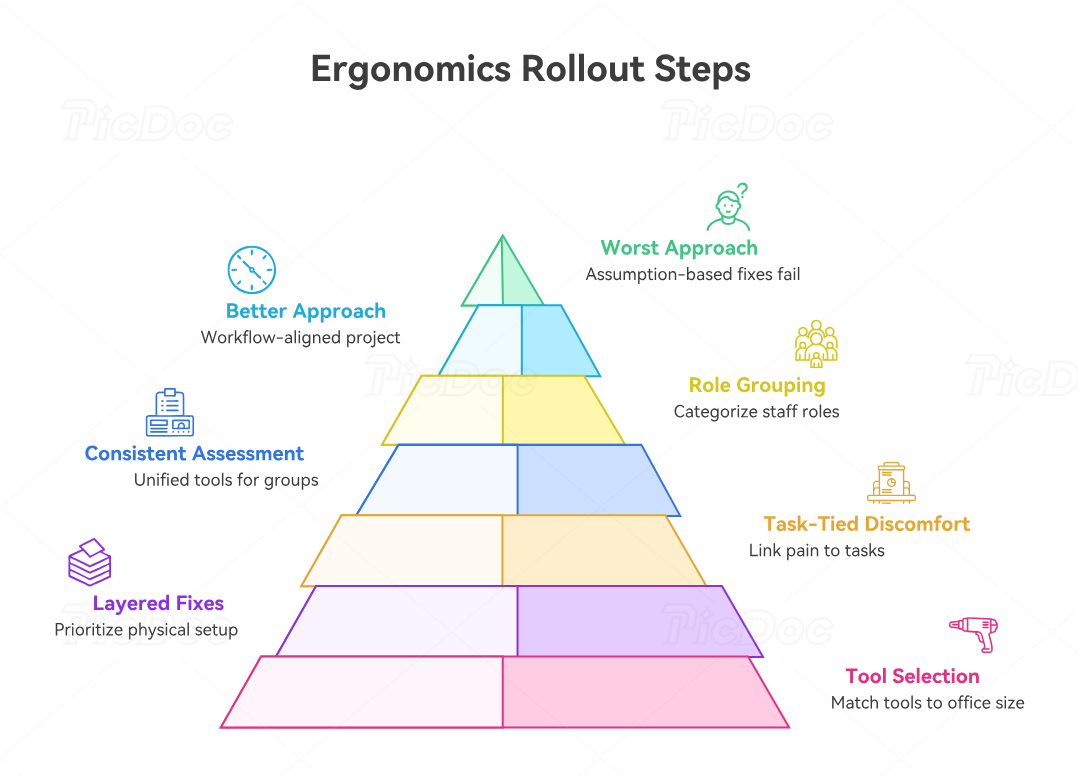
The worst ergonomics rollout is the one built on assumptions. Leadership hears “people are uncomfortable,” buys a few random accessories, and declares the problem solved. That usually creates a new problem: mismatched equipment, inconsistent setups, and staff resentment because nothing actually changed.
A better approach is to run ergonomics like a workflow-improvement project. Start with role grouping. Separate front-desk staff, schedulers, billers, hybrid admins, and higher-mobility team members. Then use one assessment tool and one measurement method consistently across each group. That gives you pattern visibility. Maybe most pain complaints come from monitor height. Maybe scan-heavy desks are forcing lateral reach. Maybe hybrid staff are working from laptops alone. That kind of pattern recognition is much stronger than random one-off fixes.
Next, tie discomfort to actual work tasks. Ask when pain appears. During insurance verification? During long portal messaging sessions? During peak front-desk operations? During repetitive medical office automation tasks? This matters because ergonomic corrections should support the real work, not some generic idea of office comfort.
Then buy in layers. Fix the biggest fit errors first: chair adjustment, monitor height, keyboard and mouse placement, foot support, and document placement. Use break-reminder tools only after the physical setup is reasonable. For larger offices, a platform like VelocityEHS, ErgoPlus, or Briotix may justify itself when you need centralized reporting, training, and broader pattern analysis. For smaller clinics, OSHA, Cornell, NIH, OHCOW, and Ergotron tools may be enough.
5. The biggest ergonomics mistakes medical offices keep making
The first mistake is confusing discomfort with weakness. Staff are often made to feel that soreness is just part of being busy. That mindset delays correction and normalizes lost productivity. OSHA’s resources do the opposite: they frame workstation design as a legitimate safety and performance issue.
The second mistake is treating chairs as the whole answer. Chairs matter, but both CCOHS and NIH emphasize broader chair fit criteria and adjustment features, not just branding or price. If the desk is too high, the monitor is wrong, or the mouse is too far away, even a great chair becomes part of a bad system.
The third mistake is ignoring micro-break behavior. Workrave and posture-reminder style tools exist because repetitive strain is driven not just by bad posture, but by staying in any posture too long. In medical administration, especially in roles built around healthcare portals, telehealth support, scheduling, and privacy-sensitive documentation tasks, static work can quietly pile up into real injury risk.
The fourth mistake is skipping measurement. OHCOW, WSPS, and Ergotron all provide tools that make setup more objective. That matters because “looks okay” is a terrible standard for a workstation someone uses eight hours a day.
The fifth mistake is forgetting procurement. Cornell’s evaluation tools and the chair-selection criteria from CCOHS and NIH are valuable because they help offices stop buying gear based on marketing language alone. That saves money and prevents the familiar cycle of accessory clutter with little real relief.
6. FAQs
-
Start with OSHA’s computer workstation eTool or checklist, then pair it with either the NIH or Yale self-assessment. That combination is simple, credible, and practical for office-heavy roles.
-
The OHCOW Office Ergonomics Calculator and Ergotron Workspace Planner are especially useful because they turn vague discomfort into measurable setup corrections.
-
Prioritize workstation assessments, mouse and keyboard positioning, monitor-height tools, and break-reminder software. Static repetitive work is exactly where reminder tools like Workrave can help.
-
Yes, but usually only when you need organization-wide visibility, training, or standardized assessments across many people or sites. That is where platforms like VelocityEHS, ErgoPlus, and Briotix make more sense than standalone checklists.
-
Absolutely. In fact, remote staff often benefit more because they may not have facility support. NIH, Yale, Cornell, Ergotron, and calculator-style tools are particularly strong for self-directed setup correction.
-
No. Chair fit matters, but it is only one part of the system. Monitor position, keyboard height, mouse reach, foot support, and work pattern matter too.
-
Use free checklists and calculators first, fix the biggest fit errors, add break-reminder tools, and only then buy accessories based on actual need. That sequence usually beats random spending.
-
Track symptom complaints, task-specific fatigue, setup changes, and error-prone workflows for 30 to 60 days. If staff are more comfortable, moving better, and working with fewer interruptions, the tools are doing their job. This is where an internal discomfort tracker and workstation photo audit become surprisingly powerful.
