

Patient Portal Management: Interactive Guide & Key Terms
Patient portal management determines whether digital access makes healthcare easier or simply moves administrative confusion onto a screen. A well-managed portal connects patient intake procedures, appointment scheduling, secure messaging, records access, billing, and follow-up into one controlled workflow. Poor management creates locked accounts, unanswered messages, duplicate requests, privacy risks, and missed clinical escalations. This guide explains the essential terminology, maps the complete portal lifecycle, and provides an interactive framework for medical administrative assistants, scribes, front-desk teams, and portal support staff.
1. What Patient Portal Management Actually Involves
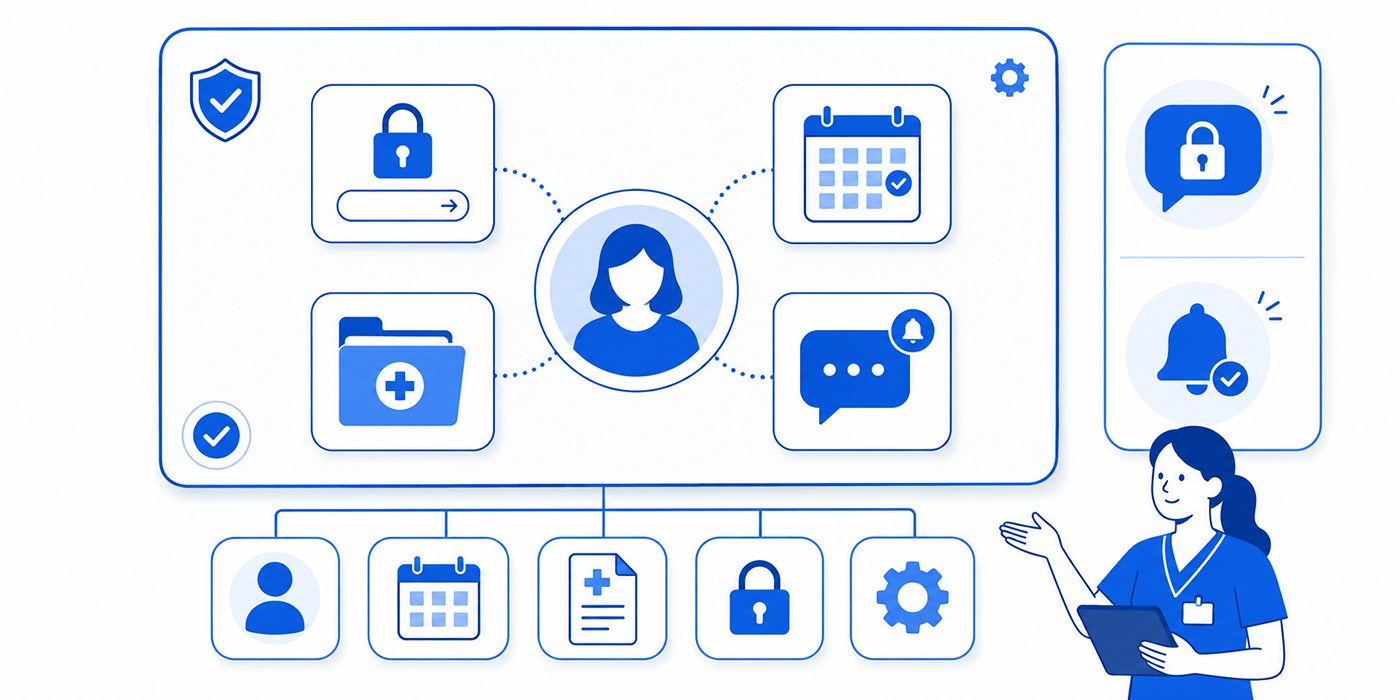
Patient portal management covers every process required to enroll users, verify identity, control access, route requests, publish information, resolve technical problems, protect privacy, and measure service quality. The portal itself is only the interface. Reliable performance depends on the people, policies, integrations, escalation rules, and response standards operating behind it.
A patient may use the portal to confirm demographics, complete forms, request appointments, view test results, send messages, request prescription renewals, download records, review charges, pay balances, or join a telehealth visit. Each function connects with a different operational team. Scheduling requests may enter front-desk operations, clinical questions may require medical office triage, billing questions may connect with revenue cycle management, and record requests may enter a controlled medical records release workflow.
The greatest portal risk is unclear ownership. A message may appear inside the system without a responsible queue, response deadline, or escalation pathway. The patient assumes the practice has received the request. The practice assumes another team is handling it. Days pass while an appointment remains unscheduled, a medication question remains unanswered, or a form remains incomplete.
Every portal function should therefore have five controls:
A clearly defined owner
A routing rule
A response-time target
An escalation threshold
A documented closure standard
Portal staff must also distinguish administrative requests from clinical content. A request to change an address may be handled through a controlled patient record update. A message describing worsening chest discomfort requires immediate routing under the organization’s triage protocol. Administrative teams should never interpret symptoms beyond their role, but they must recognize when routine processing is unsafe.
Identity verification is another critical responsibility. Portal access may expose diagnoses, medications, test results, visit summaries, insurance data, billing information, and private correspondence. Weak enrollment controls can give the wrong person access to a record. Staff should follow defined patient confidentiality practices, apply appropriate HIPAA and patient privacy terms, and document how identity was verified before activating, restoring, or transferring access.
Portal management also depends on integration. Appointment requests should connect correctly with scheduling software. Messages should reach the intended pool. completed questionnaires should enter the appropriate chart section. Payments should post accurately. Test results should follow approved release rules. Telehealth links should match the correct patient and encounter. Weak EMR integration can make the portal appear functional while silently creating duplicate work and missing data.
A mature portal program treats accessibility as an operational issue. Patients may struggle with language, literacy, visual limitations, device compatibility, password recovery, or unfamiliar digital workflows. Staff need alternatives that preserve service access without bypassing security. Effective patient communication, careful active listening, and practical de-escalation techniques are essential when a patient is already frustrated by repeated login failures or delayed responses.
| # | Patient Portal Term | Practical Meaning | Common Failure | Operational Control |
|---|---|---|---|---|
| 1 | Portal Enrollment | The process of registering a patient for digital portal access. | Invitation sent to the wrong email address. | Confirm identity and contact information before sending activation instructions. |
| 2 | Identity Proofing | Verification that the person requesting access matches the patient record. | Unauthorized access to protected information. | Use approved identifiers and escalation procedures for discrepancies. |
| 3 | Activation Code | A temporary code used to initiate a portal account. | Expired or misdirected codes creating support calls. | Set expiration limits and verify the delivery destination. |
| 4 | Multi-Factor Authentication | A login control requiring more than one verification factor. | Patients becoming locked out after changing devices or phone numbers. | Maintain a secure recovery process that does not weaken identity checks. |
| 5 | Proxy Access | Authorized portal access granted to another person, such as a caregiver or parent. | Access continuing after authority changes. | Define scope, expiration, age transitions, and revocation procedures. |
| 6 | Minor Access | Portal permissions involving children, parents, and guardians. | Inappropriate disclosure during age-based access changes. | Apply jurisdiction-aware policies and automated transition reviews. |
| 7 | Access Revocation | Removal of portal permissions when access is no longer authorized. | Former caregivers retaining access. | Document the request, authority, action, and completion time. |
| 8 | Account Recovery | Restoring access after forgotten credentials or account lockout. | Support staff bypassing verification under pressure. | Use a documented recovery script and identity-proofing checklist. |
| 9 | Secure Messaging | Protected communication between patients and authorized healthcare teams. | Messages sitting in unassigned queues. | Create routing rules, queue owners, and service-level targets. |
| 10 | Message Pool | A shared inbox assigned to a department, role, or clinical team. | Duplicate replies or absent ownership. | Assign primary coverage, backup coverage, and handoff rules. |
| 11 | Message Triage | Classification of portal messages by urgency, topic, and destination. | Clinical concerns handled as routine administrative requests. | Use approved urgency indicators and escalation protocols. |
| 12 | Turnaround Time | The period between message receipt and completed response. | Patients sending duplicate messages or calling repeatedly. | Publish realistic response expectations and monitor overdue queues. |
| 13 | Auto-Acknowledgment | An automatic confirmation that a portal request was received. | Patients mistaking confirmation for clinical review. | State clearly that the message awaits review and list emergency alternatives. |
| 14 | Result Release | Making laboratory, imaging, or other results visible through the portal. | Patients receiving complex results without explanation. | Define release rules, notification language, and follow-up ownership. |
| 15 | Visit Summary | A patient-facing overview of an encounter, instructions, and follow-up. | Outdated or incomplete information reaching the patient. | Confirm note completion, medication updates, and follow-up instructions. |
| 16 | Medication Renewal Request | A patient-generated request for continued medication authorization. | Request routed to the wrong provider or mistaken for an emergency refill. | Validate medication, pharmacy, responsible provider, and urgency. |
| 17 | Online Scheduling | Patient self-service booking through approved appointment rules. | Wrong visit type booked into an unsuitable slot. | Use eligibility questions, visit-type rules, and exception review. |
| 18 | Appointment Request | A request requiring staff review before confirmation. | Patient assumes the requested date is confirmed. | Separate request receipt from final appointment confirmation. |
| 19 | Electronic Check-In | Digital completion of demographics, forms, consents, and questionnaires. | Submitted information remains outside the active chart workflow. | Map each form field and document to an accountable review process. |
| 20 | Electronic Consent | A consent captured and authenticated through a digital workflow. | Missing signature, date, version, or patient identity. | Preserve consent version, signer, timestamp, and related encounter. |
| 21 | Record Download | Patient retrieval of available health information from the portal. | Patient believes the download includes every designated record. | Explain portal availability limits and formal request options. |
| 22 | Billing Statement | A portal display of charges, adjustments, insurance activity, and balances. | Amounts appear before payer processing is complete. | Use clear status labels and route disputed balances correctly. |
| 23 | Online Payment | A digital payment submitted through the patient portal. | Payment posts to the wrong account or remains unmatched. | Reconcile transaction identifiers with the patient account. |
| 24 | Telehealth Launch Link | A secure connection used to enter a scheduled virtual visit. | Link sent for the wrong encounter or provider. | Match patient, appointment, time, provider, and platform. |
| 25 | Interoperability | The ability of the portal, EHR, scheduling, billing, and external systems to exchange usable information. | Data appears in one system without reaching another. | Test interface mappings, status updates, and exception queues. |
| 26 | Audit Trail | A log showing portal access, activity, changes, and communications. | Inability to investigate disputed access or message handling. | Preserve logs and define review triggers. |
| 27 | Notification Preference | The patient’s chosen method for receiving portal alerts. | Notifications sent to outdated contact information. | Prompt patients to review contact details and preferences regularly. |
| 28 | Downtime Workflow | The alternative process used when the portal or connected system is unavailable. | Requests disappearing during outages. | Capture requests securely and reconcile them after restoration. |
| 29 | Service-Level Target | The expected response or completion time for a portal task. | Staff apply inconsistent urgency standards. | Define targets by message category and risk level. |
| 30 | Portal Adoption Rate | The percentage of eligible patients actively using portal functions. | Enrollment numbers look high while meaningful use remains low. | Measure completed actions, repeat usage, and support demand. |
2. How the Essential Patient Portal Terms Work Together
Portal terminology becomes useful when teams understand how the concepts interact. The most important relationships fall into four operational areas: access, routing, integration, and accountability.
Access begins with identity and continues through the account lifecycle
Enrollment, identity proofing, authentication, proxy access, recovery, and revocation belong to one continuous control chain. Strong enrollment can still be undermined by a weak password-reset process. Valid proxy access can become inappropriate when a caregiver relationship changes. A properly created account can become unsafe when staff fail to update contact details.
Portal support teams should verify more than a patient’s name. Approved procedures may require combinations of demographic information, contact information, record identifiers, security questions, or other evidence. The exact method should follow organizational policy and applicable privacy requirements.
Access controls should connect with patient privacy communication, HIPAA terminology for medical scribes, and the organization’s legal responsibilities. Staff should document why access was granted, changed, restored, limited, or revoked.
Proxy arrangements require particular care. A family member helping with appointments may require different permissions from a legally authorized representative managing the patient’s care. Staff should never assume that a relationship automatically creates access rights. The portal should display the correct account context so messages, appointments, and payments are attached to the intended person.
Routing converts incoming messages into accountable work
Secure messaging only creates value when requests reach the correct team. Each message category should have a defined destination. Appointment requests may enter a scheduling pool. Billing questions may go to patient accounts. prescription requests may reach clinical staff. Records questions may go to health information management.
Routing should align with medical administrative workflows, scheduling terminology, and emergency appointment management. Broad inboxes labeled “general,” “other,” or “patient message” tend to accumulate requests that nobody clearly owns.
Message triage should examine urgency, request type, patient identity, destination, and completeness. A message containing symptoms should follow clinical escalation policy. A request for a specialist referral may require provider review, insurance verification, and scheduling coordination. A statement dispute may require review of the Explanation of Benefits, medical claim status, and possible denial-management activity.
Integration determines whether portal activity becomes usable data
A patient may complete an online form successfully while staff remain unable to locate it in the chart. An appointment may appear confirmed in the portal without reserving the correct scheduling slot. A payment may process through a gateway without posting to the patient ledger. These failures occur when portal workflows and underlying systems are poorly mapped.
Teams should understand the difference between visible confirmation and completed integration. A portal may display “submitted” when the request has only entered a holding queue. Staff should know where exceptions appear and who resolves them.
Strong integration depends on EHR and EMR knowledge, reliable medical scheduling tools, properly configured patient communication applications, and controlled telehealth platforms.
Accountability turns activity into completed service
An auto-acknowledgment confirms receipt. It does not prove that a person reviewed the message. A portal message should remain open until the required action is completed, documented, and communicated.
Teams need clear closure definitions. “Reviewed” may mean only that someone opened the message. “Resolved” should mean the appropriate action occurred, the patient received a usable response, and any required documentation reached the record.
Supervisors should monitor response times, reassigned messages, reopened tasks, duplicate requests, and unresolved queues. The purpose is to detect workflow weakness before patients begin calling repeatedly or seeking care elsewhere.
3. The Complete Patient Portal Workflow From Enrollment to Resolution
A strong portal workflow follows a controlled path. Each stage should contain a decision point that prevents incomplete or risky requests from moving forward.
Step 1: Invite and enroll the correct patient
Enrollment should begin after staff confirm the patient’s identity and contact information. The invitation must reach an email address or phone number controlled by the intended user. Staff should avoid reading temporary codes aloud to an unverified caller or sending activation information to contact details that conflict with the record.
Enrollment can be incorporated into patient intake, electronic appointment scheduling, and routine front-desk checklists. Staff should explain the portal’s practical benefits instead of giving a vague instruction to “sign up online.”
A useful enrollment explanation might mention appointment requests, form completion, record access, secure messaging, telehealth entry, or balance review. Patients are more likely to complete activation when they understand the immediate purpose.
Step 2: Configure access and preferences
After enrollment, the patient may select notification methods, communication preferences, pharmacy details, language options, and proxy permissions. Each preference should transfer accurately into the relevant workflow.
Proxy access requires documented authorization and periodic review. Pediatric accounts, dependent adults, caregivers, and representatives may require different rules. Portal teams should maintain an escalation route for complicated authority questions rather than making improvised decisions.
Step 3: Receive and classify the request
Every portal submission should receive a category, urgency level, owner, and expected completion time. Staff should verify that the request belongs to the selected category. Patients may place billing questions in clinical message forms or describe urgent symptoms inside appointment requests.
A structured classification system can include:
Scheduling and rescheduling
Registration and demographic updates
Clinical questions
Prescription requests
Referral and authorization questions
Test-result questions
Billing and insurance issues
Records and form requests
Telehealth support
Technical access problems
Teams can connect this structure with insurance verification workflows, prior authorization processes, medical billing terminology, and appointment conflict handling.
Step 4: Route the request to an accountable queue
Routing logic should be specific enough to reduce manual transfers. A cardiology refill request should reach the responsible cardiology pool rather than a general clinical inbox. A records request should reach staff trained to validate scope and authorization. A payment problem should reach the team capable of reviewing posting and account status.
Coverage rules matter outside standard hours, during staff leave, and when message volume spikes. A portal inbox with one owner becomes dangerous when that person is unavailable. Teams should use medical staff scheduling tools, collaboration platforms, and documented handoff procedures to maintain continuity.
Step 5: Complete the action
The responsible team should investigate the request, perform the required action, document relevant details, and communicate the result. A scheduling request is complete when the appointment is confirmed, declined, or redirected with clear instructions. A demographic update is complete when the information is verified and entered correctly. A billing inquiry is complete when the patient receives an explanation connected to the actual account activity.
Responses should use clear language. Dense abbreviations, internal workflow labels, and unexplained coding terms create additional questions. Administrative staff should draw on healthcare portal terminology, empathy in healthcare administration, and difficult-conversation techniques.
Step 6: Document and close the request
Closure should capture the action taken, person responsible, date, communication sent, and any unresolved dependency. Staff should avoid closing a message merely because it was forwarded.
Some requests require follow-up. A referral may remain open until authorization is received. A record correction may require provider review. A payment issue may require reconciliation. The portal task should reflect the real status so another employee can understand what remains outstanding.
4. Interactive Patient Portal Management Guide
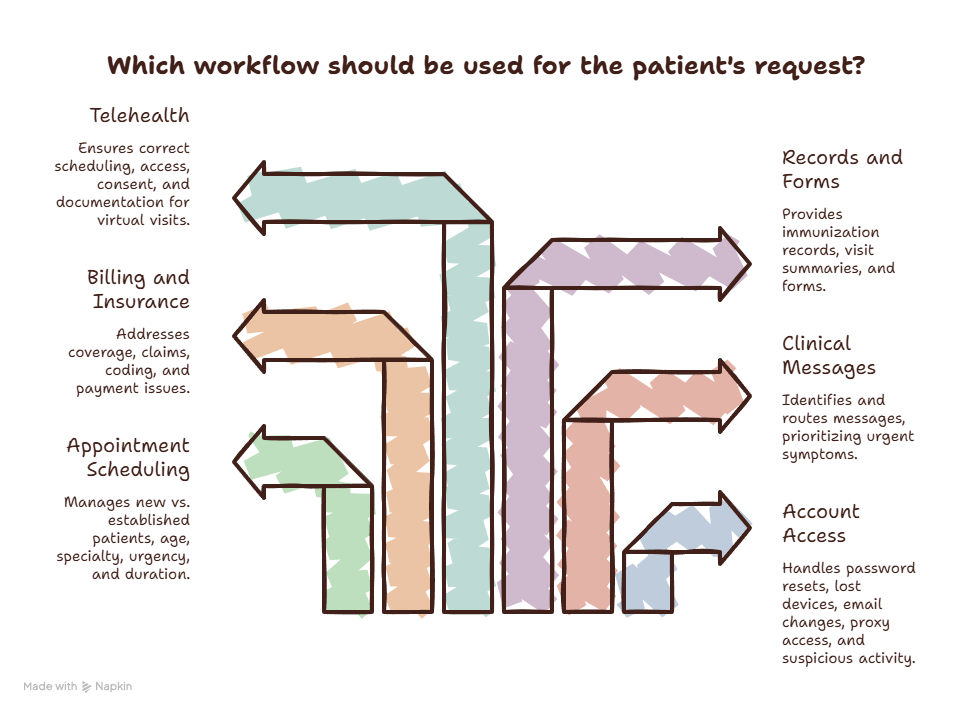
The interactive guide below turns portal management into a sequence of decisions. Staff can select the workflow closest to the request they are handling and review the minimum controls required before closure.
Account access workflow
Account-access requests often appear simple, yet they involve some of the portal’s highest privacy risks. Staff should determine whether the user forgot a password, lost access to a verification device, changed an email address, requires proxy access, or reports suspicious activity.
The recovery process should connect with patient confidentiality controls, risk-management strategies, and written medical office policies. Staff pressure, patient frustration, or familiarity should never replace required verification.
Appointment workflow
Portal scheduling should help patients reach the correct care pathway. It should not simply expose every available slot. Visit-type rules should account for new versus established patients, age, specialty, procedure needs, urgency, referral status, appointment duration, and required preparation.
Teams should combine scheduling software mastery, secure scheduling tools, and appointment terminology. A patient who requests an appointment has initiated a workflow. The appointment becomes valid after the practice confirms it.
Clinical message workflow
Administrative staff should identify clinical content quickly and route it without adding unsupported interpretation. Messages mentioning severe or rapidly worsening symptoms require immediate handling under the organization’s approved protocol. Portal disclaimers cannot compensate for a queue that remains unmonitored.
Teams should align portal routing with medical office triage scenarios, medical scribe documentation terms, and clinical documentation improvement. The message, response, and follow-up should enter the record according to policy.
Billing and insurance workflow
Portal balances may confuse patients when claims remain pending, contractual adjustments have not posted, or the insurer’s EOB uses unfamiliar language. Staff should identify whether the question concerns coverage, claim processing, denial, coding, payment posting, or patient responsibility.
Useful references include insurance verification terminology, CPT code explanations, ICD-10 terminology, and claims-management training. Staff should avoid changing a charge merely to end a difficult conversation.
Records and forms workflow
Patients may request immunization records, visit summaries, disability forms, school forms, referral documents, or complete record copies. Each request should be classified correctly. A document available for immediate portal download may follow a different workflow from a signed form requiring provider review.
Teams should connect portal requests with medical records management, record-release tools, and medical chart audit practices. Staff should explain what the portal contains and how to request information unavailable through self-service access.
Telehealth workflow
Portal-based telehealth depends on correct scheduling, identity, platform access, consent, technical readiness, and post-visit documentation. A failed connection may create clinical delay, wasted provider time, and patient frustration.
Medical administrative assistants should understand telemedicine terminology, virtual patient management, telehealth administration, and the role of medical scribes in telemedicine.
5. How to Audit and Improve Patient Portal Performance
A portal program should be measured by completed service, patient safety, privacy control, and staff workload. Enrollment totals alone reveal little. Thousands of patients may have accounts while message queues remain unmanaged and online scheduling creates constant corrections.
Measure meaningful portal performance
Useful metrics include:
Percentage of eligible patients successfully activated
Percentage using at least one meaningful function
Activation failure rate
Account-recovery volume
Average message response time
Messages exceeding the service-level target
Number of messages reassigned more than once
Duplicate patient messages
Clinical messages requiring urgent escalation
Appointment requests converted into confirmed visits
Incorrect self-scheduled visit rate
Form-completion rate
Failed payment-posting rate
Telehealth connection failure rate
Proxy-access reviews completed
Privacy or unauthorized-access incidents
Portal requests received during downtime
Patient complaints related to portal confusion
Supervisors should segment data by department, message type, location, and time of day. An acceptable overall response time may hide a specialty queue where patients wait several days. A low technical-support volume may indicate that patients have abandoned the portal rather than successfully resolved their problems.
Teams can manage improvement work through medical admin time-tracking tools, office organization systems, and healthcare collaboration tools.
Audit complete workflows instead of isolated screens
Portal audits should follow a request from submission to closure. Auditors should confirm that the request reached the correct queue, received the appropriate priority, remained visible during reassignment, produced an accurate action, and generated a clear response.
A useful sample may include:
A password reset
A proxy-access request
A rescheduling request
A clinical message
A prescription-renewal request
A result question
A billing dispute
A record-copy request
A telehealth connection failure
A request received during downtime
Each sample should be compared against policy, system logs, response-time targets, and final documentation. This approach reveals hidden transfers, abandoned tasks, unauthorized access, and premature closure.
Reduce avoidable patient confusion
Many portal support calls begin with unclear wording. Patients may see “scheduled” when an appointment is pending review, “balance due” while insurance processing remains incomplete, or “new result” without knowing whether follow-up is required.
Organizations should review message templates through the lens of effective patient communication, active-listening principles, and healthcare empathy. Instructions should state what happened, what remains pending, who owns the next step, and when the patient should expect further communication.
Train staff through realistic scenarios
Portal training should require decisions rather than passive memorization. Staff should practice handling:
A caregiver requesting access without documented authority
A patient locked out after changing phone numbers
A message containing urgent symptoms inside a billing category
A duplicate appointment request
A form submitted under the wrong patient
A payment posted without updating the displayed balance
A test result that triggers patient concern
A telehealth link connected to the wrong appointment
A record request exceeding portal download capabilities
A message left open during staff leave
Certification candidates can reinforce related skills through an ACMSO 30-day study schedule, CMAA exam preparation, medical terminology memorization, and medical admin interview preparation.
6. Frequently Asked Questions About Patient Portal Management
-
A patient portal administrator coordinates access, permissions, workflow configuration, user support, message routing, integration monitoring, and performance reporting. The exact role may be divided among health information management, front-desk leadership, information technology, compliance, clinical operations, and revenue-cycle teams.
The administrator should understand healthcare portal terms, EHR integration tools, patient privacy principles, and medical administrative workflows. Strong portal management requires operational judgment, technical awareness, and clear cross-department ownership.
-
Each organization should define response-time targets according to message type, urgency, staffing, and clinical risk. Administrative scheduling requests may have a different target from clinical messages, prescription requests, or technical access problems.
Patients should receive realistic expectations at the point of submission. Auto-acknowledgments should clarify that receipt does not equal clinical review and should direct emergencies to the appropriate immediate resource. Teams should monitor overdue messages through staff scheduling systems, time-management practices, and clearly assigned message pools.
-
Medical administrative assistants may acknowledge, classify, and route clinical messages according to organizational policy. They should avoid diagnosing, interpreting symptoms, recommending treatment, or answering clinical questions outside their authorized role.
Their responsibility is to recognize clinical content and move it through the approved medical office triage process. Training in medical terminology, patient communication, and risk management helps staff recognize when a message requires rapid escalation.
-
Proxy access allows an authorized person to use the portal on behalf of a patient. Common examples include parents, guardians, caregivers, and legally authorized representatives. Permissions may vary according to the relationship, patient age, applicable rules, and organizational policy.
Proxy access should be separate from sharing the patient’s own username and password. Staff should document authorization, scope, duration, and revocation. Sensitive situations should follow formal patient confidentiality procedures and the organization’s legal responsibility framework.
-
Misrouting usually occurs when portal categories are vague, patients select the closest available option, routing rules are outdated, or staff lack clear ownership. A message labeled “general question” may concern billing, scheduling, records, medication, or symptoms.
Organizations should redesign categories around real patient needs and operational destinations. Routing should align with front-desk operations, revenue-cycle workflows, appointment scheduling, and records-release management.
-
Staff should follow the organization’s approved urgent-message and clinical-triage protocol immediately. They should avoid making independent clinical judgments outside their role. The message should be routed or escalated through the designated pathway, with actions and communication documented.
Portal instructions should also tell patients that the portal may be unsuitable for emergencies or time-sensitive symptoms. Teams should regularly test whether urgent messages are detected, assigned, and acted upon under real staffing conditions.
