

Virtual Check-In Systems: Interactive Definitions & Examples
Virtual check-in systems let patients complete arrival tasks through a smartphone, patient portal, tablet, or kiosk before staff begin the visit. Their real value extends beyond replacing a clipboard. A well-designed system strengthens patient intake procedures, validates demographic and insurance data, protects patient confidentiality, reduces registration queues, and directs exceptions to the right employee. A weak system merely transfers confusing front-desk work to the patient. This guide explains the terminology, controls, workflows, failure points, and performance measures medical administrative teams need to design virtual check-in responsibly.
1. What Is a Virtual Check-In System?
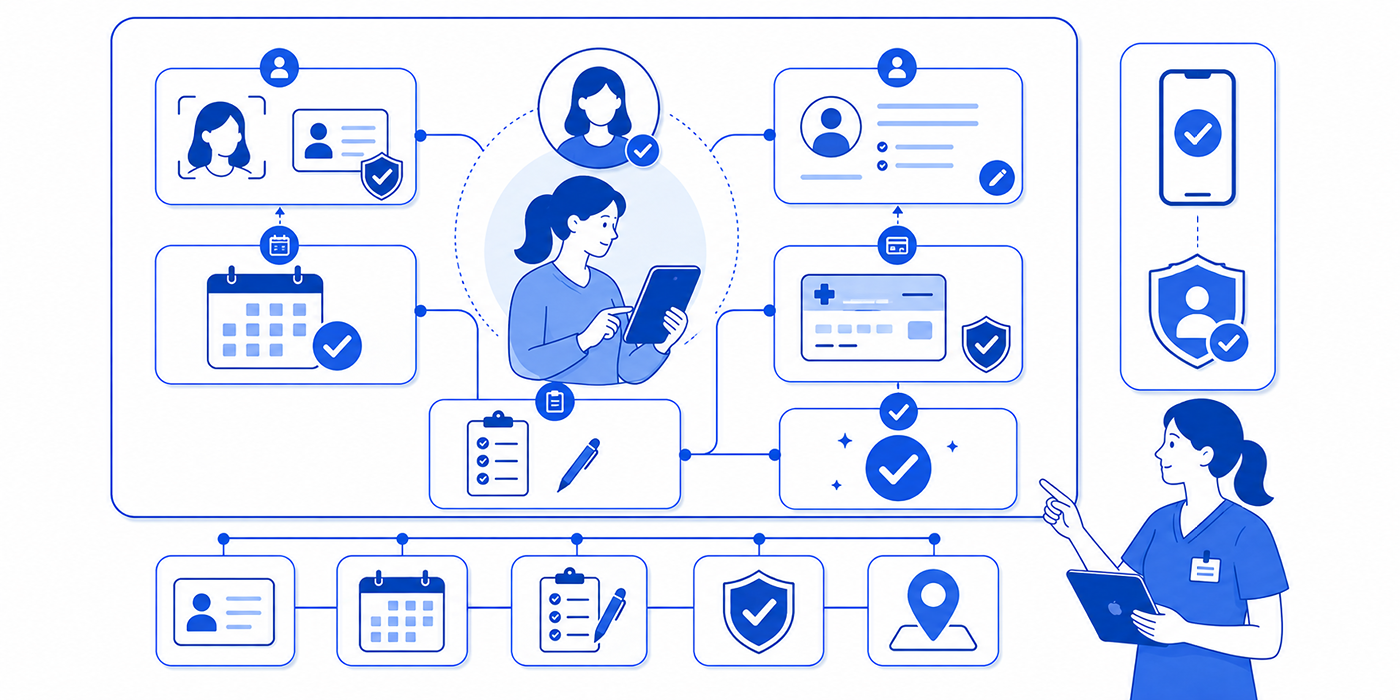
A virtual check-in system is a digital workflow through which a patient confirms arrival and completes selected pre-visit administrative requirements. Depending on the practice, those requirements may include identity verification, demographic review, consent acknowledgement, insurance capture, balance notification, symptom screening, form completion, and notification of the clinical team.
Virtual check-in may begin at home through a secure link, continue through patient portal management, and end when the patient enters a geofenced location or selects “I have arrived.” It may also take place on an in-office kiosk or staff-controlled tablet. The delivery channel changes; the underlying responsibility for accurate registration, HIPAA compliance, and safe exception management remains with the organization.
The most useful distinction is between pre-registration and arrival confirmation. Pre-registration collects or validates information before the appointment. Arrival confirmation tells the practice that the patient is physically present or ready for a virtual encounter. Combining the two without clear status labels can create a dangerous operational gap: the patient believes check-in is complete while the care team cannot see that the patient has arrived.
A complete system should therefore produce three separate signals:
Administrative readiness: Required forms, demographics, insurance information, and applicable payments have been addressed.
Physical or virtual arrival: The patient is on-site, waiting remotely, or connected to the appropriate telehealth platform.
Clinical handoff readiness: Registration exceptions have been resolved sufficiently for the care team to begin the encounter.
This separation helps front-desk operations identify where a delay actually occurred. A patient can be administratively ready but absent, physically present but missing consent, or fully checked in but waiting because room capacity is constrained.
Virtual check-in also differs from online appointment scheduling. Appointment scheduling best practices determine when and where a patient will be seen. Check-in confirms that the scheduled patient has arrived and satisfies the administrative conditions attached to that specific encounter. Treating these functions as interchangeable can produce duplicate records, mismatched appointment statuses, and inaccurate no-show reporting.
The system should support administrative judgment rather than conceal unresolved work. If an uploaded insurance card is unreadable, an address conflicts with the EHR, or a minor arrives without an authorized adult, the workflow needs a visible exception state. Quietly labeling every completed patient-facing screen as “checked in” makes the dashboard look efficient while leaving staff to discover high-risk problems after the appointment has begun.
| # | Virtual Check-In Term | Working Definition | Operational Example | Control or Risk Signal |
|---|---|---|---|---|
| 1 | Pre-registration | Completion of administrative tasks before arrival | Patient verifies address and insurance the night before | Timestamp completion separately from arrival |
| 2 | Arrival confirmation | Digital notice that the patient is ready and present | Patient taps “I’m here” from the parking area | Prevent remote or premature arrival claims |
| 3 | Identity proofing | Evidence-based confirmation of a person’s identity | System validates selected identity attributes | Escalate mismatches without exposing answers |
| 4 | Patient matching | Linking the user to the correct health record | Name, DOB, and another identifier locate the chart | Avoid automatic merges on partial matches |
| 5 | Multifactor authentication | Verification using two or more authentication factors | Password plus one-time code | Provide recovery paths for changed numbers |
| 6 | Demographic reconciliation | Review and resolution of demographic differences | New address is compared with the existing record | Route sensitive or conflicting changes to staff |
| 7 | Insurance capture | Collection of current coverage information | Patient photographs both sides of the card | Reject blurred, cropped, or expired images |
| 8 | Eligibility verification | Check of active benefits for the service date | Payer response confirms active coverage | Coverage does not guarantee payment |
| 9 | Consent capture | Documented patient acknowledgement or authorization | Patient reviews and signs a current form | Store form version, signer, date, and time |
| 10 | Attestation | Recorded confirmation that submitted information is accurate | Patient attests that demographics are current | Display the exact statement accepted |
| 11 | Required field | Information necessary to advance in the workflow | Emergency contact must be addressed before submission | Use “declined” or “unknown” where appropriate |
| 12 | Conditional logic | Questions displayed according to prior answers | Pregnancy question triggers relevant follow-up fields | Test every branch after form changes |
| 13 | Progressive disclosure | Showing information only when it becomes relevant | Payment details appear after insurance review | Keep critical notices visible before consent |
| 14 | Exception queue | Worklist containing unresolved check-in problems | Coverage mismatch enters a registrar queue | Assign owner, urgency, and resolution deadline |
| 15 | Hard stop | Rule that prevents the workflow from advancing | Unsigned required consent blocks completion | Reserve for legal, safety, or essential data needs |
| 16 | Soft stop | Warning that permits an authorized override | Missing optional photo prompts staff review | Record who overrode it and why |
| 17 | Abandonment rate | Share of started check-ins left incomplete | Users repeatedly exit at document upload | Measure abandonment by screen and device |
| 18 | Completion rate | Share of eligible patients who finish the workflow | Completed check-ins divided by invitations delivered | Segment by language, age, and visit type |
| 19 | Cycle time | Elapsed time from workflow start to completion | Patient completes check-in in six minutes | Separate patient time from staff correction time |
| 20 | Queue visibility | Ability to see status and pending work in real time | Dashboard shows arrived, blocked, and ready patients | Use precise status definitions |
| 21 | Audit trail | Chronological record of access, edits, and actions | Log identifies who changed an address | Logs must be reviewable and retained appropriately |
| 22 | Role-based access | Permissions aligned with job responsibilities | Registrar can correct demographics but cannot alter clinical notes | Review access after transfers and terminations |
| 23 | Data minimization | Collection limited to information needed for a defined purpose | Form omits unrelated historical questions | Document the purpose of every collected field |
| 24 | Interoperability | Reliable exchange and use of data across systems | Verified address updates the correct EHR field | Test field mapping and failure recovery |
| 25 | Write-back | Transfer of accepted data into the destination record | Reviewed insurance data updates the PM system | Distinguish automatic from staff-approved write-back |
| 26 | Downtime procedure | Approved workflow used during system interruption | Staff use controlled paper forms during an outage | Define reconciliation after restoration |
| 27 | Accessibility fallback | Equivalent completion route for users facing barriers | Staff-assisted check-in is available without penalty | Test keyboard, screen-reader, vision, and language access |
| 28 | Proxy access | Authorized access by a caregiver or representative | Parent completes check-in for a child | Validate authority and apply age-sensitive rules |
| 29 | Digital wayfinding | Location guidance delivered after check-in | Patient receives the correct suite and waiting area | Keep directions synchronized with clinic changes |
| 30 | Touchless payment | Digital collection of an applicable patient amount | Patient pays an established copay by phone | Do not present estimates as final liability |
2. How a Safe Virtual Check-In Workflow Should Operate
A dependable workflow begins before the invitation is sent. The appointment must be associated with the correct location, provider, visit type, patient record, required forms, and arrival method. Errors at this stage contaminate everything downstream. The cleanest patient interface cannot rescue a pediatric consent packet mistakenly assigned to an adult cardiology visit.
Invitation and access
The invitation should identify the organization, appointment context, link expiration, and support route without exposing unnecessary health information. Text and email delivery should follow documented communication preferences and appropriate patient privacy communication controls. Staff should be able to see whether the invitation was generated, delivered, opened, started, completed, or expired.
Delivery status matters because “patient did not complete check-in” describes several different failures. The mobile number may be obsolete, the link may have expired, the patient may distrust the message, or the form may break on a specific device. Patient communication apps, healthcare CRM terminology, and healthcare portal workflows help teams distinguish outreach failure from patient refusal.
Identity and record matching
Before showing protected information or accepting material changes, the system must connect the user to the correct record. Matching should use enough information to reduce false matches while avoiding questions that an unauthorized person could easily answer. Potential duplicates, conflicting identifiers, and substantial demographic changes belong in a controlled review queue.
Automatic record creation deserves particular caution. A typo in a name or date of birth can generate a second chart for an established patient, fragmenting allergies, results, balances, and clinical history. Teams trained in medical records management, EHR versus EMR terminology, and patient record updates should define which fields write back automatically and which require human approval.
Demographic and insurance review
An effective screen asks the patient to confirm each major category rather than presenting one vague “everything is correct” checkbox. Address, phone, preferred communication channel, emergency contact, guarantor, and insurance may each have different effective dates and verification requirements.
Insurance capture should request readable images, subscriber details, relationship to subscriber, and coordination information where relevant. The resulting data should feed a genuine insurance verification workflow, rather than simply storing a photograph. Staff must understand that active eligibility does not establish medical necessity, authorization, network participation, covered benefit, or final patient responsibility. These distinctions connect virtual registration with prior authorization procedures, coordination of benefits, and revenue cycle management.
Forms, consent, and payment
Forms should be assigned by visit type and governed by version control. The system should retain which version appeared, when it was presented, who completed it, what was accepted, and whether a proxy acted for the patient. A signature image alone provides weak evidence when the organization cannot reconstruct the associated language.
A patient should also be able to pause, request clarification, or complete sensitive forms privately. Effective patient communication, medical interpreter services, and cultural competence in medical administration become operational requirements when patients are expected to understand financial, privacy, and consent language without a staff member beside them.
Payment screens should distinguish confirmed amounts from estimates. If the system requests a copay, prior balance, or estimated responsibility, it should explain the basis of the amount and provide a route for questions. Aggressive hard stops can cause patients to abandon medically necessary visits, particularly when insurance has changed or the displayed balance is disputed.
Arrival and staff notification
Finishing pre-registration should lead to explicit next-step instructions: “You have completed your forms; confirm arrival when you reach the clinic,” for example. Arrival confirmation should then update the scheduling or practice-management system and alert the responsible work queue.
The system should avoid silently changing an appointment to “arrived” when a location signal merely detects that a phone is nearby. Patients may arrive early, remain in another building, or send a caregiver ahead. Reliable medical administrative workflows, integrated appointment scheduling tools, and clear scheduling terminology should determine when the operational clock actually starts.
3. Interactive Examples: What the System Should Do
Example 1: An established patient with unchanged information
Maria opens the secure link, passes identity verification, reviews each demographic field, confirms that her insurance remains unchanged, signs the current acknowledgement, and selects “I have arrived” after entering the clinic.
The system should mark demographic and insurance review as patient-confirmed, retain the consent version, post the arrival event, and notify the correct queue. Staff can complete a quick exception-free review rather than re-entering every field. This represents productive automation because it removes repetitive work without concealing unresolved risk. The same workflow benefits from reliable EMR integration tools, strong practice management systems, and defined daily office procedures.
Example 2: A new insurance card with failed eligibility
David uploads a new card. The image is readable, but the payer response cannot confirm active eligibility for the service date.
The workflow should preserve the upload, label eligibility as unresolved, request only information that may correct the inquiry, and send the case to a staff-owned queue. It should avoid telling David that he is uninsured or demanding full payment based on an inconclusive response. A CMAA applying insurance verification definitions, medical billing terms, and denial management principles can investigate payer data, subscriber information, coverage dates, and plan requirements.
Example 3: A parent checking in a minor
A parent accesses the workflow for a 15-year-old patient. The form contains adolescent-sensitive questions and jurisdiction-dependent confidentiality considerations.
The system should verify the proxy relationship, display only information appropriate for that access level, and direct sensitive portions through an approved private workflow. A generic family account that exposes every answer to every proxy can undermine confidentiality and patient trust. Proper design connects patient confidentiality terms, legal responsibilities for CMAAs, and risk management strategies.
Example 4: A patient reports urgent symptoms
During check-in, a patient selects an answer suggesting severe shortness of breath. A registration system should avoid functioning as an uncontrolled diagnostic tool. It should immediately display approved emergency instructions and alert the designated clinical pathway according to organizational protocol.
The screen must clearly state that submitting a form does not guarantee immediate clinical review. A response sitting unseen in an administrative queue creates false reassurance. Organizations should align virtual check-in with medical office triage terminology, emergency appointment management, and crisis communication procedures.
Example 5: The patient cannot use the digital workflow
An older patient has limited vision and cannot complete a poorly labeled mobile form. The clinic should offer an equivalent staff-assisted, telephone, accessible kiosk, or in-person route without shaming the patient or delaying care as punishment for digital noncompletion.
Completion rates can look impressive while hiding exclusion. Teams should review outcomes by language, disability-related access needs, device type, age group, visit type, and new-versus-established status. Empathy in healthcare administration, active listening techniques, and patient satisfaction metrics help expose friction that a single organization-wide average can bury.
Which virtual check-in failure creates the most front-desk pressure in your practice?
Select the workflow problem that creates the greatest operational burden.
Audit your status labels and separate form completion from confirmed patient arrival.
Measure how often uploaded insurance information still requires staff correction or payer follow-up.
Review patient-matching thresholds and restrict automatic record creation when identifiers conflict.
Test every step with real users and provide an equivalent staff-assisted check-in pathway.
Assign every exception category an owner, priority level, resolution deadline, and escalation rule.
4. How to Evaluate a Virtual Check-In System Before Adoption
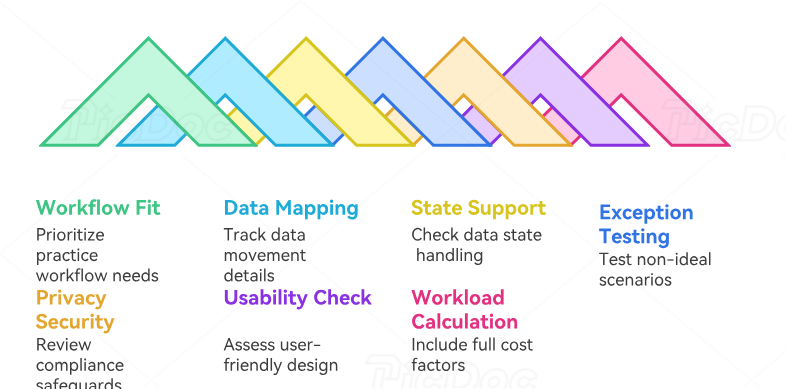
Start with workflow fit rather than a feature count. A product may offer digital signatures, card scanning, payments, reminders, and analytics while still failing to support the practice’s actual visit types, proxy rules, eligibility exceptions, or EHR write-back requirements. Evaluation should use realistic cases built from the organization’s difficult encounters, since ideal patients rarely reveal system weaknesses.
Map every data movement
For each field, document where the data originates, where it appears, whether it replaces or supplements existing data, who approves it, and what happens when transmission fails. A polished integration can still place a correct value in the wrong EHR field. That failure may affect clinical documentation improvement, downstream medical claims processing, and later medical chart audits.
Ask whether the platform supports real-time, delayed, and failed-write states. If the patient updates an address but the EHR connection is unavailable, the system should retain the change securely, notify an owner, and prevent staff from assuming the destination record was updated.
Test exceptions, not demonstrations
Vendor demonstrations usually follow a clean path: valid identity, active insurance, completed forms, successful payment, and instant integration. Build test scripts around the opposite conditions:
Duplicate or near-duplicate patient records
Changed surname or date-of-birth discrepancy
Expired insurance card
Dependent with a different surname
Proxy checking in a minor or dependent adult
Limited-English-proficiency patient
Screen-reader and keyboard-only user
Declined consent
Disputed balance
Broken EHR interface
Patient who arrives without completing pre-registration
Urgent symptom response entered outside staffed hours
These cases reveal whether the platform supports handling patient complaints, difficult patient conversations, and de-escalation techniques, or merely pushes every exception back to an already overloaded front desk.
Review privacy and security architecture
The assessment should cover authentication, encryption, access controls, audit logs, session expiration, data retention, device behavior, incident response, vendor relationships, and the minimum information displayed in messages. Teams should connect this review with HIPAA and patient privacy terms, medical compliance terminology, and current organizational legal review.
Kiosks require additional safeguards. Screens should resist shoulder surfing, sessions should clear completely, downloaded files should not remain accessible, and the next patient should never see prior information. Cleaning procedures should also align the device with medical-office infection control.
Examine usability as an operational control
A confusing label can become a data-quality defect. Patients may select the wrong plan, misunderstand the subscriber relationship, overlook a required signature, or interpret “complete” as “arrived.” Usability testing should observe where users hesitate, choose incorrect answers, request help, or abandon the workflow.
Evaluate reading level, translation quality, mobile responsiveness, screen-reader compatibility, contrast, touch-target size, error messages, and the ability to return without losing work. Patient education principles, bedside manner for administrative staff, and patient interaction scripts should inform the microcopy patients encounter at stressful moments.
Calculate the full workload
Licensing cost provides only one piece of the business case. Include implementation, interface development, hardware, security review, training, form configuration, translation, patient support, exception resolution, downtime preparation, updates, and audit activity.
Measure work transferred as well as work removed. If patients spend longer entering information and staff spend additional time correcting it, digital adoption may rise while total effort worsens. Medical admin time-tracking tools, time-management practices, and office productivity design can reveal whether the system reduces end-to-end cycle time.
5. Implementation, Training, and Performance Measurement
Implementation should begin with a controlled pilot involving representative visit types, patient groups, devices, languages, and exception scenarios. A narrow pilot that includes only digitally confident established patients may generate excellent completion figures while failing to predict real operational performance.
Before launch, define status language. “Invited,” “opened,” “in progress,” “submitted,” “exception pending,” “administratively cleared,” “arrived,” and “ready for clinical handoff” should each have one operational meaning. Staff should know which status starts wait-time measurement and which status requires action. This discipline strengthens front-desk checklists, medical admin policies, and staff collaboration workflows.
Training should be role-specific and scenario-based. Front-desk employees need to resolve identity, demographic, consent, payment, and arrival exceptions. Billing staff need visibility into eligibility and coverage discrepancies. Clinical teams need to understand which submitted responses require review and which remain administrative. Managers need dashboards that distinguish system delay from staff delay and patient delay.
Each exception category needs four elements: an owner, priority, resolution target, and escalation path. A failed payment can usually wait longer than a potential identity mismatch or urgent symptom response. Placing every problem in a shared generic inbox guarantees uneven attention and weak accountability.
Downtime planning must define how staff register patients when the check-in platform, internet connection, EHR interface, payment service, or messaging channel fails. It should also specify how temporary records are reconciled after service restoration. Teams familiar with resolving EMR software issues, secure scheduling tools, and risk-management controls can prevent an outage from becoming a duplicate-record or privacy event.
Performance measurement should combine efficiency, quality, access, and safety:
Invitation delivery rate: Measures whether patients actually receive the workflow.
Start rate: Shows how many delivered invitations lead to engagement.
Completion rate: Measures finished workflows among eligible patients.
Step abandonment rate: Locates the exact screen producing friction.
Median completion time: Estimates patient effort without distortion from extreme values.
Correction rate: Tracks how often staff must fix submitted information.
Straight-through processing rate: Measures cases completed without manual intervention.
Exception volume by category: Identifies systemic data, integration, or usability problems.
Arrival-to-ready time: Shows whether digital check-in improves actual patient flow.
Duplicate-record incidence: Detects unsafe matching or record-creation behavior.
Assisted-check-in demand: Quantifies support needs and accessibility barriers.
Payment dispute rate: Reveals confusing or inaccurate financial presentation.
Patient complaint themes: Exposes trust, privacy, clarity, and access problems.
Downtime recovery accuracy: Measures whether temporary data is reconciled correctly.
Completion rate alone is a weak success metric. A practice could improve it by excluding difficult cases, forcing completion through hard stops, or asking fewer essential questions. Pair digital usage with correction rates, accessibility outcomes, patient complaints, registration accuracy, and total labor.
Segment results rather than relying on one average. Compare new and established patients, visit types, locations, languages, device types, age bands, accessibility pathways, and proxy users. This approach connects virtual check-in performance with patient satisfaction insights, predictive analytics in medical administration, and AI and automation readiness.
6. FAQs About Virtual Check-In Systems
-
Only when the organization has deliberately defined form completion as check-in and the system transmits a reliable arrival signal. Many workflows treat completed forms as pre-registration. The patient must still confirm physical or virtual arrival. Separating these events prevents false no-shows, invisible waiting patients, and misleading wait-time data. Teams should align status definitions with their appointment scheduling workflow, practice management system, and medical administrative procedures.
-
It can when a configured integration supports write-back, although automatic updating should be field-specific and risk-based. A verified phone number may be suitable for direct update, while a legal name change, conflicting date of birth, guarantor change, or potential duplicate requires staff review. The integration should preserve an audit trail, support accurate patient record updates, and follow established medical records management.
-
The platform should classify the result as unresolved, retain the submitted evidence, explain the next step without making unsupported coverage claims, and assign the case to a responsible employee. Staff may need to correct subscriber data, verify dates, contact the payer, review coordination of benefits, or discuss self-pay procedures. An inconclusive transaction should never be described as proof of no coverage. Apply the organization’s insurance verification process, prior authorization workflow, and claims-management controls.
-
That decision depends on organizational policy, applicable requirements, the certainty of the amount, the nature of the visit, and approved financial procedures. A payment hard stop can delay care when coverage data is wrong, the displayed amount is disputed, or the patient needs assistance. The screen should distinguish established copays, outstanding balances, and estimates. Staff should use clear medical billing terminology, appropriate EOB concepts, and professional patient communication techniques.
-
The organization should offer accurately translated content, qualified interpreter access where needed, and a staff-assisted pathway. Machine-translated legal, financial, or consent language can introduce serious misunderstandings. The system should also record language preference appropriately and avoid asking family members to interpret sensitive information when qualified services are required. Build the workflow around medical interpreter services, cultural competence, and clear patient education practices.
-
The strongest primary measure is usually the percentage of encounters that reach an accurate, administratively ready state without preventable rework. It captures more value than raw digital completion because it considers data quality and staff effort. It should be reviewed alongside abandonment, correction, exception, duplicate-record, accessibility, complaint, and arrival-to-ready measures. This balanced view supports patient satisfaction analysis, workflow improvement, and credible medical admin time tracking.
