

Healthcare Automation Tools: Essential Terms & Interactive Examples
Healthcare automation is rapidly changing how medical offices schedule patients, verify coverage, manage records, route messages, monitor tasks, and handle repetitive administrative work. The real advantage comes from understanding where automation belongs inside a controlled medical administrative workflow, how it connects with EMR integration, which safeguards protect patient confidentiality, and when human review is essential. This guide translates healthcare automation into practical terminology, workflow examples, implementation decisions, failure points, and interactive training concepts medical administrative professionals can use in real practice environments.
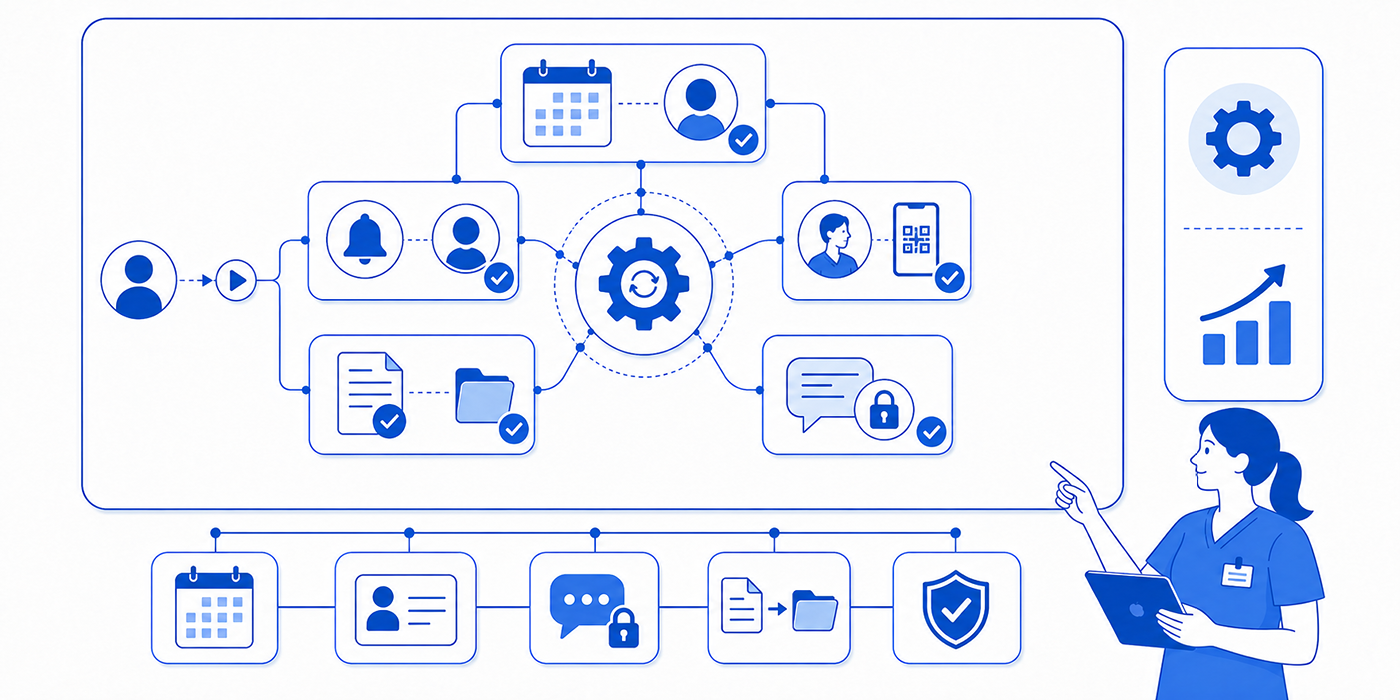
1. Healthcare Automation: What Medical Administrative Professionals Actually Need to Understand
Healthcare automation uses software, predefined rules, integrations, artificial intelligence, or other digital processes to complete repetitive tasks, move information, trigger actions, or assist decision-making with less manual effort. Medical offices encounter automation across appointment scheduling systems, patient communication applications, practice management systems, and healthcare CRM platforms.
The value of automation depends heavily on the workflow around it. A reminder system can automatically contact hundreds of patients, yet outdated contact information can produce failed reminders at enormous scale. An automated insurance workflow can flag missing information, while inaccurate demographic data can still derail insurance verification, prior authorization, claims processing, and coordination of benefits.
This creates an important skill shift for medical administrative assistants. Staff increasingly need to understand what triggered an automated action, where the information came from, what happens when the automation fails, and who owns exceptions. Those questions connect directly with EMR troubleshooting, patient record updates, medical chart audits, and risk-management strategies.
Automation also changes where errors appear. A manual mistake may affect one account. A poorly configured rule can affect hundreds of accounts before anyone recognizes the pattern. Administrators therefore need monitoring skills alongside operational skills. Understanding medical compliance terminology, HIPAA privacy concepts, medical records management, and legal responsibilities for CMAAs becomes increasingly important as automated systems touch more patient information.
A strong automation strategy therefore begins with task selection. Repetitive, rules-based, high-volume tasks with predictable inputs are often better candidates than conversations requiring nuanced clinical judgment or sensitive problem-solving. Examples include reminder delivery, document routing, eligibility checks, queue notifications, recurring reports, form distribution, and task creation. These applications can support front-desk operations, medical office organization, time-management systems, and daily office procedures.
| # | Automation Term | Practical Definition | Healthcare Example | Key Risk or Control |
|---|---|---|---|---|
| 1 | Workflow automation | Technology that automatically moves tasks or information through predefined steps. | A completed intake form automatically creates a registration task. | Poorly designed rules can route work to the wrong destination. |
| 2 | Trigger | An event or condition that starts an automated action. | An appointment booking triggers a confirmation message. | Incorrect trigger conditions may create unnecessary or inappropriate actions. |
| 3 | Action | The task an automation performs after the trigger occurs. | Send reminder, create task, update status, or route information. | The action must match the actual workflow requirement. |
| 4 | Conditional logic | Rules that determine which action occurs based on specific conditions. | New patients receive registration forms while established patients receive a shorter update form. | Incorrect conditions can produce inappropriate workflows. |
| 5 | Rules engine | A system that evaluates predefined rules and determines the corresponding workflow action. | Insurance-related messages route according to payer or request type. | Rules require maintenance when workflows change. |
| 6 | Task automation | Automatic creation, assignment, updating, or completion of administrative tasks. | An unsigned document automatically generates a follow-up task. | Tasks can accumulate silently when ownership is unclear. |
| 7 | Robotic process automation | Software designed to perform repetitive computer-based actions that follow defined steps. | Transferring standardized information between systems. | Changes in screen layouts or fields may break the automation. |
| 8 | API integration | A structured connection that allows different software systems to exchange information or requests. | A scheduling tool sends confirmed appointment data to another approved system. | Data mapping and access permissions must be controlled. |
| 9 | System integration | The broader process of connecting separate technologies so information can move between them. | Patient communication software integrates with the practice management system. | Disconnected records can create duplicate or inconsistent data. |
| 10 | Data mapping | Defining how information from one system corresponds to fields in another. | A mobile phone field in one application maps to the correct patient contact field in another. | Incorrect mapping can place information in the wrong field. |
| 11 | Interoperability | The ability of different systems to exchange and meaningfully use information. | An approved system shares relevant patient or scheduling data with another platform. | Technical connection alone does not guarantee accurate workflow interpretation. |
| 12 | Automated appointment reminder | A system-generated notification sent before an appointment. | Text, portal, email, or voice reminders according to approved settings. | Outdated patient contact preferences can create failed or inappropriate communication. |
| 13 | Automated scheduling | Software-assisted booking based on defined availability and scheduling rules. | Patients select eligible appointment slots through an online interface. | Incorrect scheduling rules can place patients in unsuitable slots. |
| 14 | Digital intake automation | Automated distribution, collection, and routing of patient registration information. | Registration forms are sent automatically before the first visit. | Incomplete or outdated information still requires human review. |
| 15 | Eligibility automation | Technology that helps initiate or process insurance eligibility checks. | Coverage information is checked before an upcoming service. | Eligibility responses do not automatically guarantee payment. |
| 16 | Prior authorization automation | Technology that assists with information gathering, submission, tracking, or status management for authorization workflows. | Missing documentation triggers a task before submission. | Complex requirements may still need staff interpretation and payer follow-up. |
| 17 | Claims automation | Software-assisted processing of claim-related tasks. | Claims are electronically prepared, checked, transmitted, or tracked. | Incorrect source data can propagate into multiple claims. |
| 18 | Automated denial workflow | Rules that classify or route denied claims for appropriate follow-up. | A denial reason automatically creates a task for the correct billing team. | Complex denials may require manual review rather than automatic categorization. |
| 19 | Document automation | Automated generation, movement, classification, or management of documents. | A completed form is routed to the appropriate record queue. | Wrong-patient or duplicate documents can create record integrity problems. |
| 20 | Optical character recognition | Technology that converts text contained in images or scanned documents into machine-readable information. | Information from a scanned document becomes searchable or extractable. | Recognition errors require validation when accuracy matters. |
| 21 | Natural language processing | Technology that processes and analyzes human language. | A system helps categorize incoming written messages. | Ambiguous language and clinical nuance can produce incorrect classifications. |
| 22 | Artificial intelligence assistant | Software using AI techniques to assist users with tasks such as drafting, searching, summarizing, or classification. | A tool suggests a draft administrative response for staff review. | Outputs require governance and appropriate human verification. |
| 23 | Human-in-the-loop | A workflow requiring a person to review, approve, correct, or intervene in automated processing. | Staff verify an automatically classified message before routing. | Removing review at high-risk steps can allow automated errors to spread. |
| 24 | Exception handling | The process for managing cases an automation cannot complete normally. | A failed eligibility query moves to a staff exception queue. | Unmonitored exception queues can hide unresolved patient work. |
| 25 | Automation fallback | An alternative manual or technical workflow used when automation fails. | Staff follow the approved manual scheduling process during system downtime. | Teams may improvise unsafe workarounds when fallback procedures are absent. |
| 26 | Audit trail | A record of user and system actions associated with a workflow. | Staff can determine when an automated task was generated or reassigned. | Poor logging makes errors difficult to investigate. |
| 27 | Automation monitoring | Ongoing review of whether automated workflows are functioning as designed. | A dashboard shows failed reminders, unresolved tasks, or integration errors. | Silent failures can continue for days before staff notice. |
| 28 | False positive | An automation incorrectly identifies a condition as present. | A routine message is incorrectly flagged for a specialized queue. | Excessive false alerts can create alert fatigue. |
| 29 | False negative | An automation fails to identify a condition that should have been detected. | A message that meets an escalation rule remains in a routine queue. | Important work may receive insufficient attention. |
| 30 | Automation governance | The policies, accountability structures, controls, review processes, and standards governing automated systems. | A practice defines who may configure rules, approve changes, audit performance, and respond to failures. | Uncontrolled automation can create operational, privacy, compliance, and patient-safety risks. |
2. The Essential Healthcare Automation Terms That Control Real Workflows
The most important concept in the table is the trigger-action relationship. Every automation starts because something happened: an appointment was scheduled, a form was completed, a claim changed status, a message arrived, or a deadline approached. The system then performs an action. Understanding that relationship helps staff diagnose problems in appointment scheduling, patient portal management, medical claims processing, and medical records workflows.
Consider an appointment reminder. The trigger may be “appointment scheduled seven days from now.” The condition may check whether the appointment remains active and whether an approved contact method exists. The action sends the message. The exception captures a failed delivery. The fallback may send the task to staff. This sequence connects secure patient scheduling, patient communication apps, healthcare CRM terminology, and front-desk operations into one workflow.
Exception handling deserves particular attention because exceptions reveal where real-world healthcare refuses to behave like a perfect flowchart. A patient may have two insurance policies, an authorization requirement may change, a scanned document may be unreadable, an integration may time out, or a message may contain details that defeat automatic classification. Good systems place these cases into an identifiable queue with a responsible owner. That concept is valuable across insurance verification, denial management, coordination of benefits, and medical coding error management.
Human-in-the-loop workflows are equally important. Automated systems can prepare information, identify patterns, suggest routing, or draft responses while an authorized employee verifies the result before action occurs. Human review is especially valuable where the consequences of misclassification are high. Examples include patient-facing communication, sensitive records, unusual insurance cases, escalation decisions, and complex documentation. Staff can strengthen these review skills through clinical documentation improvement, medical chart audits, medical compliance, and HIPAA communication training.
Automation monitoring separates dependable operations from invisible failure. Medical offices should know how many automated tasks succeeded, failed, remained unresolved, were manually overridden, or generated repeat work. A system that reports a 98% delivery rate may still leave dozens of patients without reminders in a large practice. A dashboard therefore becomes useful only when someone reviews it and has authority to act. Monitoring aligns naturally with medical admin time tracking, office productivity management, patient satisfaction metrics, and practice management systems.
Finally, governance determines who can change the automation. A receptionist should understand the workflow without necessarily having permission to modify integration logic. Organizations need clear responsibility for testing changes, approving new automations, reviewing access, investigating failures, and documenting updates. Governance becomes increasingly important as teams adopt AI in medical administration, emerging medical technologies, predictive analytics, and future-ready CMAA skills.
3. Interactive Healthcare Automation Examples Across the Medical Office
Example 1: Appointment reminder automation
A patient books an appointment through an approved medical scheduling tool. The booking triggers a confirmation message and schedules future reminders. If the patient cancels, the reminder workflow should stop. If delivery fails, the system may create a manual follow-up task.
Key question: Who reviews failed reminders?
The weak workflow ends after the system reports “message attempted.” The stronger workflow identifies failed contacts, checks patient record information, follows appointment scheduling practices, and updates the appropriate healthcare CRM workflow.
Example 2: Automated patient intake
A first-time appointment triggers digital registration forms. Completed information enters the appropriate administrative system, while incomplete forms remain visible for follow-up. Staff should review critical registration fields before relying on automation downstream.
A wrong address, birth date, insurance member ID, or contact number can affect patient intake, insurance verification, medical claims processing, and patient portal management. Automation can accelerate accurate data and inaccurate data with equal efficiency.
Example 3: Insurance eligibility automation
The system initiates an electronic eligibility check before an upcoming appointment and returns structured information for staff review.
The employee should understand the difference between an eligibility response and a guarantee of payment. Deductibles, plan limitations, authorization requirements, coordination rules, and service-specific coverage may still matter. Strong automation therefore supports the employee working through revenue cycle terminology, coordination of benefits, EOB terminology, and prior authorization.
Example 4: Automated message routing
A patient submits, “My insurance changed and I also have a question about the medication I started yesterday.”
An automated classifier may recognize insurance language and route the entire message to registration. Human review should identify that the message contains more than one issue and route the medication question according to the organization’s clinical communication process.
This example shows why administrators need secure messaging skills, medical office triage terminology, effective patient communication, and risk-management training.
Example 5: Denial workflow automation
A payer denial enters the billing workflow. The system categorizes the denial reason and assigns a task. Straightforward cases can move quickly, while unusual denials are sent for manual review.
The strongest setup tracks whether the case was merely assigned or actually resolved. Staff should understand denials management, medical coding errors, CPT terminology, and ICD-10 concepts.
Example 6: Medical records request automation
An approved request can automatically generate a task, route documentation, and update the request status. Human verification may still be needed for authorization, scope, identity, document selection, and release destination.
This is where records-release tools, patient confidentiality, HIPAA privacy terminology, and legal CMAA responsibilities determine whether the workflow is both efficient and controlled.
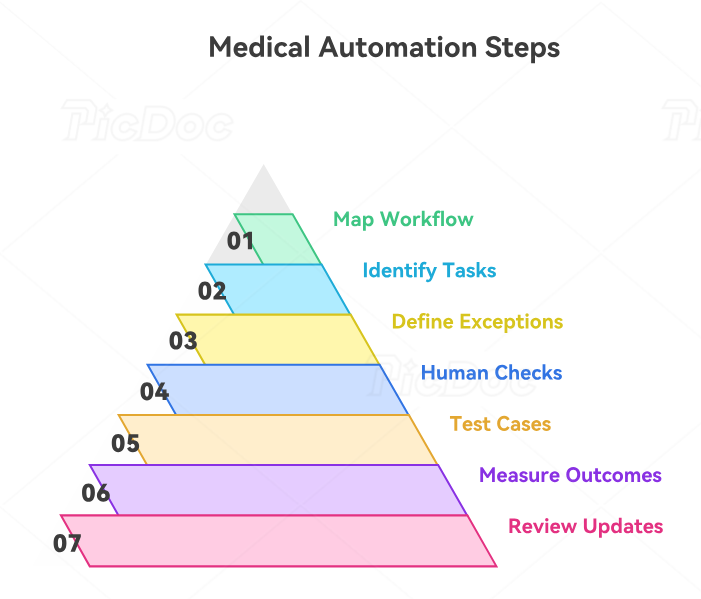
4. A Seven-Step Framework for Implementing Healthcare Automation Safely
Step 1: Map the existing workflow first
Document how the work currently enters the organization, who handles it, which information is required, where delays occur, and what defines completion. Automation applied to a poorly understood process can simply accelerate confusion. Workflow mapping should connect with medical administrative workflow terminology, front-desk operations, daily office checklists, and medical office organization.
Step 2: Identify repetitive decisions with stable rules
Good candidates often include recurring reminders, standardized form distribution, queue assignment, status notifications, duplicate administrative checks, and recurring task generation. Examine appointment scheduling tools, medical admin scheduling tools, patient communication applications, and practice management systems for processes with predictable inputs and outputs.
Step 3: Define exceptions before launch
Ask what should happen when data is missing, an integration fails, the patient does not respond, the workflow receives contradictory information, or a message does not match any category. Every high-volume automation needs a visible exception pathway. This principle becomes especially important in prior authorization workflows, insurance claims management, denial management, and records-release procedures.
Step 4: Decide where human approval remains mandatory
Create explicit checkpoints. Patient-facing language, unusual authorization cases, sensitive records, ambiguous message classification, complaint responses, and workflows touching clinical escalation often deserve human review. Those checkpoints should reflect patient privacy communication, medical office triage, handling difficult conversations, and legal responsibilities for CMAAs.
Step 5: Test with ugly cases
Testing should include misspelled names, duplicate patients, missing phone numbers, two insurance plans, expired coverage, incomplete forms, invalid attachments, unusual punctuation, conflicting instructions, and messages involving two departments. Clean test cases prove very little. Stress testing is especially useful for patient intake workflows, healthcare portal management, EMR troubleshooting, and secure messaging.
Step 6: Measure operational outcomes
Useful measurements include manual minutes saved, exception rate, routing accuracy, duplicate-task rate, failed-message rate, unresolved items, patient repeat contacts, corrected records, and staff overrides. These measurements fit alongside medical admin time-tracking tools, patient satisfaction metrics, healthcare predictive analytics, and medical office productivity.
Step 7: Review automation after every workflow change
A new payer process, scheduling policy, clinic location, provider template, staff structure, portal setting, or EMR update can make previously correct logic obsolete. Automation documentation should therefore be reviewed alongside creating medical admin policies, regulatory changes for CMAAs, EMR integration, and emerging medical administration technology.
5. How to Evaluate Automation Tools Before Your Medical Office Depends on Them
Begin with the problem being solved. “We need AI” provides no measurable operational target. “Thirty percent of portal messages are manually reassigned because patients choose the wrong category” defines a problem that can be measured before and after implementation. This discipline helps teams evaluate healthcare automation, patient portal systems, collaboration tools, and medical admin technologies against actual needs.
Then evaluate data dependency. Determine what information the automation reads, where that data originates, how frequently it changes, which fields are required, and what happens when the data is missing. A scheduling automation may depend on appointment type, provider, duration, location, age rules, visit status, and resource availability. Weak source data creates downstream problems across secure scheduling, patient intake, EMR charting, and medical record updates.
Evaluate visibility next. Staff should be able to tell whether an automation succeeded, failed, timed out, generated an exception, or requires intervention. Invisible automation is dangerous because the absence of a visible error can be mistaken for success. Review how automation monitoring connects with healthcare CRM tools, EMR integration systems, medical office collaboration tools, and time-management workflows.
Evaluate privacy and access with equal care. Determine what patient information enters the tool, who can view it, which users can modify workflows, how access changes when employees leave, and how incidents are reported internally. Organizations should align automation use with their own HIPAA and security obligations, policies, vendor-review process, and risk analysis. Staff responsible for these workflows benefit from understanding HIPAA terms, patient confidentiality, medical compliance, and risk management.
Finally, evaluate reversibility. Teams need to know whether they can stop the automation quickly, restore manual processing, identify items affected by a faulty rule, and correct records created during the incident. A system that saves 20 staff hours per week can still create enormous operational damage if nobody can determine what happened during a configuration failure. Reversibility should be planned alongside medical chart auditing, medical records management, office procedure design, and future-proofing CMAA careers.
6. Frequently Asked Questions About Healthcare Automation Tools
-
High-volume tasks with consistent rules are generally the clearest starting points. Examples include appointment confirmations, reminder sequences, routine form distribution, task creation, status notifications, standardized routing, and recurring reports. Each automation still requires exception handling and monitoring. Start by examining appointment scheduling tools, patient communication apps, medical admin scheduling tools, and practice management systems.
-
Human-in-the-loop automation deliberately requires a person to review or approve an automated result at a defined stage. Examples include verifying an automatically categorized portal message, checking extracted document information, reviewing an AI-generated response draft, or confirming an unusual authorization workflow. Human review is especially important where mistakes can affect patient privacy, clinical escalation, medical records, or legal responsibilities.
-
Workflow automation usually follows defined triggers, conditions, and actions. AI systems may perform tasks involving prediction, language processing, classification, generation, or pattern recognition. Medical offices may combine both approaches. An AI system may classify a message, while a rules-based workflow sends the approved classification to the appropriate queue. Understanding this distinction helps staff navigate AI in medical administration, predictive analytics, emerging admin technologies, and future medical documentation.
-
Automation can handle many scheduling steps when rules are sufficiently defined, including displaying eligible slots, issuing confirmations, sending reminders, and processing straightforward rescheduling actions. Complex cases may require staff judgment when multiple services, provider restrictions, clinical routing rules, insurance requirements, or accommodation needs are involved. Strong workflows combine appointment scheduling best practices, scheduling conflict management, emergency appointment management, and secure scheduling systems.
-
Errors can originate from incorrect source data, faulty rules, poor data mapping, integration failures, outdated workflows, ambiguous language, duplicate records, incorrect user permissions, or missing exception processes. Automation can multiply these errors because one rule may process large volumes of work. Detecting them requires medical chart audits, EMR troubleshooting, patient record training, and risk-management controls.
-
Organizations should define review requirements according to the message type, risk, workflow, applicable policies, and technology being used. Patient-facing messages involving sensitive information, individualized instructions, clinical questions, complaints, unusual billing circumstances, or ambiguity deserve particularly careful oversight. Strong review practices draw from secure healthcare messaging, effective patient communication, patient privacy communication, and medical compliance.
