

Secure Messaging in Healthcare: Interactive Dictionary & Examples
Secure messaging has become one of the busiest front doors in healthcare. A single inbox may contain refill questions, appointment problems, insurance documents, symptom updates, referral requests, photographs, and messages intended for entirely different departments. Managing that traffic safely requires stronger skills than simply replying quickly. Medical administrative professionals need disciplined patient privacy communication, accurate patient portal management, dependable medical administrative workflows, and clear effective patient communication. This interactive dictionary explains the terminology, workflows, security controls, routing decisions, and real-world messaging examples that make digital healthcare communication safer and more useful.
1. What Secure Messaging Means in Healthcare
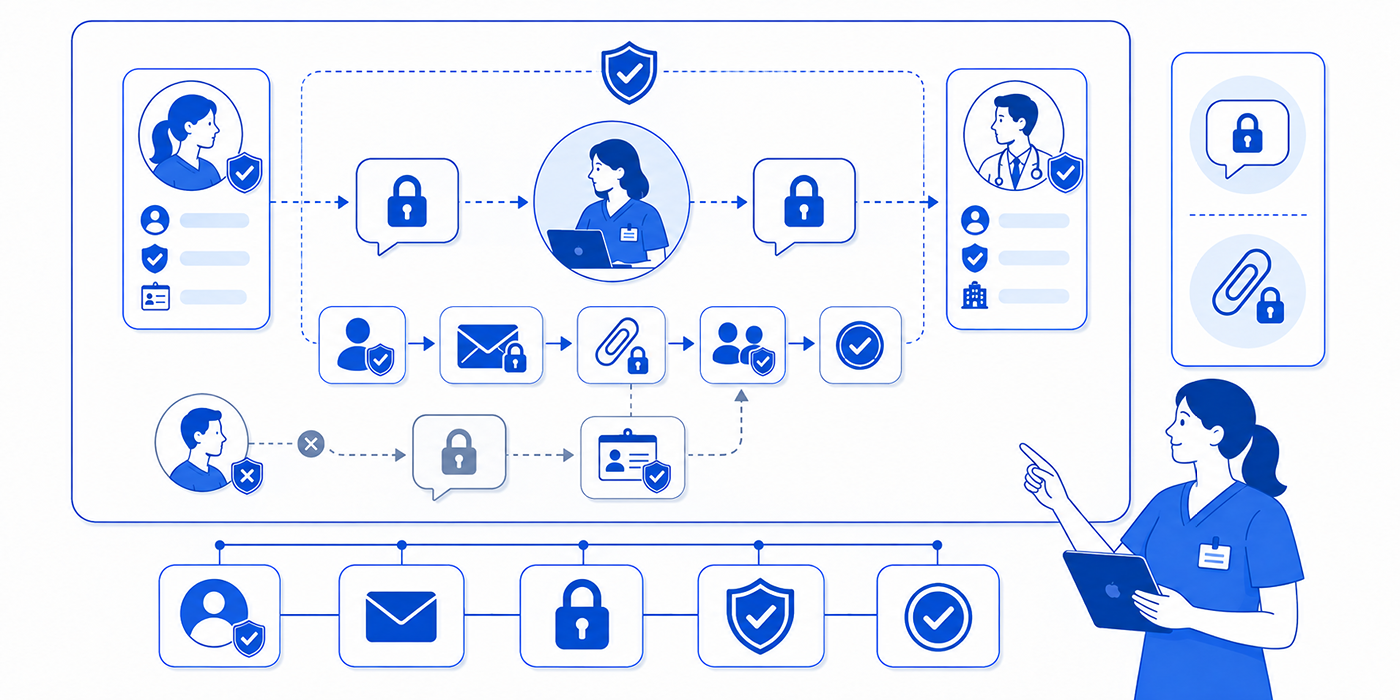
Secure messaging is electronic communication involving patients, healthcare professionals, administrative teams, or other authorized parties through systems designed to protect sensitive information and support controlled access. Common examples include patient-portal inboxes, EHR-integrated messaging, internal clinical communication platforms, and approved mobile or cloud-based communication tools. When these systems handle electronic protected health information, the surrounding organization must address HIPAA Privacy and Security Rule obligations through appropriate safeguards, policies, risk management, and workforce practices.
For medical administrative professionals, the practical challenge begins after the message arrives. Someone must determine whether it belongs to appointment scheduling, insurance verification, prior authorization, or a medical office triage pathway. A technically protected message can still create operational risk when it lands in the wrong queue, sits unread, receives an ambiguous reply, or contains information that the recipient lacks authority to disclose.
HIPAA’s Security Rule focuses on the confidentiality, integrity, and availability of ePHI and requires regulated entities to implement appropriate administrative, physical, and technical safeguards. HHS identifies technical concepts including access controls, audit controls, authentication, integrity protections, and transmission security. For a medical office, those concepts translate into practical questions: Who can open the inbox? Which staff members can see attachments? Are access events logged? How quickly are former employees removed? Who watches messages during absences? How are suspicious links reported?
Secure messaging also depends heavily on workflow design. An administrator may receive a message that begins as a routine healthcare portal question and evolves into a concern requiring clinical review. Another message may contain a billing attachment requiring medical claims processing, while a third involves protected records requiring careful patient confidentiality handling and medical records management. Reliable teams classify the message before responding.
HHS permits electronic communication with patients under the Privacy Rule when reasonable safeguards are applied. Its guidance specifically points to precautions such as verifying addresses before sending sensitive information. This reinforces an important operational principle: every outbound communication should undergo a recipient check, a content check, and a channel check before anyone presses send.
| # | Term | Practical Definition | Medical Office Example | Risk When Mishandled |
|---|---|---|---|---|
| 1 | Secure messaging | Electronic communication handled through an approved system and protected by organizational safeguards. | A patient sends a referral question through the practice portal. | Sensitive information may be exposed, misrouted, or left unmanaged. |
| 2 | PHI | Protected health information covered by the HIPAA Privacy Rule when maintained or transmitted by regulated entities. | A patient's name combined with appointment, diagnosis, insurance, or treatment information. | Unauthorized disclosure creates privacy exposure. |
| 3 | ePHI | Protected health information maintained or transmitted electronically. | A laboratory result stored in an EHR or patient portal. | Electronic access, transmission, or storage can create security vulnerabilities. |
| 4 | Patient portal | An authenticated digital environment through which patients may access services, records, or messages. | A patient asks about an upcoming appointment through the portal inbox. | Unmanaged queues can create delayed responses and missed escalation needs. |
| 5 | Authentication | A process used to verify the identity of a person or system requesting access. | A workforce member signs into the EHR with approved credentials. | Unauthorized users may obtain access to sensitive information. |
| 6 | Multi-factor authentication | An authentication approach that requires more than one category of verification. | Password plus an approved second verification factor. | Stolen credentials may provide easier entry when additional controls are absent. |
| 7 | Access control | Rules and technical mechanisms governing who may access particular systems or information. | Billing staff receive access appropriate to billing functions. | Employees may view information unrelated to their responsibilities. |
| 8 | Role-based access | Access configured according to workforce responsibilities. | A receptionist and clinician receive different permissions. | Excessive privileges increase exposure and misuse risk. |
| 9 | Audit control | Mechanisms that record and help examine activity involving information systems containing ePHI. | The organization can review who accessed a patient message. | Improper activity becomes harder to investigate. |
| 10 | Audit trail | The recorded history of system or user actions relevant to an information resource. | A log shows when a message was opened, routed, or modified. | Accountability and incident investigation become weaker. |
| 11 | Encryption in transit | Protection applied to data while it moves across electronic networks. | Information traveling between a portal and healthcare system is protected during transmission. | Intercepted traffic may expose sensitive information. |
| 12 | Encryption at rest | Protection applied to stored electronic information. | Messages and attachments stored on approved infrastructure are encrypted. | Stored information may be more vulnerable after device or system compromise. |
| 13 | Transmission security | Controls designed to protect ePHI transmitted over electronic networks. | The organization evaluates how portal messages are sent between systems. | Information may be accessed or altered during transmission. |
| 14 | Minimum necessary | A Privacy Rule standard requiring certain uses, disclosures, and requests for PHI to be limited appropriately to the purpose. | A scheduling message contains the information needed for scheduling rather than unrelated clinical history. | Unnecessary PHI spreads across more systems and people. |
| 15 | Business associate | An external person or organization performing certain functions or services involving PHI for a covered entity. | A vendor provides a cloud messaging service involving ePHI. | Vendor relationships may lack required safeguards or contractual protections. |
| 16 | Business associate agreement | A written arrangement establishing applicable responsibilities for safeguarding PHI. | A covered practice contracts with an eligible messaging vendor handling ePHI. | Responsibility and permitted use may be inadequately defined. |
| 17 | Routing queue | A designated inbox or workflow destination for a category of messages. | Referral messages route to the referral team queue. | A message may sit with staff unable to resolve it. |
| 18 | Inbox ownership | Assignment of responsibility for monitoring and acting on a messaging queue. | One named role covers the portal inbox each shift. | Everyone assumes another employee is checking messages. |
| 19 | Escalation pathway | A predefined route for messages requiring higher authority, specialized expertise, or faster action. | A symptom-related message is sent to the appropriate clinical team according to protocol. | Time-sensitive information remains in an administrative queue. |
| 20 | Response-time standard | An organizational expectation for reviewing or responding to particular message categories. | Administrative questions and clinical messages follow different service standards. | Patients develop inaccurate expectations and repeatedly contact the office. |
| 21 | Closed-loop messaging | A workflow in which the message is received, assigned, acted upon, and its outcome communicated or documented. | A referral request remains open until the next step has been completed. | Routing may be mistaken for resolution. |
| 22 | Proxy access | Authorized access allowing another person to interact with certain health information or portal functions for a patient. | A parent or caregiver accesses permitted portal features. | Information may be shared with someone lacking proper authority. |
| 23 | Message retention | Policies governing how messages and related records are preserved according to applicable requirements. | A clinically relevant portal exchange becomes part of the appropriate record workflow. | Important communication history may disappear or become inaccessible. |
| 24 | Attachment control | Procedures governing uploaded or transmitted files. | A patient uploads an insurance card or photograph through an approved channel. | Malicious files, wrong-patient attachments, or excessive PHI can enter workflows. |
| 25 | Misdirected message | A message sent to the wrong patient, staff member, department, or external recipient. | A portal response is accidentally addressed to another patient. | Privacy incidents and delayed care workflows can result. |
| 26 | Phishing | A deceptive communication designed to trick recipients into revealing information, opening harmful files, or following malicious links. | An employee receives a fake password-reset message. | Credentials or systems may be compromised. |
| 27 | Security incident | An attempted or successful unauthorized access, use, disclosure, modification, destruction, or interference involving information systems. | An account displays suspicious sign-in activity. | Delayed reporting can allow damage or exposure to continue. |
| 28 | Downtime workflow | An approved alternative process used when the normal secure messaging system is unavailable. | Staff follow a designated communication procedure during portal downtime. | Employees may improvise with unapproved channels. |
| 29 | Message escalation flag | A visible designation used according to organizational protocol to identify messages requiring particular attention. | A queue item receives the approved priority classification. | Important messages can become buried among routine requests. |
| 30 | Incident response | The organization's structured process for identifying, containing, investigating, documenting, and responding to security events. | Staff immediately report a message sent to an unintended recipient. | Employees may delete evidence, delay containment, or handle the incident inconsistently. |
2. How Secure Messaging Works From Intake to Resolution
A secure messaging workflow should begin with classification rather than composition. Before writing a response, determine what kind of message has arrived. Appointment requests belong with scheduling best practices, billing concerns may require medical billing terminology, authorization questions belong within prior authorization workflows, and symptom-related communication may activate the practice’s medical office triage procedures. Classification determines who should see the message and what response standard applies.
The second stage is identity and access verification. Patient portals commonly place authentication around the communication channel, yet staff still need to inspect the actual conversation before disclosing information. Proxy access, caregiver involvement, shared family accounts, incorrect chart selection, and changed contact details can complicate seemingly routine exchanges. The safest administrative habit is to combine approved patient intake procedures, patient record updates, patient confidentiality, and HIPAA privacy terminology rather than assuming portal access resolves every disclosure question.
The third stage is content minimization and clarity. HHS describes the minimum-necessary standard as an important Privacy Rule protection for applicable uses, disclosures, and requests involving PHI. In practice, administrative staff should avoid copying irrelevant history into a scheduling response, forwarding entire message threads when a concise summary will accomplish the task, or including diagnoses in communications where the operational purpose only requires an appointment date. This discipline strengthens medical compliance, clinical documentation improvement, medical records management, and patient privacy communication.
The fourth stage is routing with ownership. “Forwarded to nursing” describes movement. A stronger workflow identifies the destination, expected action, current status, and contingency if the item remains untouched. The same logic applies to EMR integration tools, medical office collaboration platforms, healthcare CRM systems, and medical admin staff scheduling tools. An inbox without clear ownership becomes a digital waiting room where patients cannot see how long they have been waiting.
The fifth stage is closure. Tell the patient what happened to their message, what they should expect next, and which action remains pending. For example: “Your refill question has been sent to the clinical team for review. Portal messages are monitored according to our office policy; please follow the practice’s urgent-care instructions if your situation requires immediate assistance.” The exact language should reflect organizational protocol, telehealth administration, emergency appointment management, patient education, and effective communication standards.
3. Secure Messaging Examples: Strong Responses to Real Medical Office Scenarios
Example 1: A patient sends a symptom update through the scheduling inbox
Patient message: “I need to move Thursday’s appointment. Things have gotten worse since yesterday.”
The phrase “things have gotten worse” changes the workflow. Staff should follow the organization’s escalation policy rather than simply offering a later date.
Stronger response: “Thank you for updating us. Because you reported a change in your condition, I am routing your message through our clinical review process before changing the appointment. Please follow the urgent-care instructions provided by our practice if your situation requires immediate attention.”
This response connects appointment conflict management, medical office triage, emergency appointment procedures, and risk management.
Example 2: The patient uploads an insurance card
Patient message: “Here is my new card. Can you tell me whether everything is covered?”
An administrative professional can update coverage information and begin the appropriate verification workflow while avoiding promises about benefits before verification is complete.
Stronger response: “We received your updated insurance information and will use it to verify the plan details available to our office. Coverage for a specific service can depend on benefits, authorization requirements, network status, and the insurer’s processing rules. We will document the information we can verify and let you know if additional action is required.”
That response aligns with insurance verification, coordination of benefits, prior authorization, and medical claims processing.
Example 3: A family member uses the patient’s portal
Message: “This is her daughter. Please send me the test results.”
The staff member should follow the practice’s authorization and proxy-access process before releasing information. HIPAA allows certain disclosures involving family members under defined circumstances, and the particular facts matter.
Stronger response: “I can help determine the appropriate way to handle this request. Before discussing information from the record, I need to verify the access or authorization available for you under our process.”
The response supports patient confidentiality, privacy communication, medical records release, and legal responsibilities for CMAAs.
Example 4: The patient wants a clinical interpretation
Patient message: “My portal says the result is outside the normal range. How serious is this?”
Administrative staff should route interpretation questions to the appropriate clinical professional.
Stronger response: “I understand why you want that clarified. A clinical professional needs to interpret the result in the context of your care. I’m routing your question to the appropriate team and documenting exactly what you asked.”
The skill here combines patient portal management, clinical documentation improvement, medical compliance, and patient education.
Example 5: The wrong attachment is sent
A patient receives a message containing an attachment intended for someone else.
The employee should follow the organization’s incident-response process immediately. Attempts to quietly fix the error can interfere with proper containment, documentation, risk assessment, and any applicable notification responsibilities. The HIPAA framework includes Privacy, Security, and Breach Notification requirements, and organizations should maintain procedures for handling impermissible disclosures and security incidents.
This scenario belongs alongside patient privacy communication, risk management strategies, medical compliance terminology, and medical chart audits.
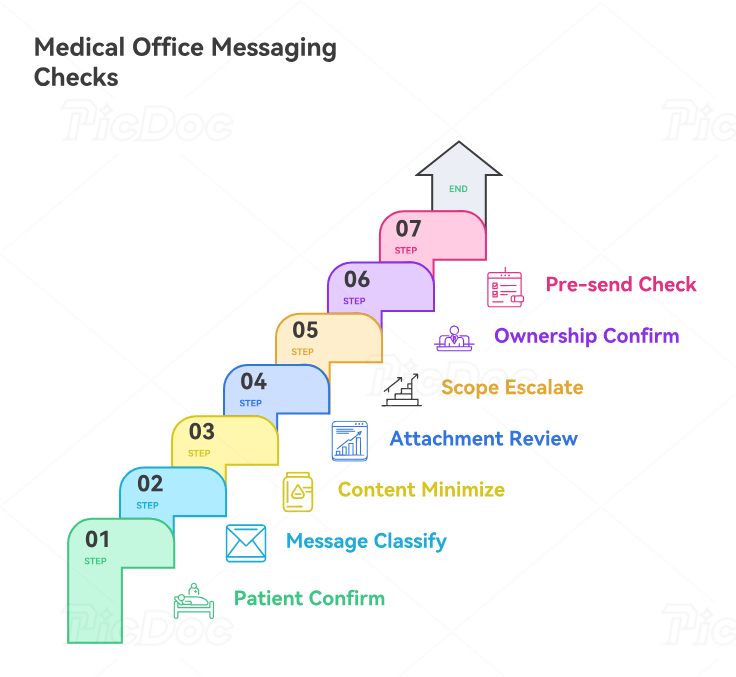
4. The Seven-Point Secure Messaging Safety Check
A strong medical office can prevent many messaging failures with a seven-point check performed before sensitive replies are sent.
1. Confirm the patient and recipient
Check that the message thread belongs to the correct patient and that the intended recipient or proxy is appropriate for the information being sent. This step should align with patient intake procedures, patient record updates, patient confidentiality, and medical records release procedures.
2. Classify the message
Identify whether the issue involves scheduling, records, billing, insurance, authorization, clinical review, medication communication, referral management, or another workflow. Accurate classification keeps appointment scheduling, insurance verification, revenue cycle management, and medical office triage from colliding in one generic inbox.
3. Identify the minimum useful content
Include enough information for the recipient to act while avoiding unnecessary duplication of PHI. The Privacy Rule’s minimum-necessary standard applies in specified circumstances and should be reflected in workforce policies. Staff can develop this judgment through HIPAA terminology, medical compliance, clinical documentation improvement, and medical chart auditing.
4. Review attachments
Open the workflow around the attachment before sending it. Confirm that it belongs to the correct patient, contains the intended pages, uses an approved file type, and is necessary for the communication. A scanned insurance card, referral document, photograph, superbill, or records request may contain substantially more information than the message text. This makes superbill management, medical claims processing, medical records management, and patient privacy communication directly relevant.
5. Check scope and escalation
A message asking, “What time is my appointment?” can remain administrative. A message asking, “Should I stop taking this medication?” requires the appropriate clinical pathway. Administrative staff need clear boundaries through legal responsibilities for CMAAs, medical office triage training, risk management, and emergency appointment management.
6. Confirm ownership
Determine who owns the next action and how unattended messages are detected. A routing queue requires backup coverage during breaks, leave, weekends, turnover, and system downtime. That makes medical admin scheduling tools, collaboration platforms, EMR integration tools, and time management part of messaging safety.
7. Perform the pre-send check
Read the recipient, patient name, attachment list, message body, dates, appointment details, and requested action once more. HHS guidance on electronic patient communication highlights precautions such as checking electronic addresses for accuracy. A ten-second check is especially valuable when staff are simultaneously managing front-desk operations, healthcare portal messages, patient communication apps, and appointment scheduling systems.
5. How to Build a Secure Messaging Workflow That Actually Holds Up
The first requirement is clear ownership by message category. Build a routing matrix listing message type, primary queue, backup queue, expected review interval, escalation condition, and final owner. Include categories such as appointments, insurance, referrals, medication messages, forms, records, billing, portal troubleshooting, complaints, and symptom-related communication. This matrix should connect directly with essential office checklists, medical admin policies, front-desk workflows, and practice management systems.
The second requirement is vendor governance. HHS states that when a cloud service provider creates, receives, maintains, or transmits ePHI on behalf of a covered entity or business associate, an appropriate business associate agreement is required and the regulated entity still needs to understand the service environment and perform risk analysis. Purchasing a messaging product therefore requires review beyond its marketing page. Organizations should evaluate access controls, authentication, logging, data handling, support processes, incident procedures, and contractual responsibilities alongside EMR integration tools, emerging medical admin technologies, AI and automation in medical administration, and future-proof CMAA skills.
The third requirement is security awareness. HHS has repeatedly highlighted phishing, malicious links, credential theft, and broader cybersecurity risks affecting healthcare. Its January 2026 cybersecurity guidance emphasizes system hardening, security baselines, and risk analysis across systems that handle ePHI. Staff who use healthcare CRM platforms, telehealth platforms, patient communication apps, and patient portals should know how to report suspicious activity without experimenting with questionable links.
The fourth requirement is auditing the workflow rather than counting messages. Useful quality indicators include messages routed to the wrong queue, messages reopened by patients because the question remained unanswered, unacknowledged messages beyond policy targets, wrong-recipient near misses, attachments corrected after sending, clinical questions sitting in administrative queues, and tasks without a current owner. These measures can be reviewed alongside medical admin time-tracking tools, patient satisfaction metrics, office productivity systems, and medical chart audits.
Regulatory awareness also matters. HHS proposed substantial modifications to the HIPAA Security Rule in late 2024 to strengthen cybersecurity requirements; HHS currently states that the existing Security Rule remains in effect while that rulemaking proceeds. Medical offices should therefore keep regulatory change monitoring, medical compliance training, risk-management programs, and future medical administration skills connected to current official guidance.
6. Frequently Asked Questions About Secure Messaging in Healthcare
-
HIPAA compliance depends on the entire environment in which ePHI is created, received, maintained, and transmitted. Relevant factors include the regulated entity’s safeguards, risk analysis, access controls, workforce procedures, vendor relationships, and technical protections. The Security Rule requires appropriate administrative, physical, and technical safeguards for ePHI. Staff should understand this through HIPAA compliance guidance, patient portal management, medical compliance terminology, and risk-management strategies.
-
HHS states that the HIPAA Privacy Rule permits providers to communicate electronically with patients, including by email, when reasonable safeguards are used. It specifically discusses precautions such as checking addresses before sending information. Organizations should apply their own approved patient privacy communication, healthcare portal, patient confidentiality, and medical records management procedures.
-
Follow the organization’s approved escalation pathway immediately and route the message to the appropriate clinical resource. Administrative staff should document what the patient reported and avoid providing independent clinical interpretation. This belongs within medical office triage, emergency appointment management, legal CMAA responsibilities, and risk management.
-
The HIPAA minimum-necessary standard generally requires covered entities and business associates, in circumstances where the standard applies, to limit PHI used, disclosed, or requested to what is reasonably necessary for the intended purpose. Administratively, this means staff should think carefully before copying extensive records, forwarding whole threads, or adding unrelated medical information. Training should connect HIPAA terminology, medical records release, medical compliance, and clinical documentation improvement.
-
Employees should immediately activate the organization’s privacy or security incident procedure, preserve relevant information, report the event to the designated personnel, and follow instructions for containment and assessment. The organization can then evaluate the incident under applicable Privacy, Security, and Breach Notification requirements. Staff preparation should include patient privacy communication, risk management, legal responsibilities, and medical compliance procedures.
-
Patients may interpret silence as evidence that nobody received their message, leading to duplicate portal submissions, phone calls, complaints, or delayed next steps. Organizations should define realistic service standards by message category and communicate them clearly. Strong response workflows combine patient satisfaction metrics, healthcare CRM tools, time-management systems, and medical admin collaboration tools.
