

Appointment Reminder Software: Key Terms & Interactive Guide
Appointment reminder software sits at the intersection of appointment scheduling, patient communication, medical administrative workflow, and patient portal management. Used well, it can reduce avoidable no-shows, shorten confirmation work, surface cancellations earlier, and give staff cleaner scheduling data. Used poorly, it creates duplicate messages, privacy risks, outdated instructions, and frustrated patients. This guide explains the terminology, configuration decisions, workflows, failure points, and performance signals medical administrative professionals need to understand before relying on automated reminders.
1. How Appointment Reminder Software Fits Into Medical Administration
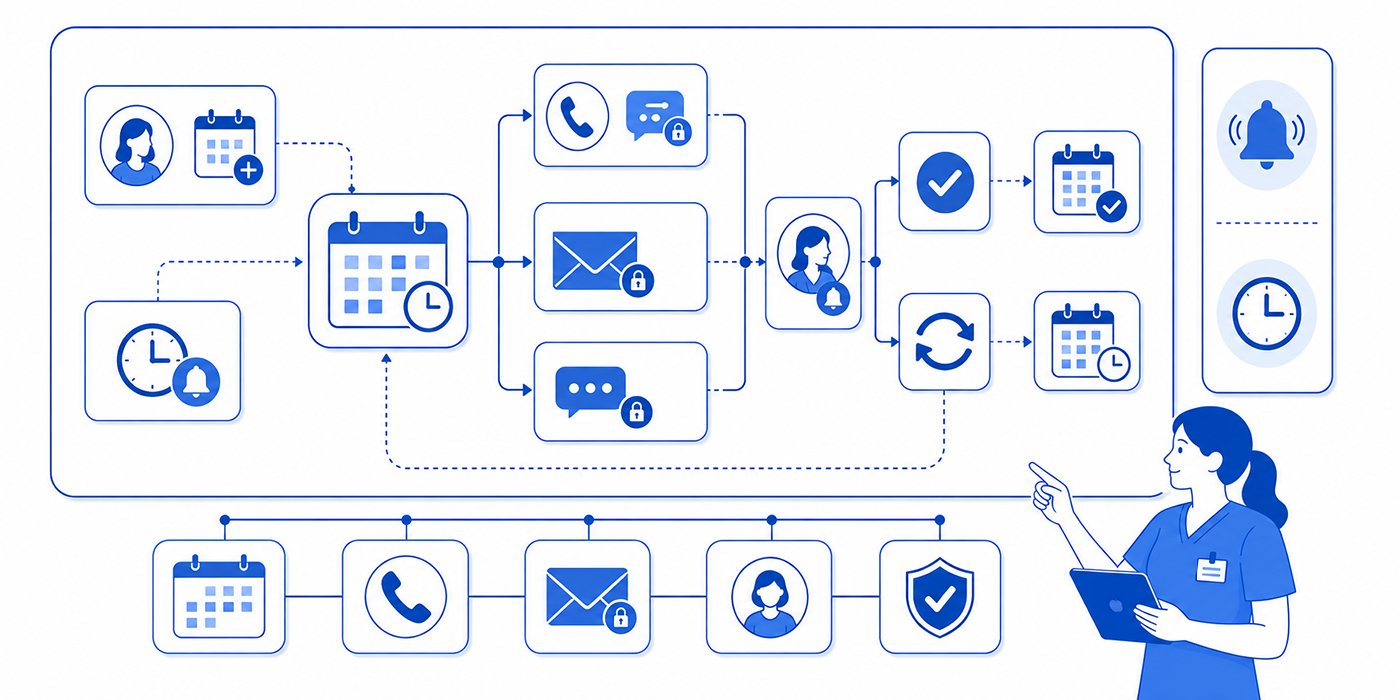
An appointment reminder system generally receives appointment data from a scheduling platform, practice management system, EHR or EMR, or another connected application. It then uses predefined rules to contact patients before appointments through channels such as SMS, telephone, email, or a secure healthcare portal. The strongest workflows connect reminders to the larger front-desk operation, so patient responses trigger actions instead of simply producing messages.
A basic reminder may say that an appointment is approaching. A mature workflow can detect confirmation, cancellation, rescheduling intent, missing intake forms, incomplete demographic information, or unanswered messages. Those responses can feed into patient intake procedures, scheduling conflict management, emergency appointment workflows, and the office’s daily procedure checklist.
The pain point for many offices appears when automation exists without operational ownership. A patient replies CANCEL, the system records the response, and nobody monitors the cancellation queue. A reminder goes to an outdated mobile number because contact information was never updated. A patient receives three messages from different systems because the EMR integration, scheduling software, patient communication app, and healthcare CRM all send independently.
Medical administrative teams therefore need to think beyond “Does the software send reminders?” A more useful evaluation asks whether the system can support the full appointment lifecycle.
Identify which appointments qualify for reminders.
Select the correct contact channel and timing.
Protect sensitive information under applicable patient privacy communication and HIPAA terminology.
Capture confirmations and cancellation requests.
Route exceptions to staff.
Update the schedule accurately.
Create a traceable communication history.
Measure response, cancellation, and no-show patterns.
This operational view also helps teams compare secure patient scheduling tools, medical appointment scheduling tools, collaboration platforms, and future AI and automation systems using practical workflow requirements instead of feature counts.
| # | Key Term | What It Means | Why Medical Admins Should Care | Practical Example |
|---|---|---|---|---|
| 1 | Reminder cadence | The planned timing and frequency of reminders before an appointment. | Cadence influences patient response rates and staff workload within the [scheduling workflow](https://acmso.org/medical-scribing/appointment-scheduling-best-practices-interactive-definitions). | A routine visit receives reminders seven days and 24 hours before arrival. |
| 2 | Confirmation status | A system label indicating whether the patient confirmed, declined, or has not responded. | It helps staff prioritize outreach through [front-desk workflows](https://acmso.org/medical-scribing/front-desk-operations-terms-interactive-guide-amp-checklist). | Unconfirmed appointments appear on a morning follow-up list. |
| 3 | Two-way messaging | The ability for patients to respond directly to a reminder. | Responses can support faster [patient communication](https://acmso.org/medical-scribing/effective-patient-communication-terms-amp-interactive-examples). | A patient replies “R” and enters a rescheduling workflow. |
| 4 | Delivery status | A record showing whether a message was sent, delivered, failed, or rejected. | Failed messages may reveal outdated data that needs correction during [patient record updates](https://acmso.org/medical-scribing/interactive-training-patient-record-updates-amp-emr-compliance). | A rejected SMS triggers verification of the mobile number. |
| 5 | Opt-in | A patient’s documented agreement to receive a particular type of communication where required. | Preferences should be handled consistently with [patient privacy communication](https://acmso.org/medical-scribing/patient-privacy-communication-key-terms-amp-interactive-checklist). | SMS preference is captured during registration. |
| 6 | Opt-out | A request to stop receiving a communication type. | Staff need a reliable way to update preferences across [patient communication applications](https://acmso.org/medical-scribing/patient-communication-apps-every-cmaa-should-use-interactive-directory). | A patient requests email-only reminders. |
| 7 | Appointment trigger | The event that causes an automated reminder workflow to begin. | Triggers must align with the [practice management system](https://acmso.org/medical-scribing/practice-management-systems-pms-essential-interactive-dictionary). | Creating a new appointment starts the reminder sequence. |
| 8 | Suppression rule | A condition that prevents a reminder from being sent. | Suppression prevents inappropriate messaging after cancellations or schedule changes documented through [scheduling tools](https://acmso.org/medical-scribing/medical-appointment-scheduling-tools-ranked-by-ease-of-use-202627-review). | Canceled appointments are removed from future reminder runs. |
| 9 | Template variable | A dynamic field inserted into a message automatically. | Incorrect mapping can create confusing or unsafe communication within [healthcare portals](https://acmso.org/medical-scribing/healthcare-portal-terms-interactive-dictionary-amp-use-cases). | Appointment date, location, or provider name fills automatically. |
| 10 | Message template | A standardized communication format used repeatedly. | Templates support consistency across [professional communication](https://acmso.org/medical-scribing/professional-email-etiquette-terms-amp-interactive-examples-for-admin-assistants). | The office uses separate templates for visits and procedures. |
| 11 | Escalation rule | A rule sending unresolved responses or exceptions to staff. | Escalation helps staff handle unusual cases using [scheduling conflict procedures](https://acmso.org/medical-scribing/interactive-guide-to-handling-appointment-scheduling-conflicts). | A patient requests an urgent change and the message enters a staff queue. |
| 12 | Fallback channel | A secondary contact method used after the primary channel fails. | Fallbacks help reduce gaps in [virtual patient management](https://acmso.org/medical-scribing/virtual-patient-management-essential-guide-for-cmaas). | A failed text generates an automated voice reminder. |
| 13 | Confirmation window | The period during which the patient can confirm electronically. | It helps staff decide when manual [active-listening outreach](https://acmso.org/medical-scribing/active-listening-techniques-for-medical-admin-professionals) should begin. | Unconfirmed appointments are called after 3 p.m. the previous day. |
| 14 | No-show rate | The percentage of scheduled patients who fail to attend without completing the expected cancellation process. | It is a core scheduling performance signal alongside [patient satisfaction metrics](https://acmso.org/medical-scribing/patient-satisfaction-metrics-definitions-amp-interactive-insights). | The office compares no-show rates before and after changing reminder timing. |
| 15 | Cancellation lead time | The time between cancellation and the original appointment. | Earlier cancellations give staff more opportunity to reuse the slot through [schedule optimization](https://acmso.org/medical-scribing/top-20-scheduling-amp-appointment-terms-cmaas-should-know-by-heart). | A reminder prompts cancellation 48 hours early instead of 20 minutes before arrival. |
| 16 | Rescheduling workflow | The process used when a patient wants another appointment time. | Automated rescheduling needs safeguards consistent with [secure scheduling tools](https://acmso.org/medical-scribing/secure-patient-scheduling-tools-2026-27s-best-picks-amp-why). | A patient selects “reschedule” and receives approved alternative slots. |
| 17 | Appointment-type logic | Rules that vary reminders according to visit category. | Different visits may require different preparation instructions within [patient education workflows](https://acmso.org/medical-scribing/patient-education-essential-terms-amp-interactive-guide). | A procedure reminder includes preparation instructions while a routine follow-up does not. |
| 18 | Data synchronization | The process of keeping appointment data consistent across connected systems. | Synchronization is central to reliable [EMR integration](https://acmso.org/medical-scribing/emr-integration-tools-every-medical-administrative-assistant-needs). | A rescheduled visit immediately updates the reminder platform. |
| 19 | Duplicate suppression | Logic preventing multiple systems from sending unnecessary copies of the same message. | It reduces communication overload across [collaboration and communication tools](https://acmso.org/medical-scribing/best-collaboration-tools-for-medical-office-teams-cmaa-approved). | Patients receive one appointment reminder rather than three. |
| 20 | Audit trail | A chronological record of messages, responses, status changes, and staff actions. | Audit trails support [medical compliance](https://acmso.org/medical-scribing/medical-compliance-terms-interactive-reference-amp-examples) and internal review. | Staff can see when a reminder was delivered and when the patient canceled. |
| 21 | Patient preference | A documented choice regarding communication channel, language, or contact method. | Preferences strengthen [culturally competent communication](https://acmso.org/medical-scribing/cultural-competence-in-medical-admin-terms-amp-interactive-guide). | A patient receives Spanish voice reminders instead of English SMS. |
| 22 | Reminder exception | An appointment that should follow a different communication rule. | Exceptions matter in complex [medical office workflows](https://acmso.org/medical-scribing/medical-administrative-workflow-key-terms-amp-practical-use-cases). | Sensitive visit categories follow a restricted messaging workflow. |
| 23 | Response mapping | Rules connecting a patient response with a system action. | Poor mapping can create missed cancellations or unresolved [scheduling conflicts](https://acmso.org/medical-scribing/interactive-guide-to-handling-appointment-scheduling-conflicts). | “C” updates the appointment to cancellation requested and alerts scheduling. |
| 24 | Queue | A worklist containing responses or exceptions that require human action. | Queues support staff accountability and [time management](https://acmso.org/medical-scribing/time-management-mastery-for-medical-admin-professionals). | All unsuccessful reminder contacts appear in one queue. |
| 25 | Message latency | The delay between a trigger and the actual message delivery. | Unexpected delays can undermine [medical admin time tracking](https://acmso.org/medical-scribing/medical-admin-time-tracking-tools-complete-directory-amp-usage-guide) and scheduling accuracy. | A “24-hour” reminder arrives only four hours before the appointment. |
| 26 | Contact validation | The process of confirming that contact information is current and usable. | Validation should form part of [patient intake](https://acmso.org/medical-scribing/patient-intake-procedures-essential-definitions-amp-processes). | Staff verify the mobile number at each check-in. |
| 27 | Conversion rate | The proportion of reminders that generate the desired action. | Conversion helps evaluate communication performance beside [patient satisfaction measures](https://acmso.org/medical-scribing/patient-satisfaction-metrics-definitions-amp-interactive-insights). | Seventy percent of delivered reminders generate confirmations. |
| 28 | Failed-delivery workflow | The process used after automated contact cannot be delivered. | A reliable workflow improves [front-desk operations](https://acmso.org/medical-scribing/front-desk-operations-terms-interactive-guide-amp-checklist). | A failed SMS creates a manual call task. |
| 29 | Integration error | A problem preventing accurate information from moving between systems. | These errors often require structured [EMR troubleshooting](https://acmso.org/medical-scribing/resolving-common-emr-software-issues-practical-cmaa-guide). | Canceled appointments remain active in the reminder platform. |
| 30 | Reminder performance dashboard | A reporting view showing delivery, response, cancellation, confirmation, and failure patterns. | Dashboards support better decisions alongside [predictive analytics](https://acmso.org/medical-scribing/predictive-analytics-in-medical-administration-opportunities-amp-skills-needed). | A manager identifies that one clinic location has twice the failed-delivery rate. |
2. The Appointment Reminder Terms Medical Admins Need to Understand
The most useful reminder-system terminology describes when information moves, what the patient can do with it, and what happens after the response. Medical administrative professionals who understand these concepts can troubleshoot scheduling problems much faster than staff who view reminders as isolated text messages. The same logic appears throughout medical scheduling terminology, EMR terminology, healthcare CRM workflows, and medical administrative operations.
Reminder cadence
A reminder cadence determines how many contacts occur and when they occur. A high-frequency cadence can create patient fatigue. A single reminder sent too close to the appointment may leave little time to fill a canceled slot. Teams should evaluate cadence by appointment type, historical response patterns, patient population, cancellation lead time, and the office’s ability to manage incoming requests through appointment scheduling tools, staff scheduling systems, and daily office procedures.
Confirmation status
A confirmation should have operational meaning. If “confirmed” simply means a patient clicked a button, staff need to understand what that status does inside the practice management system, EHR, or scheduling application. Ideally, confirmation reduces unnecessary manual outreach and gives the office a current picture of tomorrow’s schedule.
Suppression rules
Suppression rules deserve special attention because incorrect logic creates some of the most visible automation failures. A patient cancels on Monday and receives a “We look forward to seeing you tomorrow” message on Tuesday. The patient loses confidence in the office’s internal coordination. Staff then spend time explaining a problem created by automation. Correct suppression depends on accurate patient record updates, reliable EMR integration, and disciplined scheduling conflict management.
Exception routing
Automation should recognize when a situation requires human judgment. A patient replying “I am having chest pain and cannot make it” creates a different administrative responsibility from a routine cancellation. Staff need predefined escalation rules, scope boundaries, and medical office triage terminology. Similar safeguards apply to emergency appointment management, crisis communication, and legal responsibilities for CMAAs.
3. How a High-Quality Reminder Workflow Should Operate
A reliable reminder workflow starts well before the first message is sent. During patient intake, staff should verify the patient’s current phone number, email address, preferred language, communication preferences, and any fields required by organizational policy. Incorrect source data creates incorrect automation, regardless of how advanced the patient communication application, healthcare portal, or secure scheduling platform may be.
Step 1: Validate the appointment record
The appointment should contain the correct date, time, location, provider, appointment type, and applicable preparation category. Teams already using strong appointment scheduling practices, EMR shortcuts, and medical office checklists can build verification into the initial scheduling workflow.
Step 2: Apply reminder eligibility rules
Certain appointment categories may need different messaging, timing, channels, or staff review. The reminder engine should use appointment-type logic that reflects the office’s medical administrative policies, patient privacy practices, medical compliance terminology, and risk-management procedures.
Step 3: Send through the approved channel
Patients may respond differently to SMS, calls, email, or portal notifications. Channel selection should account for preference, accessibility, deliverability, and office policy. Teams working across telehealth platforms, virtual patient management, patient portals, and medical interpreter services should consider how reminder communication interacts with language and access needs.
Step 4: Translate responses into work
Every patient response needs a destination. Confirmed may update the schedule. Cancel may open the slot and trigger a refill process. Reschedule may produce available times or create a staff task. Question may enter an administrative queue. A medically concerning response should follow established triage procedures, while an upset patient may require de-escalation techniques, active listening, and a structured difficult-conversation workflow.
Step 5: Reconcile the schedule
Automated responses need to appear correctly in the working schedule. A cancellation that remains visually booked creates wasted capacity. A rescheduled patient appearing in both the old and new time creates duplicate work. Daily reconciliation should therefore connect scheduling software mastery, medical admin time management, office organization, and collaboration tools.
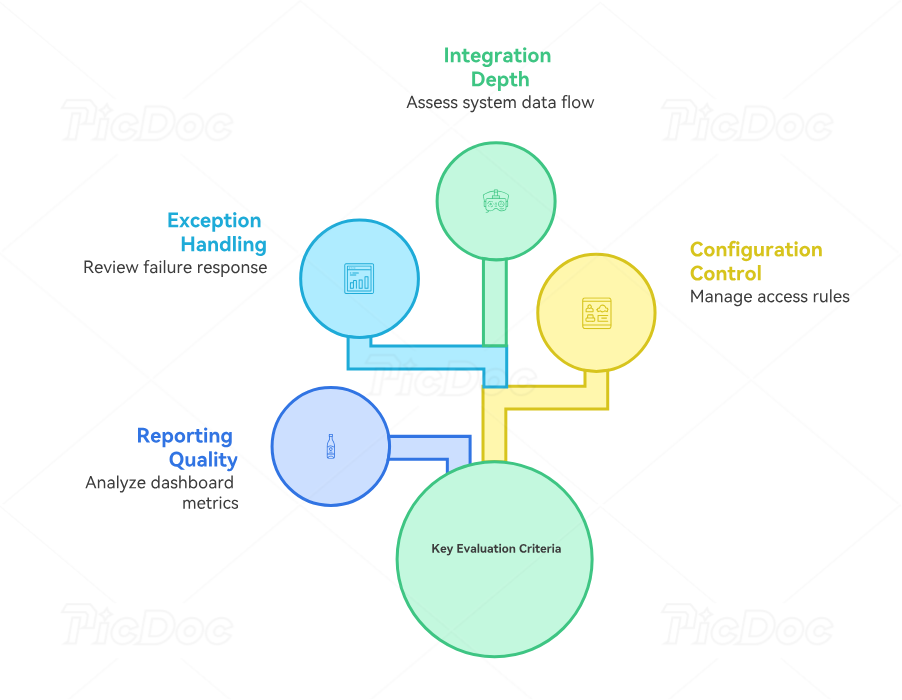
4. How to Evaluate Appointment Reminder Software Before Implementation
Medical offices often compare reminder systems using surface-level features such as “text reminders,” “email,” or “automated calls.” Those features tell administrators very little about whether the platform will reduce workload. A stronger evaluation examines how the software behaves inside the organization’s medical administrative workflow, practice management environment, EHR infrastructure, and patient communication ecosystem.
Evaluate integration depth
Ask exactly what data moves between systems and how quickly. A platform may technically “integrate” while updating only basic appointment fields. Teams should test newly created appointments, cancellations, reschedules, provider changes, location changes, appointment-type changes, and same-day edits. The test process should align with EMR integration tools, EMR troubleshooting practices, patient record compliance, and medical chart audit principles.
Evaluate exception handling
Ask what happens when a message fails, a patient replies with unexpected text, a reminder reaches the wrong number, or the patient asks a question requiring staff review. The system should make exceptions visible. Hidden failures are especially dangerous because staff may assume automation completed the work. A robust exception workflow can be tied to risk management, medical compliance, patient privacy communication, and patient complaint management.
Evaluate configuration control
The office should know who can edit templates, cadence rules, communication channels, appointment categories, suppression logic, and escalation paths. Excessive access increases inconsistency. Excessively restricted access can slow routine corrections. A role-based approach usually fits better with medical admin policies, legal CMAA responsibilities, HIPAA terminology, and broader medical compliance requirements.
Evaluate reporting quality
A useful reminder dashboard should reveal delivery failures, confirmation rates, cancellation timing, rescheduling requests, channel performance, location patterns, and appointment-type differences. Those metrics can then be analyzed alongside patient satisfaction data, medical admin time tracking, predictive analytics, and future medical administration technology.
The key question is whether the software helps staff identify why appointments remain unconfirmed or become no-shows. Reporting that simply displays total messages sent gives little operational insight.
5. How to Reduce Reminder Failures, No-Shows, and Staff Rework
The strongest improvement strategy begins with failure classification. Treating every missed appointment as “the patient forgot” hides important causes. Some patients never received the reminder. Others could not respond. Some tried to cancel through an unsupported channel. Others received confusing instructions or an outdated appointment time. An effective review connects appointment scheduling practices, patient communication techniques, patient satisfaction metrics, and medical office workflow analysis.
Track failed delivery separately
A failed SMS is a data-quality signal. Repeated failures often point toward outdated phone numbers, incomplete registration, invalid formatting, or a broken integration. Front-desk teams should create a routine that updates contact data through patient intake, patient record management, portal workflows, and daily office procedures.
Measure response by appointment type
A reminder strategy that performs well for routine follow-ups may perform poorly for procedures, pediatric visits, telehealth appointments, or specialty care. Segment performance by location, provider, visit type, channel, and reminder timing. This supports better decisions about telehealth administration, virtual patient management, specialty documentation workflows, and secure scheduling.
Review cancellation lead time
Early cancellation can be operationally valuable because staff have time to offer the slot to another patient. Track whether reminder timing increases advance cancellations and whether staff actually reuse released capacity. That analysis should connect to scheduling conflict management, staff scheduling tools, office productivity, and time-management practices.
Audit duplicate messaging
Map every platform capable of contacting patients. The list may include the scheduling system, EHR, portal, CRM, telehealth application, and a standalone reminder service. Decide which platform owns each communication type. This ownership model reduces patient confusion and gives staff a cleaner communication workflow, stronger EMR integration, safer patient privacy communication, and more reliable healthcare CRM management.
Create a weekly reminder-quality audit
A 15-minute review can examine:
Delivered versus failed reminders
Confirmation rate
Cancellation rate
Cancellation lead time
Rescheduling volume
Unanswered patient responses
Duplicate-message complaints
Wrong-number incidents
Appointments receiving outdated reminders
Unconfirmed visits requiring manual calls
Repeated patterns can then feed into medical office risk management, medical admin policies, EMR troubleshooting, and future automation planning.
6. Frequently Asked Questions About Appointment Reminder Software
-
Appointment reminder software automates communication with patients before scheduled visits. It typically receives appointment information from a scheduling system, practice management platform, EHR or EMR, or connected patient communication application. More advanced workflows can record confirmations, route cancellation requests, manage rescheduling, identify delivery failures, and generate staff follow-up tasks.
-
The message should provide enough information for the patient to identify and manage the appointment while following organizational privacy rules. Depending on office policy, this may include appointment date, time, location, approved arrival instructions, and a confirmation or rescheduling method. Teams should review message content against patient confidentiality principles, HIPAA communication terminology, patient privacy communication, and medical compliance procedures.
-
The appropriate cadence depends on appointment type, patient population, cancellation lead time, communication channel, and historical response patterns. Many offices gain more insight by testing several reminder timings and measuring confirmation, cancellation, and failed-delivery patterns. The cadence should support appointment scheduling best practices, patient communication, front-desk operations, and time management.
-
Reminder software can help address missed appointments related to forgetting, scheduling confusion, and delayed cancellation. Its usefulness depends heavily on accurate contact data, effective timing, clear message design, reliable system integration, and quick handling of patient responses. Offices should analyze no-show patterns alongside patient intake quality, scheduling workflows, patient satisfaction metrics, and medical administrative workflow performance.
-
A failed delivery should generate a defined follow-up process. Staff may need to verify the contact information, try an approved alternative channel, document the failure, and update the patient record. Frequent failures should be analyzed for broader data-quality or integration problems. This process can be incorporated into patient record update training, front-desk procedures, EMR troubleshooting, and medical records management.
-
Scheduling software manages appointment availability, bookings, provider calendars, visit types, and related scheduling rules. Reminder software focuses on communicating with patients before scheduled encounters and processing their responses. Many modern medical appointment scheduling tools include reminder functionality, while some organizations use separate systems connected through EMR integrations, practice management systems, and healthcare CRM platforms.
