

Patient scheduling integrations determine whether appointments, provider availability, insurance checks, reminders, and patient records remain synchronized across healthcare systems. When connections fail, clinics experience duplicate bookings, incomplete patient records, missed appointments, and frustrated front-desk teams. Understanding the terminology behind practice management systems, patient portals, and healthcare automation helps administrators identify problems before they disrupt care. This dictionary explains essential integration terms, their practical applications, technical failure points, and implementation strategies for building reliable scheduling workflows.
1. Patient Scheduling Integrations: Essential Terms, Technologies, and Definitions
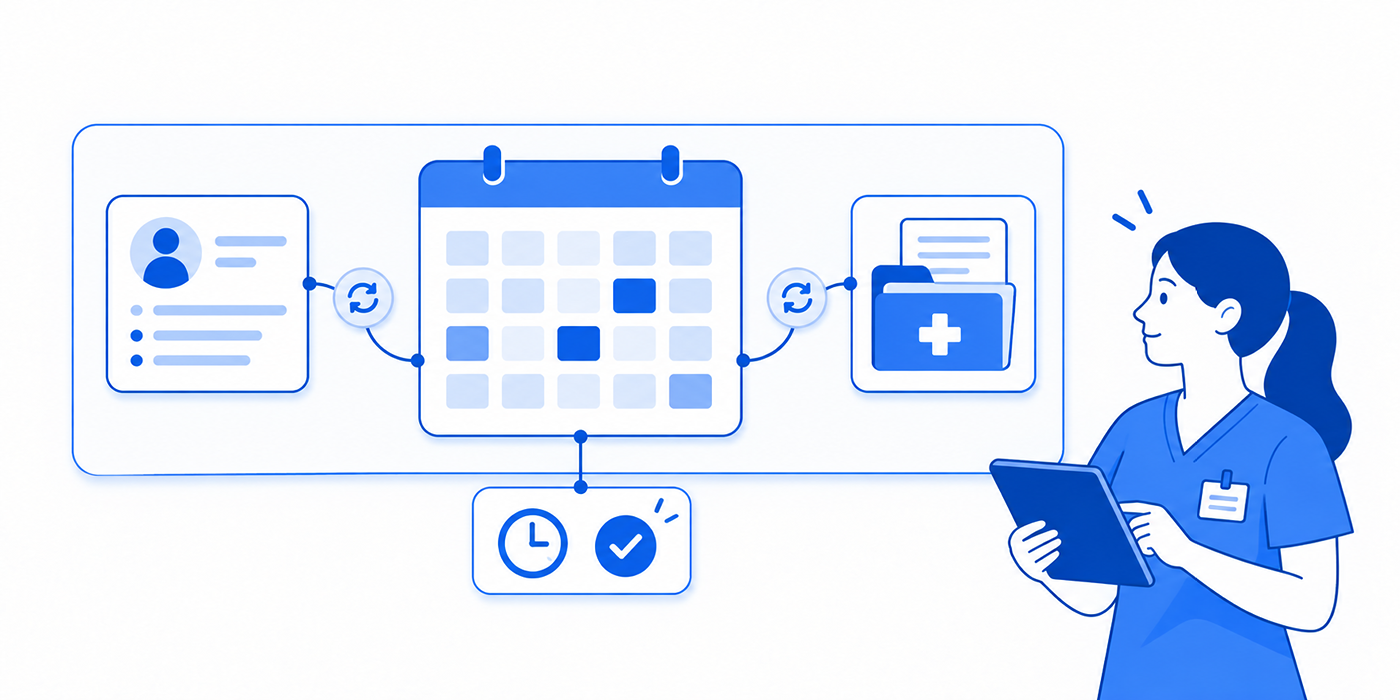
Patient scheduling integration refers to the structured exchange of appointment-related information between healthcare applications. A medical practice may use separate systems for patient registration, appointment management, insurance verification, patient communication, and clinical documentation.
Without integration, employees must manually transfer information between applications. Every additional manual entry increases the possibility of selecting the wrong patient, overlooking a schedule change, or entering an incorrect appointment duration.
Consider a patient booking an appointment through an online portal. The booking system must verify the patient's identity, identify an eligible provider, check appointment availability, reserve the correct time, and communicate confirmation. Additional processes may trigger appointment reminders, digital check-in, and insurance eligibility checks.
A disconnected workflow might confirm the appointment online while leaving the physician's actual schedule unchanged. The patient receives confirmation, arrives at the clinic, and discovers that the booking never reached the authoritative system.
Understanding the Three Integration Layers
The first layer is the scheduling source of truth.
Every organization needs an authoritative system responsible for determining whether appointments are genuinely booked. This may be the practice management system, an EHR scheduling module, or another designated scheduling platform.
External applications can display availability and submit booking requests, but the authoritative platform should control final acceptance.
The second layer is interoperability.
Interoperability allows separate applications to exchange and interpret information through APIs, HL7 Version 2 messages, HL7 FHIR resources, middleware, and other supported interfaces.
An API may permit a patient portal to retrieve appointment availability. An interface engine may translate messages between older systems and newer applications.
Technical connectivity must include correct patient matching, appointment identifiers, status mapping, security permissions, and error handling.
The third layer is workflow automation.
Once an appointment is confirmed, connected applications may initiate patient reminders, secure messaging, virtual check-in, and preparation instructions.
The integration should also respond when patients cancel, reschedule, or change important registration information.
| # | Integration Term | Definition | Practical Application | What to Verify |
|---|---|---|---|---|
| 1 | Practice Management System (PMS) | Software managing scheduling, registration, and administrative operations. | Serves as the authoritative appointment system in many practices. | Identify supported booking, cancellation, and update operations. |
| 2 | Electronic Health Record (EHR) | Platform maintaining clinical records and often scheduling functions. | Connects appointments with patient encounters. | Confirm patient identifiers and appointment references remain consistent. |
| 3 | Patient Portal | Authenticated patient-facing interface for services and communication. | Supports online booking, cancellations, and appointment viewing. | Verify displayed appointments match the authoritative schedule. |
| 4 | Application Programming Interface (API) | Defined interface allowing software to request information or actions. | Connects booking applications with healthcare platforms. | Review supported endpoints, permissions, limits, and error responses. |
| 5 | HL7 FHIR | Healthcare interoperability standard using structured resources and exchange mechanisms. | Represents scheduling-related healthcare data consistently. | Confirm supported FHIR version and scheduling operations. |
| 6 | FHIR Schedule | Resource describing the availability framework for schedulable actors. | Associates providers or services with potential appointment times. | Verify provider, location, and service associations. |
| 7 | FHIR Slot | Time interval associated with a Schedule and availability information. | Represents capacity potentially available for appointments. | Check free, busy, and overbooked handling. |
| 8 | FHIR Appointment | Resource describing a planned healthcare event involving participants. | Represents booking details, participants, and status. | Verify booking, cancellation, and status transitions. |
| 9 | HL7 SIU | HL7 Version 2 Scheduling Information Unsolicited message family. | Communicates appointment changes between systems. | Confirm supported events, field mappings, and acknowledgments. |
| 10 | SIU^S12 | HL7 scheduling message for a new appointment booking. | Notifies receiving systems of newly scheduled appointments. | Confirm the booking appears once with correct details. |
| 11 | SIU^S13 | HL7 message communicating appointment rescheduling. | Updates appointment times across applications. | Verify old slots are released appropriately. |
| 12 | SIU^S15 | HL7 message communicating appointment cancellation. | Removes obsolete bookings from active workflows. | Ensure canceled appointments stop generating reminders. |
| 13 | Interface Engine | Middleware that routes, transforms, and monitors integration messages. | Connects systems using different interfaces. | Review transformation logic and failed-message queues. |
| 14 | Webhook | Event-triggered HTTP notification sent between applications. | Can notify external systems about booking changes. | Test authentication, retries, duplicate deliveries, and failures. |
| 15 | Polling | Periodic requests checking for new or changed information. | Retrieves updates when push notifications are unavailable. | Measure polling intervals and missed-change risks. |
| 16 | Bidirectional Synchronization | Exchange of changes between systems in both directions. | Supports updates initiated from multiple authorized interfaces. | Define ownership and conflict-resolution rules. |
| 17 | Master Patient Index (MPI) | Mechanism supporting patient identification across records and systems. | Reduces duplicate identities and wrong-patient bookings. | Test ambiguous matches and duplicate demographic details. |
| 18 | Appointment Identifier | Persistent identifier representing a booking within a system. | Links cancellation and rescheduling events to the correct appointment. | Confirm identifiers remain traceable across applications. |
| 19 | Idempotency | Property ensuring repeated equivalent requests do not cause repeated effects. | Helps prevent duplicate bookings during retries. | Repeat requests and verify only the intended booking exists. |
| 20 | Race Condition | Conflict arising when concurrent actions depend on shared changing data. | Can cause simultaneous booking attempts for the same capacity. | Simulate competing reservations. |
| 21 | Resource Scheduling | Coordination of providers, rooms, equipment, and appointment capacity. | Prevents bookings without required clinical resources. | Test simultaneous provider and equipment availability. |
| 22 | Appointment Type Mapping | Translation between visit categories used by different applications. | Preserves duration and eligibility rules. | Test new-patient, follow-up, and procedure appointment types. |
| 23 | Scheduling Conflict | Overlapping or incompatible appointment assignments. | Identifies potential overbooking and capacity issues. | Test overlapping visits and unavailable providers. |
| 24 | Waitlist Automation | Process matching newly available slots to waiting patients. | Improves access to canceled appointment capacity. | Verify eligibility, expiration, and simultaneous acceptance. |
| 25 | Reminder Trigger | Event or timing rule initiating an appointment notification. | Automatically generates relevant reminders. | Ensure rescheduling cancels obsolete notifications. |
| 26 | Secure Messaging | Protected channel for healthcare-related communication. | Supports appointment updates while protecting patient information. | Review access controls and message content. |
| 27 | Virtual Check-In | Digital workflow for registration or arrival before appointments. | Connects scheduled visits with patient intake. | Verify correct encounter and registration status. |
| 28 | Eligibility Inquiry | Request checking insurance eligibility information, commonly through X12 270/271 transactions. | Supports insurance preparation before visits. | Verify payer, dates, coverage details, and response status. |
| 29 | Coordination of Benefits | Rules determining payment order when multiple insurance policies apply. | Reduces administrative and billing confusion. | Verify primary and secondary coverage order. |
| 30 | OAuth 2.0 / SMART on FHIR | Authorization framework and healthcare application integration patterns. | Controls permitted access for connected applications. | Review scopes, tokens, application registration, and permissions. |
| 31 | Role-Based Access Control | Permission model assigning access according to staff responsibilities. | Restricts unauthorized scheduling or record changes. | Test administrator, provider, and front-desk privileges. |
| 32 | Audit Trail | Record of actions and modifications occurring within a system. | Supports investigation and accountability. | Verify who changed an appointment and when. |
| 33 | Reconciliation | Comparison of records across systems to identify inconsistencies. | Detects missing or mismatched bookings. | Compare appointment identifiers, times, and statuses. |
| 34 | No-Show Rate | Percentage of eligible scheduled visits recorded as no-shows. | Supports evaluation of attendance and reminders. | Maintain a consistent definition and denominator. |
2. How Patient Scheduling Integrations Work Across EHRs, Patient Portals, and Practice Management Systems
A functioning scheduling integration coordinates patient identification, appointment availability, booking confirmation, and downstream notifications.
The sequence matters because errors introduced during registration can continue through medical-record creation, insurance verification, appointment reminders, and clinical preparation.
Step 1: Match the Appointment to the Correct Patient
When a patient begins online scheduling, the application may search existing records using identifying information.
An effective matching process should prevent unauthorized disclosure and reduce duplicate charts. Similar names, outdated contact details, and shared family addresses can create ambiguous matches.
Healthcare systems frequently rely on a master patient index or equivalent patient identity services. Uncertain matches should be escalated for authorized review rather than automatically merged.
An incorrect match can contaminate medical records, misdirect confidential communications, and undermine patient privacy protections.
Practical test: Create test patients with similar names and overlapping demographics. Verify that the scheduling application distinguishes records correctly and provides a safe exception process.
Step 2: Retrieve and Validate Appointment Availability
A physician's open calendar does not necessarily represent bookable capacity.
Suppose a new cardiology patient needs a 40-minute consultation, but the online portal displays an available 20-minute slot. The scheduling interface must recognize appointment-type restrictions before accepting the booking.
Healthcare scheduling may also depend on room availability, provider credentials, equipment, specialty, location, and patient eligibility.
FHIR Schedule and Slot resources can support availability discovery, while Appointment resources represent planned events. However, the final booking system may impose additional restrictions.
These distinctions are essential for practice management configuration, scheduling conflict prevention, and clinical encounter preparation.
Practical test: Attempt to book an appointment requiring more time or resources than the selected slot permits. The interface should reject incompatible selections or offer an appropriate alternative.
Step 3: Commit the Appointment Without Creating Duplicates
The most technically sensitive moment occurs when a patient selects Book Appointment.
Two patients might attempt to reserve the final available slot simultaneously. Alternatively, a network timeout may cause a booking application to retry a request that the EHR already accepted.
A reliable integration uses appropriate transaction controls, availability revalidation, and idempotency mechanisms to prevent unintended duplicate bookings.
The authoritative scheduling system should determine the final result.
This protects patient satisfaction, reduces avoidable front-desk conflicts, and supports accurate appointment communication.
Practical test: Submit two simultaneous requests for a slot that supports one appointment. Confirm that the system accepts only the permitted allocation and reports the other result accurately.
Step 4: Synchronize Appointment Updates Across Systems
A confirmed appointment may trigger multiple downstream activities.
These can include patient portal notifications, insurance preparation, appointment reminders, and virtual check-in.
In HL7 Version 2 environments, SIU messages can communicate new bookings, reschedules, modifications, and cancellations.
The receiving system must correctly map the appointment identifier and apply the corresponding change. A technical acknowledgment does not always establish that the downstream application updated its database correctly.
Practical test: Schedule, reschedule, and cancel one test appointment. Compare every connected system after each event, including queued reminders and patient-facing notifications.
3. Common Patient Scheduling Integration Failures and How to Fix Them
Scheduling integration failures can remain unnoticed until patients arrive for appointments that the clinic cannot locate.
Understanding the failure mechanism helps administrators select appropriate corrective actions instead of repeatedly adjusting individual bookings.
Problem 1: Duplicate Bookings Across Connected Systems
Duplicate appointments can result from concurrent requests, repeated API calls, unclear booking ownership, or delayed synchronization.
For example, a patient submits a request through the portal but receives an error message. They retry, unaware that the first appointment was already recorded.
Solution: Implement supported idempotency controls, use consistent appointment identifiers, validate availability before committing a booking, and monitor duplicates.
Staff should follow documented scheduling conflict procedures, verify the correct patient record, and coordinate resolution through team communication channels.
Problem 2: Cancellations Fail to Reach Other Applications
A patient cancels through the portal, but the EHR retains the appointment. Alternatively, the EHR shows a cancellation while the reminder system continues sending messages.
Possible causes include failed webhooks, unsupported events, incorrect status mappings, and outdated synchronization jobs.
Solution: Test cancellation-event delivery, validate appointment identifiers, configure appropriate retry handling, and reconcile appointment statuses regularly.
The process should involve patient portal management, appointment reminder configuration, and written patient communication.
Problem 3: Appointment Types Have Incorrect Durations
Different applications may use different codes for new-patient visits, follow-ups, procedures, and consultations.
A 40-minute appointment can become a 20-minute booking when integration mapping substitutes an incorrect default.
Solution: Create a mapping reference defining each appointment type, duration, eligible providers, locations, and resource requirements.
Reject unsupported appointment types rather than silently assigning generic categories.
This supports accurate practice management, reduces appointment conflicts, and improves preparation using encounter forms.
Problem 4: Time-Zone Differences Create Incorrect Appointments
Multi-location practices and telehealth platforms may store appointment times in UTC while presenting local times to patients.
Problems occur when systems apply inconsistent time-zone conversion or mishandle daylight-saving transitions.
Solution: Preserve unambiguous timestamps and appropriate time-zone information, test seasonal transitions, and verify that patient-facing messages display the intended local time.
Validate appointment reminder settings, virtual check-in platforms, and secure patient messages.
Problem 5: Insurance Verification Becomes Confused With Authorization
A positive eligibility response may confirm that a patient has coverage, but it does not necessarily establish coverage for every service or satisfy prior authorization requirements.
An integrated scheduling system should distinguish eligibility checks, referral requirements, authorization status, and financial estimates.
Solution: Define separate workflow states and provide staff with clear escalation rules.
Use coordination-of-benefits procedures, appropriate patient communication scripts, and professional administrative practices.
Problem 6: Integration Errors Are Discovered Too Late
Some interfaces appear operational while silently dropping messages or failing individual transactions.
A successful server response may confirm message receipt without establishing that the appointment was updated successfully.
Solution: Create dashboards for failed messages, synchronization delays, retry attempts, and inconsistent appointment records.
Establish escalation ownership and scheduled reconciliation between systems.
Document recovery procedures using crisis communication principles, team coordination practices, and medical compliance requirements.
Select your most disruptive issue and submit your vote to discover the next action your team should take.
Interactive self-assessment. Your selection produces immediate guidance. Shared voting statistics require a connected polling service.
4. Patient Scheduling Integration Examples Across Healthcare Settings
Different healthcare environments create different scheduling requirements.
A routine primary-care visit may need only provider availability and appointment-type validation. A specialist procedure may depend on referral status, equipment, clinical preparation, insurance restrictions, and additional staff.
Understanding these distinctions prevents organizations from applying a single oversimplified scheduling workflow to every service.
Scenario 1: Primary Care With Online Self-Scheduling
A primary-care practice introduces self-service booking through its patient portal.
Patients select appointment types and available times without contacting reception. The portal retrieves booking options from the practice management system.
The biggest challenge is appointment eligibility. An established patient's brief follow-up may require a different duration from a new patient's initial consultation.
Recommended configuration: Restrict self-scheduling to supported visit types, validate patient status, and enforce appointment duration rules.
Appointments requiring special review should follow established scheduling conflict procedures.
After confirmation, the integration should trigger relevant appointment reminders, virtual registration steps, and patient education instructions.
Scenario 2: Specialist Referrals and Insurance Dependencies
A cardiology clinic receives referrals from several primary-care practices.
Before scheduling, staff may need to confirm referral information, service eligibility, authorization requirements, and the appropriate provider.
An integration that treats every referral as immediately bookable can produce preventable cancellations.
Recommended configuration: Maintain separate states for referral received, clinical review completed, insurance verified, authorization obtained when required, and appointment confirmed.
Coordinate these activities through medical team communication, coordination-of-benefits procedures, and secure patient messaging.
Ensure patients receive clear information about outstanding requirements using approved communication scripts.
Scenario 3: Multi-Location Scheduling With Shared Providers
A physician works at one location on Mondays and another on Wednesdays.
The scheduling system must coordinate provider calendars, facility assignments, and location-specific appointment rules.
If an external application retains an outdated location assignment, a patient could receive confirmation for an unavailable facility.
Recommended configuration: Maintain authoritative provider-location records, update external availability promptly, and test temporary provider reassignment.
Use appointment conflict management, professional front-desk communication, and written appointment notifications to resolve exceptions.
Scenario 4: Telehealth Scheduling and Digital Check-In
Telehealth appointments require coordination between the scheduling system, video platform, and patient communication tools.
An integration may automatically generate a meeting link after a booking is confirmed.
Potential failures include incorrect time zones, expired links, duplicate meeting invitations, and links associated with the wrong patient.
Recommended configuration: Generate meeting information through an approved service, validate appointment identifiers, and update meeting details after rescheduling.
Apply virtual check-in procedures, confidential communication rules, and patient privacy controls.
Provide accessible instructions through appropriate patient education materials.
Scenario 5: Automated Waitlists and Canceled Appointment Recovery
A busy specialty practice maintains a waitlist for patients requesting earlier appointments.
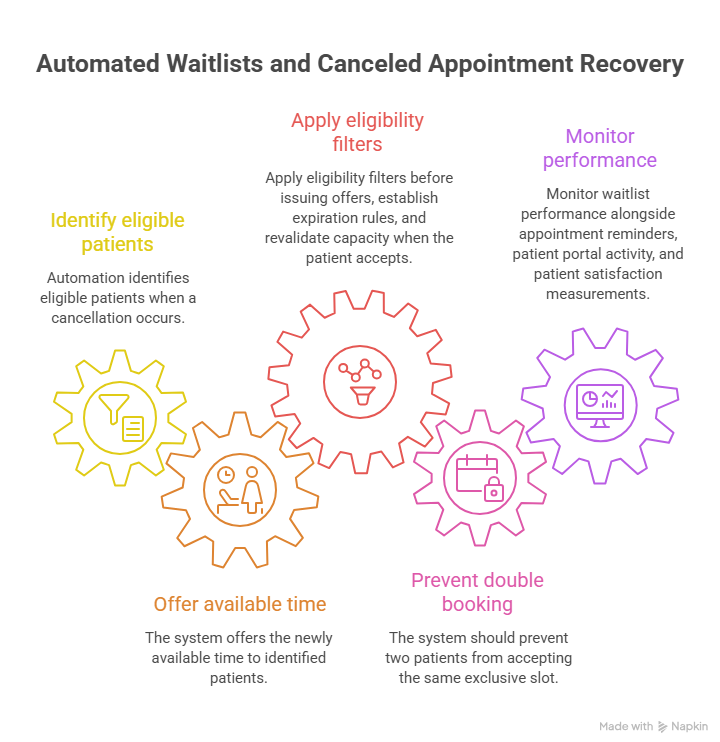
When a cancellation occurs, automation identifies eligible patients and offers them the newly available time.
The process must account for visit duration, provider restrictions, appointment type, and patient availability.
Recommended configuration: Apply eligibility filters before issuing offers, establish expiration rules, and revalidate capacity when the patient accepts.
The system should prevent two patients from accepting the same exclusive slot.
Monitor waitlist performance alongside appointment reminders, patient portal activity, and patient satisfaction measurements.
A successful integration increases usable appointment capacity without creating unnecessary work for reception staff.
5. Implementation Checklist: Security, Testing, Performance, and Workflow Optimization
Reliable integration requires documented ownership, technical validation, and staff training.
A scheduling platform may function correctly during a basic demonstration but fail when patients simultaneously book appointments, physicians change availability, or messages arrive out of order.
The following implementation framework offers a practical starting point for healthcare administrators and technology teams.
Phase 1: Map Systems and Define Data Ownership
Identify every application involved in the appointment lifecycle.
Typical components include the practice management system, EHR, patient portal, reminder software, and virtual check-in platform.
For each data element, document its authoritative source, permitted editors, downstream consumers, and correction procedure.
Essential fields include patient identifiers, appointment identifiers, provider assignments, appointment types, start and end times, locations, and booking statuses.
A documented field-mapping matrix reduces implementation ambiguity and helps prevent medical-record discrepancies.
Completion criterion: Every important data element has a designated owner and a documented synchronization process.
Phase 2: Validate Interfaces and Security Permissions
Review the precise operations supported by each vendor.
FHIR compatibility alone does not establish that a system supports external appointment creation. Some systems expose read-only scheduling information or require proprietary interfaces for booking.
Confirm supported APIs, HL7 messages, authentication requirements, response behavior, and operational limits.
Use suitable access controls and limit information exchange to what the workflow requires.
Healthcare integrations involving protected health information should be reviewed under applicable medical compliance requirements, patient privacy procedures, and confidential communication standards.
When a vendor handles protected health information on behalf of a covered entity, determine whether the relationship requires a HIPAA business associate agreement.
Completion criterion: Every connection has verified permissions, documented security controls, and approved data flows.
Phase 3: Test High-Risk Scheduling Scenarios
Test routine bookings, cancellations, rescheduling, and reminder delivery.
Then test exceptional conditions that commonly generate hidden errors.
These should include simultaneous booking attempts, network timeouts, duplicate requests, unavailable providers, changed locations, failed webhooks, and patient identity conflicts.
Also examine whether incorrect appointment types produce scheduling errors and whether stale appointment reminders persist after cancellations.
Use nonproduction or appropriately controlled test data, and document expected results.
Build a recovery process based on crisis communication procedures, scheduling conflict management, and team coordination standards.
Completion criterion: High-risk scenarios pass documented acceptance tests, and every unresolved defect has an owner.
Phase 4: Monitor Performance With Meaningful KPIs
Successful implementation requires ongoing measurement.
Start with confirmed booking accuracy, synchronization delays, unresolved interface errors, duplicate appointments, and appointment attendance.
Booking success rate can be calculated as successful confirmed bookings divided by valid booking attempts.
Duplicate-booking rate can be calculated as identified duplicate bookings divided by confirmed bookings, using a consistent definition.
Synchronization delay measures the time between an authoritative appointment update and its appearance in another application.
Failed-message backlog measures unresolved integration events and their age.
No-show rate measures the proportion of eligible scheduled appointments recorded as no-shows under a consistent organizational definition.
Cancellation refill rate measures how frequently eligible canceled slots are successfully booked again.
These indicators should be interpreted alongside patient satisfaction metrics, appointment reminder effectiveness, and healthcare automation outcomes.
Establish baseline performance before introducing a new integration. This allows meaningful comparisons after implementation and helps identify unintended consequences.
Phase 5: Train Administrative Teams and Establish Recovery Procedures
Technical reliability depends on staff understanding what to do when systems disagree.
Front-desk employees should know how to identify missing appointments, verify the authoritative record, escalate patient identity problems, and correct errors within their permissions.
Provide examples of common exceptions and written procedures for responding.
Training should cover professional patient interactions, medical front-desk etiquette, written communication, and scheduling conflict resolution.
Administrators should also understand when an issue requires IT support, vendor escalation, compliance review, or clinical staff involvement.
Phase 6: Audit and Improve the Integration Regularly
Scheduling requirements change as practices add providers, locations, procedures, and digital services.
Periodic audits should verify that integrations still support current appointment types and organizational policies.
Review unused interfaces, excessive permissions, recurring mapping errors, delayed messages, and failed synchronization attempts.
When evaluating new vendors, require demonstrations of actual scheduling functions rather than accepting general interoperability claims.
A vendor should be able to explain how its platform handles duplicate booking requests, appointment cancellations, error recovery, and patient identity matching.
Review healthcare automation terminology, medical compliance requirements, and patient satisfaction indicators when deciding which improvements deserve priority.
The most useful integration is one that staff can operate confidently, patients can rely on, and administrators can monitor when something goes wrong.
6. FAQs About Patient Scheduling Integrations
-
An EHR integration connects scheduling information with clinical records and related workflows. A practice management integration usually focuses on appointments, registration, billing-related administration, and operational coordination.
Some healthcare platforms combine both functions. Administrators should identify the authoritative appointment system before connecting external patient portals or scheduling applications.
-
FHIR provides resources and interoperability mechanisms that can support scheduling, but prevention of conflicting reservations depends on the implementation's capacity rules and transaction controls.
The booking system should revalidate availability and handle concurrent requests appropriately.
Test these controls through scheduling conflict management, practice management workflows, and controlled booking simulations.
-
Schedule defines the availability framework for schedulable resources. Slot represents a time interval associated with that schedule. Appointment represents a planned healthcare event involving specific participants.
The precise booking process depends on the implementation and system rules.
Understanding these distinctions improves appointment coordination, patient portal configuration, and clinical encounter preparation.
-
Yes. HHS considers appointment reminders part of treatment, and HIPAA generally permits them without a separate patient authorization.
Organizations must still protect patient information and apply appropriate communication safeguards.
Review patient privacy procedures, appointment reminder settings, and confidential communication standards. Other applicable messaging laws and patient communication preferences may also affect implementation.
-
The authoritative scheduling platform should record the change and distribute appropriate updates to connected applications.
Receiving systems should correctly identify the original booking and update its status, time, or associated resources.
Appointment reminders, patient portal displays, and virtual check-in workflows should reflect the confirmed appointment state.
Regular reconciliation helps identify updates that fail silently.
-
The appropriate sequence depends on the service, payer rules, and organizational policy.
Some clinics schedule appointments before completing eligibility checks. Others require verification or authorization-related review before confirming certain procedures.
Eligibility verification and prior authorization are separate processes.
Healthcare administrators should apply coordination-of-benefits procedures, professional patient communication, and medical compliance practices.
