

Virtual patient intake systems can eliminate repetitive paperwork, reduce registration delays, and improve the accuracy of information entering medical records. However, poorly configured forms can create duplicate charts, missed consent requirements, insurance verification errors, and frustrating patient experiences. Understanding the technology is essential for administrators responsible for reliable digital registration. This interactive dictionary explains the terminology behind virtual check-in systems, patient scheduling integrations, cloud-based EMRs, and workflow automation, with practical examples and troubleshooting strategies for real healthcare environments.
1. Virtual Patient Intake Fundamentals: How Digital Registration Systems Work
Virtual patient intake refers to the collection, verification, and processing of registration and health information through electronic systems before or during a healthcare encounter.
A typical intake workflow may include appointment confirmation, identity verification, demographic updates, insurance information, medical history questionnaires, consent documentation, and payment collection.
The value comes from moving verified information into the appropriate operational and clinical workflows. A patient completing a digital form has limited benefit if employees must manually reenter those answers into the EHR.
The six stages of a successful virtual intake workflow
Patient identification: Match the individual to the correct existing record or establish an appropriate new record.
Information collection: Request demographic, clinical, insurance, and communication details relevant to the encounter.
Validation: Identify missing fields, inconsistent answers, unsupported formats, and possible duplicate information.
Documentation: Capture applicable acknowledgments, signatures, authorizations, and consent records.
System integration: Transfer information to the appropriate registration, scheduling, billing, and clinical systems.
Exception resolution: Route uncertain matches, failed transmissions, and incomplete submissions to responsible employees.
These stages connect digital patient check-in with medical administrative communication, EHR data handling, and automated healthcare workflows.
Why intake completion alone is a weak performance indicator
A dashboard might show that 94% of patients completed digital forms before their appointments. That figure can conceal operational problems.
For example, completed forms may still contain incorrect insurance member IDs, outdated medication lists, duplicate patient records, or signatures that were never correctly attached to the encounter.
An effective intake program therefore measures verified, usable information, alongside completion rates.
Consider a practice receiving 200 intake submissions daily. If 12 require manual identity reconciliation, 18 contain missing insurance details, and 9 fail to transfer into the EHR, staff may experience substantial administrative rework despite high completion.
Administrators should analyze these problems through medical technology troubleshooting, registration communication procedures, scheduling software integration reviews, and healthcare compliance monitoring.
| # | Term | Practical Meaning | Risk & Administrative Action |
|---|---|---|---|
| 1 | Digital Intake | Electronic collection and processing of registration and encounter information. | Track completed forms that still require reentry. Review digital check-in workflows. |
| 2 | Pre-registration | Collecting required information before the appointment date or arrival. | Send invitations early enough to resolve errors through appointment reminder tools. |
| 3 | Patient Portal | Authenticated digital access to selected patient services, records, and forms. | Prevent account confusion using EHR access controls. |
| 4 | Self-Service Kiosk | Shared on-site device used for check-in or information updates. | Clear previous sessions and protect screen privacy using device security safeguards. |
| 5 | Mobile-Responsive Form | An intake form designed to function across screen sizes and devices. | Test long fields and upload controls during technical quality assurance. |
| 6 | Identity Proofing | Establishing confidence that a person is who they claim to be. | Use risk-appropriate verification before giving account access; follow confidentiality procedures. |
| 7 | Patient Matching | Linking submitted information to the correct patient across systems. | Escalate uncertain matches before updating records; coordinate through team handoff procedures. |
| 8 | Duplicate Medical Record | Multiple charts incorrectly representing the same patient. | Use an approved duplicate-resolution process instead of guessing during front-desk registration. |
| 9 | Master Patient Index (MPI) | An index used to link patient identities and records within an organization or network. | Review duplicate identifiers before connecting scheduling applications. |
| 10 | Deterministic Matching | Matching records through specified exact agreement rules on selected identifiers. | Watch for legitimate variations in names or addresses; route exceptions through reconciliation workflows. |
| 11 | Probabilistic Matching | Estimating whether records refer to the same person using weighted similarities. | Send uncertain matches for human review using automation controls. |
| 12 | Electronic PHI (ePHI) | Protected health information stored or transmitted electronically. | Limit unauthorized access to forms and uploads with healthcare data safeguards. |
| 13 | Intake Questionnaire | A structured set of questions collecting health, demographic, or visit information. | Separate clinical questions from administrative questions using clear form language. |
| 14 | Conditional Logic | Showing or requiring questions based on earlier answers. | Test every branch to prevent missing important responses in automated forms. |
| 15 | Field Validation | Checking whether a response meets defined format or completeness rules. | Distinguish missing values from invalid values during form troubleshooting. |
| 16 | Structured Data Capture | Recording answers in consistently defined fields rather than free-text documents alone. | Preserve clinical meaning during EHR field mapping. |
| 17 | FHIR Questionnaire | An HL7 FHIR resource describing the questions, answer options, and rules of a form. | Verify question definitions during integration planning. |
| 18 | FHIR QuestionnaireResponse | An HL7 FHIR resource representing answers supplied to a questionnaire. | Check that responses are linked to the correct patient and encounter in clinical record workflows. |
| 19 | HL7 FHIR API | A standardized approach for exchanging defined healthcare information between systems. | Verify supported resources, permissions, and field mapping through integration testing. |
| 20 | EHR Integration | Moving or synchronizing intake information with the electronic health record. | Compare source data with destination records using data transfer checks. |
| 21 | Bidirectional Synchronization | Exchange of supported data updates in both directions between applications. | Define which system owns each field to avoid overwrite conflicts in synchronized workflows. |
| 22 | Field Mapping | Defining how data elements correspond between source and destination systems. | Test medication, allergy, and contact fields using EHR integration validation. |
| 23 | Integration Error Queue | A worklist of failed or unprocessed data transfers requiring attention. | Set owners and escalation deadlines for integration exceptions. |
| 24 | Electronic Signature | A legally recognized electronic method for indicating agreement or signing where applicable requirements are met. | Preserve signer, document version, and timing evidence through consent workflows. |
| 25 | Notice of Privacy Practices Acknowledgment | Documentation of a patient's acknowledgment of receiving a required privacy notice, when applicable. | Keep the notice distinct from treatment consent through privacy communication procedures. |
| 26 | Consent to Treat | Permission for healthcare services under applicable legal and clinical requirements. | Avoid treating it as blanket authorization for unrelated data disclosures; use consent-specific procedures. |
| 27 | Insurance Eligibility Verification | Checking available coverage details for a patient and service date. | Identify inactive coverage before visits; route issues through revenue-cycle handoffs. |
| 28 | Prior Authorization | A payer's advance approval process for certain services, subject to plan rules. | Separate authorization status from eligibility within appointment readiness workflows. |
| 29 | Accessibility | Designing digital forms usable by people with different disabilities and assistive technologies. | Test keyboard access, screen readers, and error messages using patient support procedures. |
| 30 | Abandoned Intake Recovery | Helping patients complete interrupted submissions without losing validated information. | Send safe reminders and offer assisted completion through reminder automation. |
| 31 | Reconciliation Queue | A worklist for comparing and resolving patient-submitted changes before committing them. | Assign responsibility for medication and demographic discrepancies through exception workflows. |
| 32 | Downtime Workflow | An approved alternative for continuing intake when digital systems become unavailable. | Maintain a secure fallback and controlled reentry process using downtime troubleshooting guidance. |
2. How Virtual Patient Intake Systems Handle Real Registration Challenges
A well-designed digital intake process should reduce the number of decisions employees must reconstruct manually. The most expensive failures often occur between form submission and successful use of that information in the clinical or billing workflow.
Scenario A: A patient completes intake using a different name
A returning patient submits an intake form using a shortened first name and a new phone number. The EHR contains their legal name and previous contact information.
An exact-match process may create a second chart. An overly permissive matching process could attach the submission to another person with similar details.
Recommended workflow:
Compare available identifiers against existing records.
Examine potential matches using the organization's approved matching rules.
Hold uncertain submissions in an identity-resolution queue.
Confirm the correct patient through an authorized verification process.
Record the resolution and permit approved updates to proceed.
The practice should measure how often submissions require manual identity resolution and how often confirmed duplicates are created.
Connect this review with digital check-in procedures, front-desk verification practices, EHR troubleshooting, and team communication standards.
Scenario B: A completed medication questionnaire never reaches the clinician
A patient submits a medication list before an appointment. The intake platform displays a successful submission, but the EHR integration fails because a destination field rejects an unsupported value.
The receptionist sees a completed form. The clinician sees the previous medication list.
This is a critical distinction between submission success and integration success.
A reliable workflow should preserve the original response, flag the failed transfer, route it to the responsible team, and make the information available for appropriate clinical reconciliation.
Medication changes should be reviewed through the organization's clinical procedures rather than silently overwriting an existing medication list.
Use cloud-based EMR integration controls, medical technology troubleshooting, workflow exception automation, and clinical documentation communication to prevent hidden transfer failures.
Scenario C: Insurance verification passes, but the service requires prior authorization
A patient's digital intake confirms that an insurance policy appears active. The appointment involves an imaging procedure requiring prior authorization under the applicable plan.
An active eligibility response is insufficient evidence that the payer has approved that service.
The intake system should maintain separate fields or statuses for eligibility, benefits information, referral requirements, and prior authorization.
Staff need a clear worklist identifying unresolved payer requirements before the appointment.
This can be incorporated into scheduling integration workflows, appointment reminder systems, administrative team communication, and patient interaction scripts.
Operational safeguard: Display separate verification timestamps and outstanding requirements. An eligibility check completed last month may require refreshing when coverage or appointment details change.
Scenario D: A patient cannot complete a required digital form
A patient using a screen reader encounters an unlabeled calendar control. Another patient cannot read the form in the available language. Both abandon intake.
Marking these submissions as incomplete without investigating the cause conceals a usability or accessibility failure.
Administrators should test forms using keyboards, assistive technologies, different mobile devices, and available language options. Required fields should display useful error messages and preserve entered information when validation fails.
Offer a reliable assisted intake pathway when patients cannot complete the digital process independently.
Train staff through therapeutic communication techniques, rapport-building practices, verbal communication training, and front-desk patient support procedures.
Scenario E: A guardian completes intake for a minor
A parent or guardian uses a proxy account to submit a minor's demographic and clinical information. The system automatically grants access to every note and response associated with the patient's chart.
This may create inappropriate disclosure risks where applicable laws protect certain confidential services or limit proxy access.
Intake platforms should distinguish the authority to submit registration information from the scope of portal access granted afterward.
A clinic should have a documented process for handling age-based restrictions, legal authority, sensitive information, and changes in proxy permissions.
Coordinate these controls through confidential communication policies, informed consent procedures, secure messaging settings, and healthcare compliance reviews.
3. Designing Accurate, Accessible, and Compliant Digital Intake Forms
Digital form design should be evaluated through the information the organization genuinely needs, the decisions the answers support, and the consequences of incorrect or missing responses.
Long forms increase completion burden. Poorly structured short forms can leave critical information unresolved. Good design balances accuracy, usability, and workflow requirements.
Build questions around decisions, rather than departments
A common mistake is combining every department's preferred questions into a single intake packet.
The patient may be asked to enter their address multiple times, repeat medications across several screens, and answer questions that have no relevance to the scheduled service.
Instead, map each question to its owner and downstream purpose.
For example:
A contact preference field supports future communication and reminders.
An insurance subscriber field supports coverage and billing workflows.
A medication response supports clinical review.
An allergy response requires appropriate clinical handling.
An acknowledgment confirms completion of a specific documentation step.
Each question should have an identified destination and a defined process for interpreting its answer.
Connect this design approach with written administrative communication, patient scheduling integrations, medical documentation practices, and EHR data management.
Use conditional logic without hiding important questions
Conditional logic can shorten a form by showing questions relevant to earlier answers.
For instance, selecting that an interpreter is needed may reveal a language preference field. Reporting a prior surgery may reveal fields for procedure type and approximate date.
Every conditional pathway needs testing.
A poorly configured branch can hide a required field or create contradictory answers. Administrators should maintain test cases covering affirmative responses, negative responses, unknown answers, missing inputs, and changed responses.
A particularly important test occurs when a patient changes an earlier answer. Previously displayed information should be retained or cleared according to documented rules, avoiding unintended clinical contradictions.
These tests fit naturally into healthcare automation quality assurance, technology troubleshooting, workflow design procedures, and clinical communication reviews.
Separate acknowledgment, consent, and authorization
Electronic intake packets frequently combine treatment consent, financial policies, privacy notices, and disclosure authorizations.
These documents may serve distinct purposes and have different requirements.
For example, acknowledging receipt of a Notice of Privacy Practices does not automatically constitute a HIPAA authorization for an unrelated disclosure. Similarly, a consent to treatment may have different requirements from permission to communicate with a designated third party.
Where applicable, systems should preserve the document version, signer identity, signature event, date, and associated patient or encounter.
For HIPAA-covered direct treatment providers, the Privacy Rule generally requires a good-faith effort to obtain written acknowledgment of receipt of the Notice of Privacy Practices at first service delivery, with documentation of unsuccessful efforts where required.
Review digital documentation through informed consent guidance, confidential patient communication, healthcare compliance systems, and secure electronic records procedures.
Build recovery paths for incomplete submissions
Patients may lose connectivity, switch devices, misunderstand a question, or stop before completing registration.
An effective intake system should indicate progress, preserve permitted draft information securely, and support a safe way to resume.
A reminder should avoid exposing unnecessary clinical details through message previews. Sensitive links should expire appropriately or require suitable authentication.
Administrators should track where abandonment occurs. A spike after insurance-card upload could indicate device incompatibility, file-size restrictions, or confusing instructions.
Investigate these patterns through appointment reminder analytics, secure messaging procedures, digital check-in troubleshooting, and patient support scripts.
Validate actual EHR outcomes before deployment
Pilot testing should follow information from the original answer through every downstream system.
For example, enter an allergy response into a test intake form. Confirm whether the corresponding EHR receives the correct response, whether it requires clinical review, and whether the intended user can find it.
Repeat this process for contact details, insurance information, medication histories, guardian details, and signed documents.
Where HL7 FHIR is used, distinguish the form definition represented by a Questionnaire from submitted answers represented by a QuestionnaireResponse. Actual integration capabilities depend on the vendor's supported resources and implementation.
Document unsupported fields, transformation rules, failed transmissions, and who resolves them.
Clinical information requiring reconciliation should enter the appropriate review workflow before it is treated as verified.
The objective is a dependable information handoff across EHR integrations, medical administration workflows, clinical documentation processes, and healthcare technical support.
4. How to Implement Virtual Patient Intake Systems Without Creating New Administrative Problems
A successful implementation requires coordination between registration, clinical staff, billing, IT, and compliance personnel. Each group handles different information and may interpret readiness differently.
The implementation plan should establish one measurable objective for each workflow stage and a clear owner for unresolved exceptions.
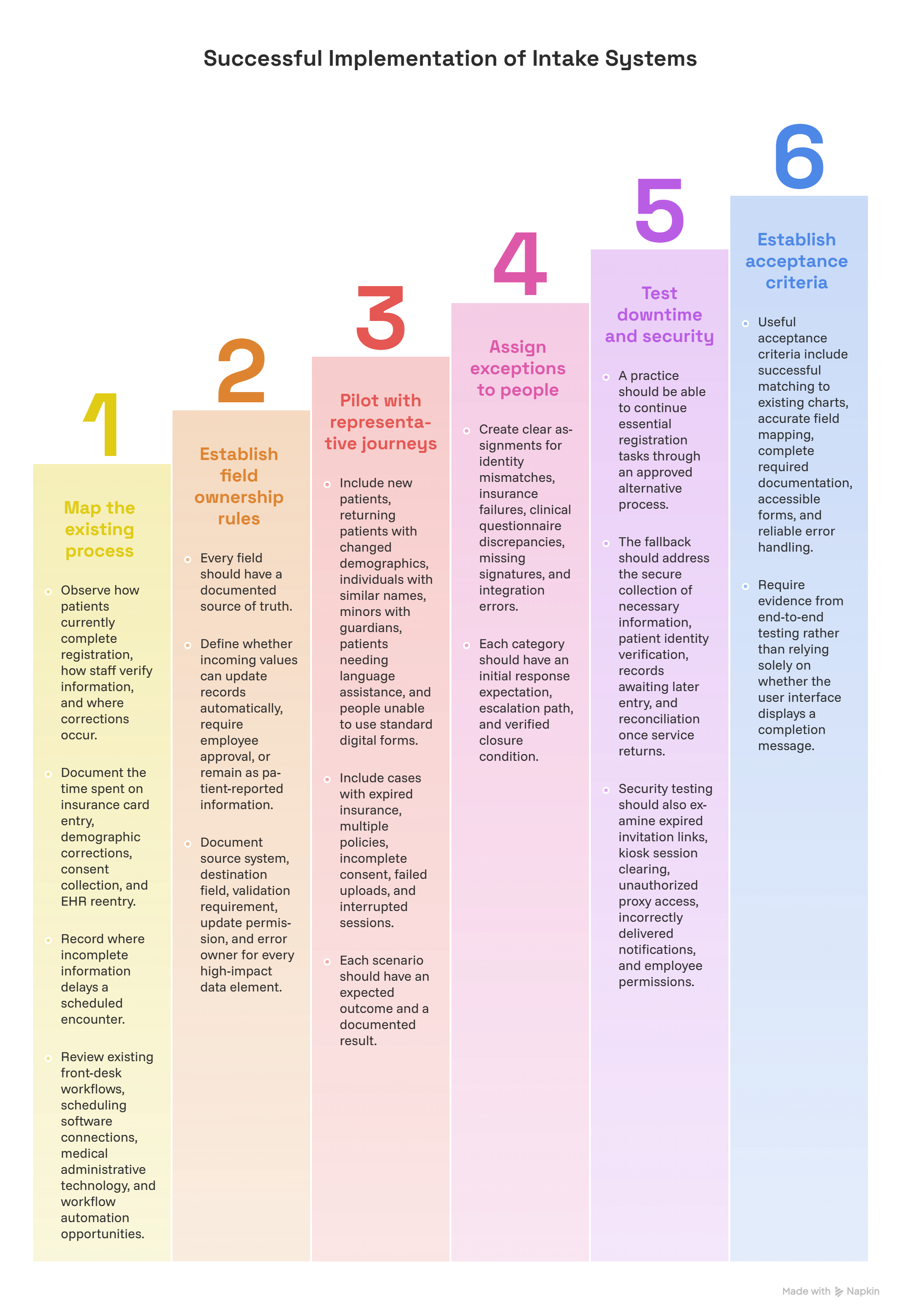
Step 1: Map the existing process before changing software
Observe how patients currently complete registration, how staff verify information, and where corrections occur.
Document the time spent on insurance card entry, demographic corrections, consent collection, and EHR reentry. Record where incomplete information delays a scheduled encounter.
This creates a meaningful baseline for evaluating improvements.
For example, if staff spend four minutes manually reentering each submitted history, the organization should examine EHR integration before investing heavily in more reminder messages.
Review existing front-desk workflows, scheduling software connections, medical administrative technology, and workflow automation opportunities.
Step 2: Establish field ownership and reconciliation rules
Every field should have a documented source of truth.
For example, the EHR may own verified demographic information while the intake platform temporarily holds patient-submitted changes pending review.
A patient changing their mailing address is different from a patient reporting that a medication has been discontinued. The first may follow an administrative verification process. The second requires appropriate clinical reconciliation.
Define whether incoming values can update records automatically, require employee approval, or remain as patient-reported information.
This distinction is critical in cloud-based EHR integration, clinical transcription processes, administrative automation, and team communication workflows.
Configuration rule: Document source system, destination field, validation requirement, update permission, and error owner for every high-impact data element.
Step 3: Pilot with representative patient journeys
Testing only a straightforward adult follow-up appointment provides limited assurance that the system can handle real registration complexity.
A practical pilot should include new patients, returning patients with changed demographics, individuals with similar names, minors with guardians, patients needing language assistance, and people unable to use standard digital forms.
Include cases with expired insurance, multiple policies, incomplete consent, failed uploads, and interrupted sessions.
Each scenario should have an expected outcome and a documented result.
For example, a returning patient who changes their address should generate the appropriate update or verification task without creating an unrelated chart.
Pilot planning should connect virtual check-in training, patient interaction procedures, technical troubleshooting methods, and confidentiality controls.
Step 4: Assign exceptions to specific people
An error queue is useful only when someone owns it.
Create clear assignments for identity mismatches, insurance failures, clinical questionnaire discrepancies, missing signatures, and integration errors.
Each category should have an initial response expectation, escalation path, and verified closure condition.
A transmitted form should remain unresolved when its destination has rejected the data. Similarly, an insurance task should remain open when eligibility has been checked but another required verification is outstanding.
Administrators can organize these responsibilities through workflow automation tools, healthcare compliance systems, team communication procedures, and medical administrative troubleshooting.
Step 5: Test downtime and security responses
Intake systems may become temporarily unavailable because of network interruptions, vendor outages, device problems, or authentication failures.
A practice should be able to continue essential registration tasks through an approved alternative process.
The fallback should address the secure collection of necessary information, patient identity verification, records awaiting later entry, and reconciliation once service returns.
Avoid leaving unprotected forms or untracked paper documents in shared areas.
Security testing should also examine expired invitation links, kiosk session clearing, unauthorized proxy access, incorrectly delivered notifications, and employee permissions.
These procedures connect healthcare cybersecurity safeguards, secure messaging controls, confidential communication requirements, and medical technology downtime procedures.
Step 6: Establish acceptance criteria before launch
A practice should decide what constitutes successful implementation before reviewing the vendor's demonstration.
Useful acceptance criteria include successful matching to existing charts, accurate field mapping, complete required documentation, accessible forms, and reliable error handling.
Require evidence from end-to-end testing rather than relying solely on whether the user interface displays a completion message.
For example, confirm that a submitted insurance update reaches the expected billing workflow, that an incomplete consent remains flagged, and that a clinical response is available to the appropriate reviewer.
An implementation review should combine EHR integration testing, scheduling synchronization, healthcare workflow automation, and compliance verification.
5. Virtual Patient Intake Performance Metrics, Quality Audits, and Troubleshooting
Virtual intake performance should be evaluated through operational outcomes rather than completed-form totals alone.
A high submission rate can coexist with duplicate records, rejected data transfers, lengthy reconciliation queues, and delayed appointments. Administrators need metrics that reveal these hidden failures and establish whether improvements reduce actual work.
The following seven measures can support practical performance reviews.
Metric 1: Verified Intake Completion Rate
Calculation: Submissions passing all required intake checks ÷ total eligible intake invitations × 100.
This measures the percentage of invited patients whose intake is complete according to defined criteria.
For example, 180 verified submissions from 200 eligible invitations produce a 90% verified completion rate.
Define those criteria before calculating the measure. Depending on the workflow, they may include completed demographic information, applicable forms, correct patient association, and successful processing.
Track the result by appointment type, device, and registration method using virtual check-in workflows, appointment reminder software, and workflow automation tools.
Metric 2: Patient Identity Exception Rate
Calculation: Submissions requiring identity reconciliation ÷ total intake submissions × 1,000.
This reveals how often the system cannot confidently associate incoming information with the appropriate patient record.
For example, 15 identity exceptions among 1,500 submissions produce 10 exceptions per 1,000 submissions.
Investigate the causes separately. Name variations, outdated contact information, incomplete identifiers, and matching configuration problems may require different corrective measures.
Review exceptions through front-desk verification practices, patient scheduling integrations, and technical troubleshooting workflows.
Metric 3: First-Pass Data Validation Rate
Calculation: Submissions passing all defined validation checks on the first attempt ÷ submissions evaluated × 100.
This measures initial data-entry quality and form design effectiveness.
Evaluate failures by field rather than reporting only an overall percentage. An insurance member ID field producing repeated errors may require better instructions or a more appropriate input format.
A demographic field with frequent corrections may indicate problems with prefilled information or unclear questions.
Use written communication principles, digital patient intake reviews, and healthcare technology troubleshooting to identify the causes.
Metric 4: EHR Transfer Success Rate
Calculation: Successfully processed intake transfers ÷ attempted intake transfers × 100.
This measures whether information sent by the intake system reaches its intended destination and is accepted for processing.
The success definition should require appropriate confirmation from the destination system. A request sent successfully over the network may still fail downstream validation.
Where relevant, track patient association, encounter association, and field-level accuracy separately.
Connect these measures to cloud-based EMR systems, patient scheduling integration checks, and healthcare automation monitoring.
Metric 5: Manual Rework Time per Encounter
Calculation: Total employee time spent correcting intake-related problems ÷ encounters evaluated.
Measure the time required to resolve missing information, duplicate records, rejected transfers, and incomplete documentation.
For example, 240 minutes of corrective work across 80 encounters equals three minutes of rework per encounter.
Segment this figure by correction type and employee responsibility. This helps identify whether improvement should focus on the form design, EHR integration, or departmental processes.
Use findings to improve front-desk operations, team communication, and workflow automation.
Metric 6: Overdue Exception Rate
Calculation: Open intake exceptions past their assigned resolution deadlines ÷ total open intake exceptions × 100.
This reveals whether unresolved problems are accumulating.
An exception queue should distinguish cases requiring immediate attention before an appointment from lower-priority corrections.
A missing signature needed before a scheduled procedure may have different operational consequences from a nonurgent demographic update.
Review queue aging, assignment accuracy, and verified closure through compliance software, administrative troubleshooting, and team communication workflows.
Metric 7: Intake Abandonment Rate
Calculation: Eligible intake sessions started but abandoned before submission ÷ eligible intake sessions started × 100.
This measures the percentage of started sessions that end without submission during the defined measurement period.
Investigate abandonment by question, device, language, browser, and entry pathway.
An unusually high abandonment rate after document upload may suggest a technical issue, while abandonment after repeated identification prompts may indicate confusing instructions or authentication friction.
Analyze these patterns with appointment reminder tools, patient interaction procedures, digital check-in systems, and technology support processes.
Turning measurement into improvements
A practical monthly audit can select a sample of completed intake cases and trace each one through patient matching, form validation, consent documentation, integration processing, and exception closure.
Record the first point where an error occurred and determine whether it originated from patient input, form configuration, data mapping, or employee handling.
Assign a corrective action to the responsible team and test whether the same failure reappears.
The practice should review these indicators together because improving one metric may create problems elsewhere. For instance, removing verification steps might improve completion speed while increasing identity errors.
A balanced review incorporates healthcare cybersecurity safeguards, administrative workflow quality, patient communication standards, and compliance monitoring.
6. Frequently Asked Questions About Virtual Patient Intake Systems
-
Online appointment scheduling generally focuses on selecting, confirming, changing, or canceling appointment times.
Virtual patient intake collects and processes information required to prepare for an encounter. It may include identity verification, demographic updates, insurance information, medical history questionnaires, acknowledgments, and applicable consent documentation.
The two systems may be integrated so that an appointment automatically triggers the appropriate intake process.
Administrators should evaluate whether information flows correctly between scheduling integrations, virtual check-in systems, appointment reminder software, and EHR platforms.
-
Many systems support automated transfers or updates, but the available functionality depends on vendor capabilities, configuration, and integration design.
Some demographic fields may be eligible for automated updates after appropriate validation. Clinical responses, including medications and allergies, may require reconciliation by authorized professionals.
Organizations should define which fields can be updated automatically and which must enter an approval queue.
Test the actual destination behavior through EHR integration procedures, healthcare automation testing, and medical technology troubleshooting.
-
The legal effect of an electronic form depends on the type of consent or authorization involved, its content, applicable laws, and the circumstances under which it was completed.
A checkbox acknowledging a privacy notice, a treatment consent, and a HIPAA authorization may serve different purposes.
The system should preserve the appropriate documentation and evidence of the signing event where required.
Administrators should work with compliance personnel to configure informed consent processes, confidential communication procedures, electronic records handling, and compliance documentation.
-
A reliable approach combines consistent demographic collection, patient matching rules, duplicate detection, and human review of uncertain matches.
Systems should be tested with realistic name variations, changed phone numbers, hyphenated names, shared household contact information, and patients with similar identifiers.
Staff should follow approved identity-resolution procedures before merging or creating records when an uncertain match appears.
Track confirmed duplicates separately from suspected matches to avoid misleading performance measures.
These controls should be incorporated into front-desk registration practices, patient scheduling integrations, administrative troubleshooting, and team communication.
-
The submitted information should be delivered to the appropriate clinical review workflow.
The organization should preserve the patient's original response, identify relevant differences from existing records, and provide the information to an authorized professional for reconciliation.
An automated system should follow documented rules for updating or presenting clinical information, especially where direct changes could affect clinical decisions.
Administrators should verify that the information reaches the correct encounter and reviewer through EHR data workflows, clinical documentation procedures, medical dictation systems, and team handoff protocols.
-
Practices should provide an accessible alternative or appropriate assistance according to applicable requirements and patient needs.
Potential barriers include visual or motor impairments, limited digital literacy, language differences, unavailable devices, and unreliable connectivity.
Usability testing should cover screen-reader compatibility, keyboard navigation, error recovery, readable instructions, and supported translation or interpretation workflows.
Employees should be trained to offer assistance while protecting sensitive information and maintaining patient dignity.
Relevant training includes patient interaction scripts, therapeutic communication, verbal communication techniques, and front-desk etiquette.
