

An electronic prescription can leave a medical practice successfully yet still encounter pharmacy rejection, incorrect medication details, insurance restrictions, or refill processing delays. Medical administrators need to recognize these problems before they become missed treatment opportunities, unnecessary callbacks, or repeated prescription requests.
This interactive dictionary explains essential e-prescribing terminology, prescription transmission standards, electronic prior authorization, controlled-substance security, and pharmacy communication workflows. You'll learn how to investigate failed prescriptions, distinguish technical errors from clinical decisions, manage medication-related administrative queues, and build more reliable electronic prescribing processes.

1. Understanding E-Prescribing: Core Terms, Prescription Lifecycles, and Administrative Responsibilities
Electronic prescribing, commonly called e-prescribing or eRx, allows authorized healthcare professionals to create and transmit prescriptions electronically to pharmacies through compatible prescribing systems and networks.
For medical administrators, e-prescribing involves significantly more than entering a medication name into an electronic health record. Every prescription passes through a sequence of verification, authorization, transmission, and pharmacy-processing activities.
These activities connect cloud-based electronic medical records, healthcare workflow automation, secure clinical communication, and medical administration troubleshooting.
The five stages of an electronic prescription
Understanding prescription status prevents one of the most common administrative mistakes: treating an electronic order as completed before the pharmacy has actually processed it.
Stage 1: Prescription preparation. An authorized employee or prescriber enters permitted information, including the patient, medication, selected pharmacy, and relevant prescription details. Staff responsibilities depend on the prescription type, system permissions, and applicable requirements.
Stage 2: Clinical review and authorization. The prescriber reviews the order, assesses medication appropriateness, and completes the required signing process.
Stage 3: Electronic transmission. The prescribing application sends the prescription through its configured electronic network or connection.
Stage 4: Pharmacy processing. The receiving pharmacy processes the prescription, which may involve reviewing drug availability, clarifying directions, or resolving insurance restrictions.
Stage 5: Dispensing and follow-up. The pharmacy may dispense the medication, reject or hold the prescription, or request additional information. Dispensing visibility depends on the available system integrations and reporting functions.
A prescription marked sent in the EHR establishes only the status reported by that system. Pharmacy acceptance, claim adjudication, preparation, and dispensing are separate events.
This distinction becomes essential when handling patient phone communication, appointment-related prescription requests, medical front-desk interactions, and patient communication scripts.
E-prescribing versus computerized provider order entry
Computerized Provider Order Entry (CPOE) is the broader process of entering clinical orders electronically. Depending on the system, these orders may include medications, laboratory testing, imaging, and other clinical services.
E-prescribing focuses specifically on electronic prescription-related activities, including communication with external dispensing pharmacies.
A medication order entered during an inpatient hospital encounter may remain within a hospital's internal clinical workflow. An outpatient prescription intended for a community pharmacy usually requires the appropriate electronic prescribing process.
Administrators should understand this difference when reviewing medical documentation systems, EHR integration terminology, healthcare automation tools, and team communication procedures.
Who is responsible for prescription accuracy?
Electronic prescribing responsibilities should be divided according to professional authority.
Prescribers are responsible for clinical decisions, appropriate medication selection, directions, and legally required authorization.
Medical administrators may coordinate patient and pharmacy information, organize prescription requests, monitor transmission exceptions, obtain permitted administrative details, and route unresolved issues to appropriate personnel.
Pharmacy professionals evaluate prescriptions within their professional responsibilities and applicable dispensing requirements.
For controlled-substance prescriptions, federal EPCS rules require the prescribing practitioner to personally complete the applicable two-factor signing process. Administrative personnel may prepare permitted information under appropriate direction but cannot sign on behalf of the practitioner.
Clear boundaries support professional medical administration, confidential healthcare communication, medical team coordination, and healthcare compliance procedures.
36 of 36 terms shown
| # | E-Prescribing Term | What It Means | Common Problem | Medical Admin Response |
|---|---|---|---|---|
| 1 | Electronic Prescribing (eRx) | Electronic creation and transmission of prescriptions through compatible prescribing systems. | Staff assume a transmitted prescription has already been dispensed. | Verify the available status and coordinate through approved communication channels. |
| 2 | NCPDP SCRIPT | Standard for exchanging electronic prescriptions and related prescription transactions. | Incompatible implementations or message-processing errors disrupt exchange. | Record the transaction type and report the issue through technical troubleshooting. |
| 3 | NewRx | Electronic transaction used to send a new prescription to a pharmacy. | The expected prescription does not appear at the selected pharmacy. | Check the intended pharmacy, signing status, and transmission record. |
| 4 | RxRenewalRequest | Electronic request from a pharmacy asking the prescriber to renew a prescription. | A renewal request remains unanswered in the work queue. | Route the request to the authorized clinician using queue management procedures. |
| 5 | RxRenewalResponse | Electronic response communicating the prescriber's renewal decision. | A response is recorded but the pharmacy reports receiving nothing. | Verify the response and transmission status before requesting another prescription. |
| 6 | RxChange | Prescription-change request and response workflow, often initiated by a pharmacy. | A proposed alternative remains pending clinical approval. | Route the request through prescriber communication procedures. |
| 7 | CancelRx | Electronic request intended to cancel a previously transmitted prescription. | The pharmacy may have processed or dispensed the medication already. | Review the cancellation response and escalate uncertainty through pharmacy communication protocols. |
| 8 | RxFill | Electronic message communicating supported prescription dispensing status information. | The EHR has no fill confirmation although the patient reports pickup. | Check whether fill-status messaging is supported before assuming a dispensing failure. |
| 9 | Medication History | Information about recorded medications, prescriptions, and available dispensing history. | External medication records conflict with the current list. | Flag discrepancies for authorized clinical documentation review. |
| 10 | Pharmacy Identifier | Identifier used to distinguish a pharmacy location or endpoint in relevant systems. | A prescription routes to the wrong branch. | Verify the complete pharmacy address and available directory identifiers. |
| 11 | National Provider Identifier (NPI) | Standard U.S. identifier for covered healthcare providers. | Prescriber or pharmacy identity details do not match the intended record. | Confirm identifiers through authorized provider directory procedures. |
| 12 | EPCS | Electronic Prescribing for Controlled Substances using compliant systems and authentication. | A prescriber cannot complete controlled-substance signing. | Verify credential status and escalate through approved EPCS support procedures. |
| 13 | Two-Factor Authentication | Authentication using two distinct approved factors for protected prescribing actions. | A clinician loses access to the required signing factor. | Follow credential recovery procedures; never share another person's authentication factor. |
| 14 | Identity Proofing | Process verifying a practitioner's identity before appropriate EPCS credentials are issued. | Controlled-substance prescribing access remains pending. | Check completion through the designated credentialing process. |
| 15 | DEA Registration | Federal registration associated with authorized controlled-substance activities. | A practitioner's controlled-substance access fails validation. | Refer registration or authorization concerns to designated compliance personnel. |
| 16 | Sig | Prescription directions describing how medication is to be used. | Directions are incomplete, unclear, or contradictory. | Request prescriber clarification through documented communication. |
| 17 | Structured Sig | Medication directions represented through standardized, structured data elements. | Structured directions conflict with free-text instructions. | Flag inconsistent directions before the authorized prescriber finalizes the order. |
| 18 | Drug Strength | Amount or concentration of an active ingredient within a specified product. | The requested strength differs from the selected catalog item. | Route the discrepancy for authorized clinical verification. |
| 19 | Dosage Form | Physical formulation, such as tablet, capsule, solution, or cream. | A pharmacy requests clarification about the prescribed formulation. | Forward the exact request to the prescriber without independently changing the order. |
| 20 | Route of Administration | Method through which a medication is intended to be administered. | Directions and selected product information appear inconsistent. | Escalate through secure clinical messaging. |
| 21 | Dosing Frequency | How often a medication is intended to be taken or administered. | Free-text and structured instructions specify different frequencies. | Flag the conflict for the authorized clinician's review. |
| 22 | Quantity | Amount of medication authorized for dispensing. | Quantity conflicts with directions or stated treatment duration. | Request a clinical clarification. |
| 23 | Days' Supply | Estimated number of days a dispensed quantity is expected to last under the prescribed directions. | A payer or pharmacy questions the submitted supply. | Identify the mismatch and route calculation or prescribing questions appropriately. |
| 24 | Refills Authorized | Number of permitted additional dispensings under the prescription, subject to applicable rules. | The patient requests another fill after authorization is exhausted. | Check the renewal workflow through approved request management. |
| 25 | Dispense As Written (DAW) | Prescription or claim indicator related to brand dispensing and substitution requirements. | The pharmacy requests clarification about generic substitution. | Refer the question to the appropriate prescriber or pharmacy professional. |
| 26 | Generic Substitution | Dispensing an appropriate generic alternative when permitted under applicable requirements. | Patient expectations conflict with prescribed product or coverage rules. | Coordinate clarification using patient communication protocols. |
| 27 | National Drug Code (NDC) | U.S. identifier used for drug products and packaging configurations. | Product or package selection causes a catalog mismatch. | Record the disputed product identifier for authorized review. |
| 28 | RxNorm | Standardized terminology supporting normalized clinical drug names. | Different systems display inconsistent medication descriptions. | Report terminology mismatches through EHR integration support. |
| 29 | Formulary | List or structured coverage information describing medications under a health plan. | The prescribed medication is excluded or restricted. | Check available benefit information and route alternatives to the prescriber. |
| 30 | Formulary Tier | Plan classification that may affect cost sharing and coverage conditions. | The patient's expected copayment differs from the displayed estimate. | Explain that actual cost depends on verified benefit information. |
| 31 | Real-Time Prescription Benefit (RTPB) | Electronic benefit information that can provide patient-specific coverage and cost estimates. | Displayed estimates differ from pharmacy checkout amounts. | Check benefit timing and refer final pricing questions to the appropriate payer or pharmacy. |
| 32 | Electronic Prior Authorization (ePA) | Electronic workflow supporting payer review of medications requiring authorization. | A prescription cannot proceed because authorization remains pending. | Track required information through authorized follow-up workflows. |
| 33 | Pharmacy Benefit Manager (PBM) | Organization administering specified prescription benefits for health plans or sponsors. | Coverage restrictions or claim information require additional investigation. | Confirm the responsible benefit administrator before directing questions. |
| 34 | Pharmacy Claim Rejection | Response indicating a submitted pharmacy claim cannot be paid as submitted. | The pharmacy reports a rejection although the prescription was received. | Obtain the reported rejection reason and coordinate through appropriate pharmacy communication. |
| 35 | Transmission Acknowledgment | Technical status indicating a message was accepted or processed at a defined transmission stage. | Staff interpret technical delivery as dispensing confirmation. | Check the specific status and avoid equating acknowledgment with medication pickup. |
| 36 | Prescription Exception Queue | Worklist tracking prescription requests or transactions requiring further action. | Rejected, unanswered, or unresolved prescriptions accumulate. | Assign owners and escalation rules through queue management. |
Training reference for U.S. medical administration. Clinical decisions, prescription authorization, controlled-substance rules, and patient-specific medication changes require appropriately authorized professionals.
2. Prescription Transmission, Pharmacy Routing, and Refill Workflows: Where E-Prescribing Breakdowns Begin
A prescription workflow can fail even when the prescribing application appears functional. Wrong-pharmacy selection, unsigned orders, transaction rejections, unanswered renewal requests, and incomplete cancellation responses create different problems that require different solutions.
Medical administrators should investigate the specific transaction before asking a prescriber to issue another order.
NewRx, renewal, change, and cancellation: Four different workflows
A NewRx transaction sends a new prescription. It should be associated with the intended patient, prescriber, medication, and pharmacy.
An RxRenewalRequest represents a request for renewal. The authorized prescriber evaluates the request and issues an appropriate response.
An RxChange transaction supports communication about a proposed change, such as a pharmacy request involving product availability or an insurance-related issue.
A CancelRx communicates a request to cancel a previously transmitted prescription. Its success depends on the destination's processing and the prescription's existing status.
These transactions can be tracked through workflow automation systems, documented with written administrative communication, investigated through medical technology troubleshooting, and escalated using secure healthcare messaging.
A renewal request should never be interpreted as automatic authorization to continue medication.
Scenario 1: The patient says the pharmacy never received the prescription
Suppose a patient calls an outpatient clinic 30 minutes after an appointment and reports that their pharmacy cannot locate the new prescription.
The administrator should use the following investigation sequence:
Verify the patient's identity and identify the relevant prescription and encounter.
Confirm whether the prescription was signed and authorized for transmission.
Compare the selected pharmacy location with the pharmacy the patient contacted.
Review available transmission timestamps, statuses, and error messages.
Determine whether the pharmacy has checked its appropriate receiving or processing system.
Escalate unresolved transmission problems through the clinic's authorized workflow.
The distinction between prepared, signed, sent, rejected, and dispensed is critical.
An order saved as a draft may never have been transmitted. A transaction accepted by an intermediary may require additional verification to establish downstream processing.
Repeating the prescription before checking its original status can create duplicate active orders or unnecessary dispensing risk.
This situation benefits from precise patient interaction scripts, professional phone communication, team escalation procedures, and EHR troubleshooting.
Scenario 2: A refill request disappears into the administrative queue
A pharmacy submits a renewal request for a medication whose existing authorized refills have been exhausted.
The request reaches the medical practice, but nobody claims responsibility because the patient's usual clinician is unavailable.
The patient calls repeatedly, the pharmacy submits additional requests, and the inbox accumulates duplicates.
An effective renewal queue should track the original request, responsible clinician or covering workflow, time received, urgency, clinical review status, and final response.
Administrators can prevent duplicate handling by identifying requests already pending rather than opening a separate task for every incoming message.
For administrative workflow automation, medical team communication, patient messaging, and appointment coordination, the most important safeguard is an accountable owner for each unresolved renewal.
Potentially urgent interruption of treatment requires prompt escalation to authorized clinical personnel.
Scenario 3: A cancellation is requested after the prescription reaches the pharmacy
A prescriber identifies an error in an earlier order and submits a cancellation.
The EHR records the cancellation request, but the pharmacy may have already processed or dispensed the medication. The administrator must distinguish a request being sent from confirmation that the pharmacy successfully canceled the prescription.
When the cancellation status is uncertain, follow the approved communication procedure to clarify whether the pharmacy received and acted on the request.
Document the response and alert the responsible clinician if there is a risk involving medication already dispensed.
This process requires confidential pharmacy communication, accurate administrative documentation, assertive escalation skills, and secure communication systems.
Prescription-routing troubleshooting checklist
When a transaction fails, collect the minimum information required for investigation:
The affected prescription or transaction identifier.
Patient and encounter identifiers through approved channels.
Prescriber identity and selected pharmacy location.
Transaction type, such as NewRx, RxChange, or RxRenewal.
Time of the attempted transmission and available response.
Error code or message displayed by the system.
Whether another prescription or request has already been created.
Patient impact and the appropriate escalation owner.
A complete support request reduces repeated investigations across cloud-based EMR systems, healthcare automation platforms, technical support workflows, and administrative team handoffs.
The goal is to establish what happened to the original transaction before choosing the next authorized action.
3. E-Prescribing Medication Data, Insurance Restrictions, and Electronic Prior Authorization
Electronic prescribing systems exchange medication information that must be sufficiently precise for clinical review, pharmacy interpretation, and insurance processing.
Administrative staff encounter unfamiliar fields such as Sig, quantity, days' supply, DAW, NDC, and formulary tier. Understanding their meanings helps identify discrepancies without crossing into unauthorized clinical decisions.
Sig, drug strength, dosage form, and days' supply
The Sig contains directions for medication use. It may include timing, frequency, route, and additional instructions.
Drug strength describes the quantity or concentration of the active ingredient within the specified product.
Dosage form identifies the product formulation, such as a capsule, tablet, liquid, or topical preparation.
Quantity identifies the amount authorized for dispensing, while days' supply estimates how long that amount is expected to last under the prescribed directions.
Consider a fictional order with a stated quantity, an administration frequency, and a days' supply value that do not agree.
The administrator can recognize and report the inconsistency. The prescriber or appropriately authorized professional must determine the correct clinical instructions.
Errors can arise when staff copy free-text medication directions into structured fields, especially when the original directions contain conditional instructions or unusual schedules.
This makes medical transcription accuracy, medical dictation review, written clinical communication, and EHR data management especially important.
NDC versus RxNorm: Understanding medication identifiers
The National Drug Code (NDC) identifies U.S. drug products and associated packaging information. It is frequently relevant to dispensing, reimbursement, and drug catalog operations.
RxNorm provides normalized clinical drug terminology, helping different systems refer to comparable medication concepts consistently.
These identifiers have different purposes.
A clinical drug concept and a particular packaged product may be represented at different levels of specificity. Consequently, a terminology mapping problem can produce mismatches even when staff recognize the medication name.
Administrators investigating such issues should preserve the exact displayed names, identifiers, dosage forms, and source-system information.
Clinical equivalence and substitution decisions belong to authorized healthcare professionals.
This type of problem may require coordination between EHR integration support, healthcare automation teams, technical troubleshooting personnel, and clinical communication workflows.
Formulary, pharmacy benefits, and real-time cost estimates
A formulary identifies medications and related coverage conditions under a particular prescription benefit arrangement.
A formulary tier is a classification that may influence patient cost sharing or medication restrictions.
Real-Time Prescription Benefit (RTPB) tools can provide patient-specific benefit information and estimated prescription costs to prescribing systems.
These estimates may change because of deductible status, pharmacy selection, benefit updates, or differences between information sources.
A medication appearing as covered in the prescribing system may still require prior authorization, have quantity restrictions, or generate a different amount when the pharmacy processes the claim.
Administrators should avoid presenting estimates as guaranteed patient costs.
Effective patient financial communication, professional verbal communication, front-desk coordination, and secure information exchange can help explain the next verification step accurately.
Electronic prior authorization: A six-stage administrative workflow
Electronic prior authorization, or ePA, supports the electronic exchange of information required when a prescription benefit administrator must review a medication before coverage can proceed.
A practical workflow contains six stages.
1. Identify the restriction. Determine whether the medication requires authorization or whether the reported issue involves another coverage limitation.
2. Confirm responsible coverage. Verify the appropriate current benefit information and identify the organization responsible for processing the request.
3. Obtain required documentation. Determine which clinical questions, supporting records, or administrative information the request requires.
4. Route clinical questions. Ensure that diagnosis, treatment history, and medical-necessity statements are completed or approved by appropriately authorized clinical personnel.
5. Monitor the determination. Record the submission reference, status, follow-up responsibilities, and relevant response.
6. Communicate the outcome. Route approvals, denials, requests for additional information, and potential alternatives through the appropriate clinical and patient communication channels.
An authorization approval also has defined scope and limitations. It should not automatically be interpreted as a guarantee of claim payment.
These steps depend on workflow automation, medical team communication, confidential information handling, and healthcare compliance software.
Prescription coverage rejection versus transmission rejection
A transmission rejection indicates a technical or processing problem involving the electronic message.
A pharmacy claim rejection occurs when the pharmacy's claim submission cannot be paid as submitted.
A prescription can reach the correct pharmacy successfully and subsequently encounter a benefit rejection.
For example, the prescription may transmit correctly while the pharmacy reports that the payer requires prior authorization.
Retransmitting the same prescription will generally fail to resolve the underlying benefit restriction.
Administrators should document the exact rejection context and determine whether the next action belongs to the interface support team, pharmacy, benefit administrator, or prescribing clinician.
This distinction improves medical administration troubleshooting, pharmacy phone communication, healthcare automation accuracy, and patient interaction quality.
4. Controlled-Substance E-Prescribing, DEA Requirements, and Prescription Security
Electronic Prescribing for Controlled Substances (EPCS) introduces additional authentication, access-control, and compliance requirements that medical administrators must understand.
Controlled-substance prescribing errors can involve both technical system problems and legal authorization concerns. The appropriate response depends on the precise cause of the failure.
How EPCS differs from ordinary electronic prescribing
EPCS allows authorized practitioners to issue controlled-substance prescriptions electronically through systems that satisfy applicable DEA requirements.
In addition to ordinary prescription information, the process involves practitioner identity proofing, appropriately configured signing permissions, and two-factor authentication.
For medical administrators, three operational distinctions are essential.
Preparing versus signing: An appropriately authorized staff member may enter information under the practitioner's direction when permitted. The prescribing practitioner must personally review and sign the controlled-substance prescription using the required authentication process.
System access versus prescribing authority: Having permission to access an EHR does not establish legal authorization to prescribe controlled substances.
Technical failure versus authorization failure: An unsuccessful signing attempt may result from a credential problem, expired registration, incorrect permissions, or an application issue. These causes require different escalation pathways.
Employees involved in healthcare cybersecurity, medical compliance software, professional administrative conduct, and confidential communication should be trained to recognize these boundaries.
Identity proofing, two-factor authentication, and signing credentials
Under DEA EPCS requirements, practitioners must obtain appropriate authentication credentials through the applicable identity-proofing process.
Two-factor authentication uses two distinct factors from recognized categories, such as something the practitioner knows, possesses, or is.
Depending on the authorized implementation, these may involve a password, approved token, or qualifying biometric mechanism.
The practitioner must retain control of their authentication factors. Office managers and administrative assistants cannot store a practitioner's signing token for their own use or enter the practitioner's credentials to complete a controlled-substance signature.
When a clinician loses a token or cannot complete authentication, the administrator should initiate approved recovery and access-support procedures.
This may require coordination with medical IT troubleshooting, security access management, secure team messaging, and healthcare compliance teams.
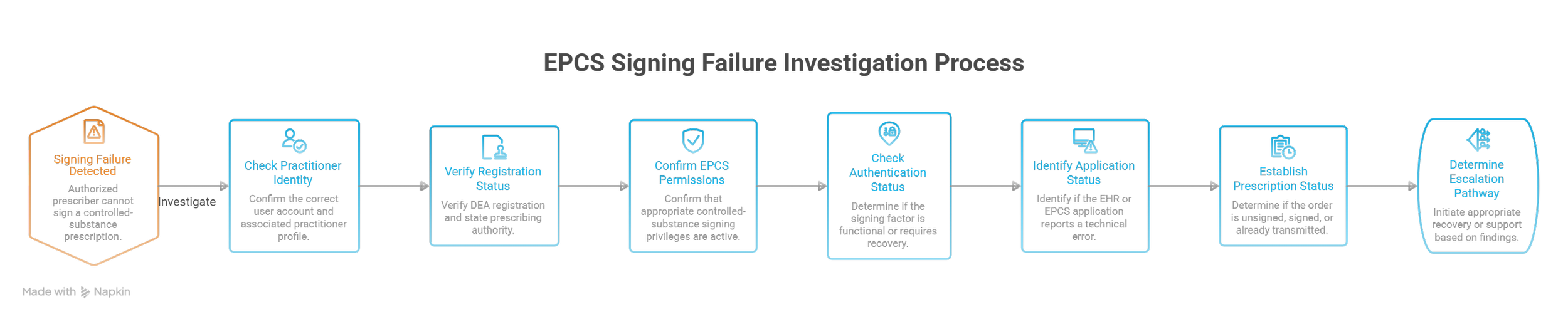
Six checks for an EPCS signing failure
When an authorized prescriber cannot sign a controlled-substance prescription, investigate the following through approved support channels.
Practitioner identity: Confirm the correct user account and associated practitioner profile.
Registration status: Have authorized personnel verify applicable DEA registration and state prescribing authority.
EPCS permissions: Confirm that appropriate controlled-substance signing privileges are active.
Authentication status: Determine whether the approved signing factor is functional or requires recovery.
Application status: Identify whether the EHR or EPCS application reports a specific technical error.
Prescription status: Establish whether the original order remains unsigned, was signed, or was already transmitted before further action.
Do not repeat signing or transmission steps without understanding the existing prescription's status.
The same investigation principles apply to cloud EHR access problems, medical administration troubleshooting, healthcare workflow automation, and team escalation procedures.
Prescription cancellation, transfer, and controlled-substance restrictions
Controlled-substance prescriptions may be subject to specific federal and state requirements involving issuance, refills, transfers, and dispensing.
A federal rule permits the transfer of certain electronic controlled-substance prescriptions between retail pharmacies for initial filling under defined conditions, including applicable state-law requirements and pharmacy-system capabilities.
Administrative staff should refer transfer questions to appropriately authorized pharmacy professionals rather than attempting to recreate a controlled-substance prescription in the medical practice's system.
Similarly, cancellation of a controlled-substance prescription requires careful attention to its existing transmission and dispensing status.
Prescribers and pharmacists must determine appropriate clinical and legal actions when a prescription has already been processed.
Accurate pharmacy phone communication, written administrative records, confidential patient information handling, and professional medical administration support safe coordination.
E-prescribing standards and planning for 2027–2028
Medical practices should distinguish current requirements from upcoming implementation deadlines.
For Medicare Part D electronic prescribing, NCPDP SCRIPT version 2023011 becomes exclusively required beginning January 1, 2028, following a transition period during which version 2017071 or 2023011 may be used.
Separate Part D standards change earlier. NCPDP Formulary and Benefit version 60 and NCPDP Real-Time Prescription Benefit version 13 are required for their applicable functions beginning January 1, 2027.
Administrators involved in technology planning should verify vendor readiness, interface compatibility, transaction testing, and implementation schedules with their designated teams.
For cloud-based EMR systems, healthcare automation platforms, medical technology troubleshooting, and healthcare compliance processes, these dates provide useful planning milestones for system reviews and vendor coordination.
5. Improving E-Prescribing Accuracy: A 30-Day Workflow Plan, Error Prevention, and Performance Metrics
Medical practices frequently experience recurring prescription problems because employees lack consistent procedures for tracking unresolved requests, identifying transmission failures, and communicating with pharmacies.
A reliable e-prescribing improvement program should make every unresolved prescription issue visible, assign an accountable owner, and establish clear criteria for closure.
Days 1–7: Audit prescription errors and identify failure patterns
Begin with a review of recent prescription-related support tickets, pharmacy callbacks, renewal queues, and patient complaints.
Classify problems into five operational categories:
Transmission problems: Failed messages, unsigned orders, incorrect destinations, or unclear delivery statuses.
Medication information discrepancies: Conflicting directions, incorrect catalog selections, or requests for clinical clarification.
Renewal delays: Unanswered requests, duplicate pharmacy messages, or missing clinical ownership.
Insurance restrictions: Prior authorizations, coverage limitations, and pharmacy claim rejections.
Security and access problems: EPCS credential failures, authorization restrictions, or suspicious system activity.
For every confirmed issue, record where the problem originated and which department ultimately resolved it.
Reviewing cloud-based EHR workflows, medical administration troubleshooting, prescription-related team communication, and administrative automation can help identify where recurring problems enter the workflow.
Deliverable: A categorized inventory of prescription exceptions, including their frequency, severity, and responsible teams.
Days 8–14: Establish a prescription exception management protocol
Every unresolved prescription issue should have a documented status and accountable owner.
A practical exception record should contain:
Exception ID: Unique reference used to avoid duplicate investigations.
Transaction reference: Relevant prescription or electronic message identifier.
Failure category: Transmission, clinical clarification, coverage, renewal, or access.
Time detected: Timestamp for the original problem.
Patient impact: Whether the issue may delay treatment or requires prompt clinical escalation.
Assigned owner: Individual or team responsible for the next authorized action.
Current status: Awaiting clinical review, pharmacy response, payer determination, or technical resolution.
Closure evidence: Confirmation that the original problem has been resolved appropriately.
Work queues should separate routine administrative tasks from potentially urgent patient-care interruptions.
A request involving possible treatment interruption should be routed promptly to authorized clinical personnel rather than handled solely according to queue age.
Structured workflow automation, secure healthcare messaging, written administrative communication, and assertive escalation practices can support consistent handling.
Deliverable: A standardized prescription exception queue with owners, escalation criteria, and verified closure requirements.
Days 15–21: Test prescription workflows using fictional scenarios
Use an approved testing environment and synthetic patient information to evaluate important e-prescribing processes.
Test A: Incorrect pharmacy selection. Create a fictional prescription directed to an unintended test pharmacy endpoint. Evaluate whether the workflow supports appropriate detection, escalation, and correction.
Test B: Failed transmission. Simulate an unsuccessful electronic message and determine whether the responsible team receives a recognizable error notification.
Test C: Renewal request duplication. Submit repeated test renewal requests and check whether employees can identify an already pending request.
Test D: Coverage restriction. Simulate an appropriate benefit-response scenario and verify that the issue reaches the team responsible for authorization follow-up.
Test E: EPCS permission failure. Test approved access controls without exposing real practitioner credentials or bypassing authentication safeguards.
Testing should establish expected behavior, observed behavior, system errors, and corrective actions.
These exercises reinforce healthcare cybersecurity practices, medical technology troubleshooting, EHR integration skills, and healthcare compliance training.
Deliverable: A documented test report identifying unresolved defects, assigned corrective actions, and successful retesting.
Days 22–30: Establish e-prescribing performance metrics
Medical administrators can evaluate workflow reliability using six measurable indicators.
1. Prescription transmission failure rate
Calculation: Confirmed failed prescription transmissions ÷ total attempted prescription transmissions × 100.
This measures the percentage of transmissions that failed within a defined reporting period.
Separate technical failures from prescriptions intentionally retained as drafts or awaiting signatures.
2. Renewal turnaround time
Calculation: Median time between receiving a renewal request and issuing the appropriate final response.
Review urgent clinical requests separately from routine renewals. Monitor the time spent waiting for reassignment or coverage during clinician absences.
3. Pharmacy clarification rate
Calculation: Prescription-related pharmacy clarification requests ÷ prescriptions transmitted × 100.
Classify requests by directions, product details, quantity, substitution, or other causes.
A rising rate may indicate inconsistent documentation, prescribing configuration problems, or changes in pharmacy processing practices.
4. Electronic prior authorization turnaround time
Calculation: Median time from complete ePA submission to the recorded payer determination.
Track incomplete requests and requests for additional information separately. These often reveal preventable documentation or administrative bottlenecks.
5. Overdue prescription exception rate
Calculation: Open prescription exceptions exceeding their assigned resolution targets ÷ total open prescription exceptions × 100.
This indicator reveals accumulated work and potential escalation failures.
Review the age of high-risk cases independently to ensure that routine backlog metrics do not conceal urgent problems.
6. Repeat prescription issue rate
Calculation: Confirmed repeat issues involving previously resolved cases ÷ resolved cases evaluated for recurrence × 100.
Define a consistent observation period. Repeated failures can indicate incomplete corrections, unresolved interface defects, or unclear ownership.
These metrics help guide improvements in workflow automation systems, cloud-based electronic medical records, administrative team coordination, and healthcare compliance monitoring.
Calculating the cost of prescription-related administrative rework
Consider a medical practice processing 3,000 electronic prescriptions monthly.
Suppose 6% generate additional administrative clarification or follow-up work.
That produces 180 cases requiring attention.
If each case consumes an average of 10 staff minutes, the practice spends approximately 30 hours monthly on prescription-related rework.
At an illustrative loaded labor cost of $25 per hour, the direct labor expense totals $750 monthly or $9,000 annually.
If improved prescription validation and exception management reduce the observed rework rate to 3%, the same practice would handle approximately 90 cases monthly.
Under unchanged assumptions, this represents 15 staff hours saved each month.
The calculation excludes possible clinical delays, additional pharmacy labor, repeated patient calls, and the consequences of unresolved prescribing errors.
Organizations evaluating healthcare automation software, administrative workflow redesign, medical technology investments, and medical administration training should use verified organizational data before projecting financial returns.
A practical prescription-issue communication template
When a pharmacy reports a problem, administrators should capture the information necessary for the responsible clinician or technical team to investigate.
Use the following structure:
Issue: Pharmacy reports a discrepancy in the prescription directions.
Prescription reference: Verified transaction identifier and relevant encounter.
Reported discrepancy: Pharmacy requests clarification about conflicting structured and free-text instructions.
Current status: Prescription awaiting authorized clarification.
Requested action: Prescriber review and appropriate response to the pharmacy.
Assigned owner: Designated clinical team member.
Follow-up requirement: Confirm that the pharmacy receives the authorized response and record the final status.
This standardized approach strengthens written medical communication, professional pharmacy phone calls, secure healthcare messaging, and administrative handoff procedures.
The most reliable process gives every unresolved prescription one accountable owner, a documented next step, and a verifiable outcome.
6. FAQs: E-Prescribing Terminology, Prescription Errors, and Medical Admin Best Practices
-
Electronic medication ordering involves entering medication-related orders into a healthcare information system.
E-prescribing specifically supports electronic prescription workflows, including communication with dispensing pharmacies.
An inpatient medication order may operate within a hospital's internal clinical systems, while an outpatient e-prescription commonly involves transmitting information to an external pharmacy.
Administrators working with cloud-based EMR systems, medical documentation technology, and healthcare automation workflows should understand these distinctions when troubleshooting medication orders.
-
Start by confirming the patient, prescription identifier, selected pharmacy location, signing status, and available transmission information.
Determine whether the order was transmitted, whether the destination was correct, and whether an error or acknowledgment was recorded.
Follow authorized pharmacy communication and escalation procedures before requesting a replacement prescription.
This reduces the risk of duplicate orders and unnecessary retransmission.
Knowledge of technical troubleshooting, pharmacy phone communication, and secure medical messaging helps establish what happened.
-
A refill generally refers to an additional dispensing authorized under an existing prescription.
A renewal involves obtaining further prescribing authorization when a new prescription or renewal decision is required.
The distinctions matter because a pharmacy's refill request does not automatically authorize additional medication.
Applicable controlled-substance restrictions may further limit refill availability.
Effective workflow automation, team coordination, and patient communication procedures help prevent unanswered renewal requests.
-
Administrative personnel may prepare certain prescription information when permitted by applicable rules, organizational policies, and the prescriber's direction.
Clinical decisions and prescription authorization remain the responsibility of appropriately licensed and authorized professionals.
For EPCS, the prescribing practitioner must personally complete the required two-factor signing process.
Employees should never use another individual's credentials or authentication token.
These safeguards support medical professionalism, healthcare compliance, and cybersecurity procedures.
-
Electronic prescribing facilitates prescription-related communication and may provide access to benefit information.
Coverage and payment depend on the patient's applicable benefits, pharmacy claim processing, restrictions, and other relevant requirements.
A medication may require prior authorization or generate a coverage rejection after the prescription reaches the pharmacy successfully.
Administrators should distinguish estimated patient costs, benefit restrictions, prior authorization decisions, and actual pharmacy claim results.
Clear patient communication, front-desk professionalism, and secure payer coordination improve the accuracy of explanations.
-
CancelRx supports requests to cancel an existing electronic prescription.
RxChange supports communication about a proposed prescription change.
These functions address different situations.
A pharmacy requesting an alternative medication or modification may initiate a change workflow requiring prescriber review.
A cancellation request may require follow-up if the pharmacy has already processed or dispensed the original prescription.
Administrators should preserve the transaction status and communicate through approved pharmacy workflows, written documentation procedures, and secure clinical messaging.
